Closed (fixed)
Project:
Sexy Exposed
Version:
7.x-1.0-alpha4
Component:
Code
Priority:
Normal
Category:
Support request
Assigned:
Reporter:
Created:
11 Nov 2011 at 00:42 UTC
Updated:
10 May 2012 at 11:50 UTC


Trying to use this on Drupal 7, it appears to simply break the views interface when I enable it for any exposed filter. Particularly the top menu bar on views gets completely exposed, with no hidden elements, and trying to save any additional changes to the menu attempts to save the javascript file to your computer, rather than completing the action, (although the action does appear to actually be saved in the view, which is why I can turn the sexy-exposed filters off without breaking too much). Also, the filter doesn't appear to show up in the actual view itself. It just stays as the original dropdown list.
| Comment | File | Size | Author |
|---|---|---|---|
| Untitled.png | 195.97 KB | NathanM |

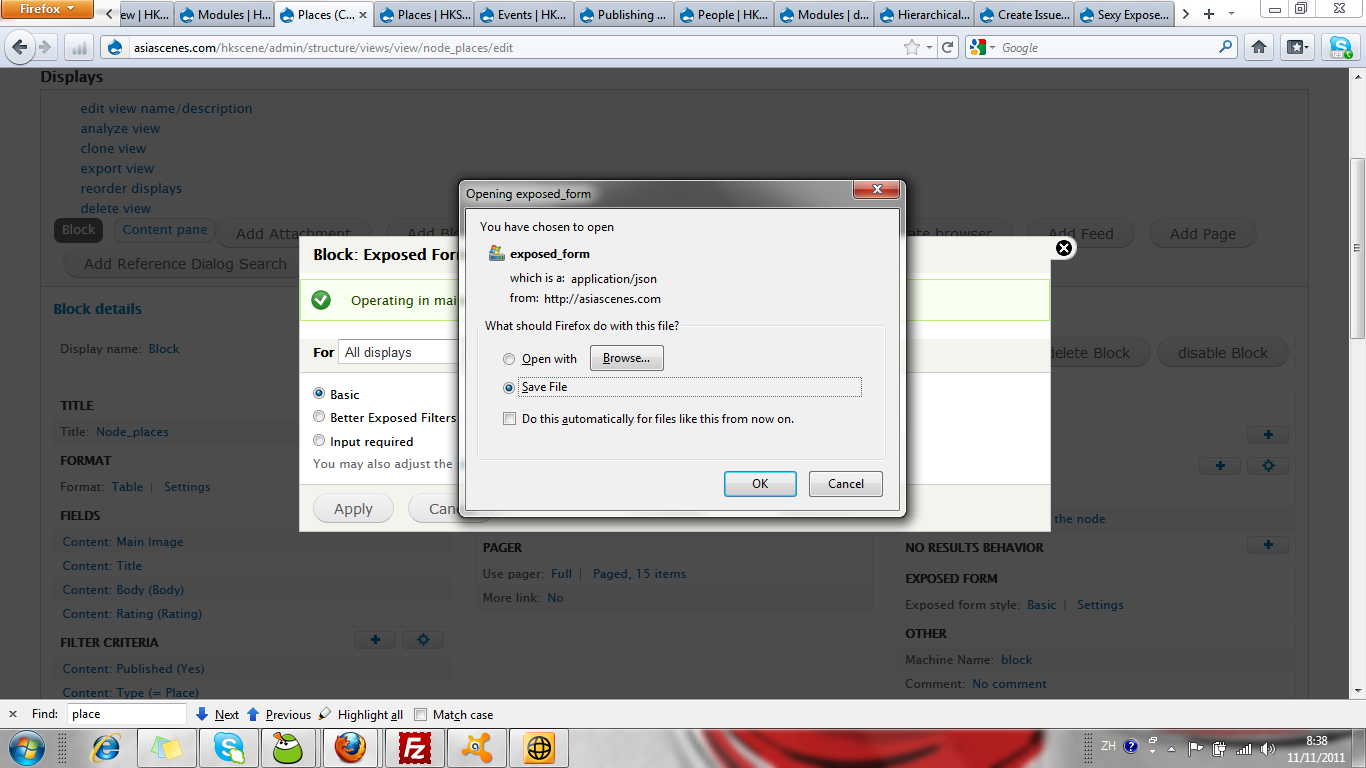
Comments
Comment #1
chuntley commentedSame here. I'm also getting some error messages.
Comment #2
ANDiTKO commentedYep. Same here ...
Comment #3
sijuwi commentedYep
Comment #4
csedax90 commentedsame problem...
Comment #5
ryan88 commentedHad the same problem, turns out there are files you have to download to the sites/all/libraries folder. Look in the README.txt file within the module. It would be nice if the front page of the module specified that you need to download the plugin!
Comment #6
ANDiTKO commentedThanks ryan88, here is the fix: