Closed (works as designed)
Project:
Omega
Version:
7.x-3.0
Component:
User interface
Priority:
Normal
Category:
Support request
Assigned:
Unassigned
Reporter:
Created:
11 Nov 2011 at 22:28 UTC
Updated:
7 Jul 2012 at 00:08 UTC


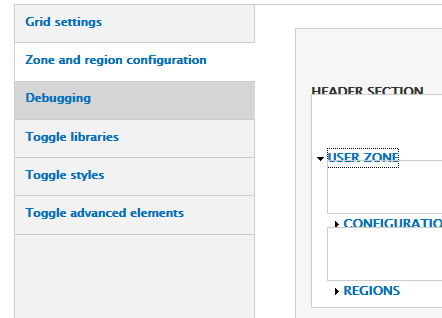
Some headings are misplaced and overlap other things in IE9 when i look at /admin/appearance/settings/some-omega-theme.
IE9 must be in "Browser Mode: IE9" to get these problems. If you set Browser Mode to "IE9 Compatibility View" or IE7 or IE8 mode, the problems go away. To see the browser mode, press F12 in IE9 (or choose "F12 Developer Tools" from the gears menu) and look at the new window at the bottom.


Comments
Comment #1
kevster commentedYou could force IE9 into compat mode by adding meta tag in preprocess-html.inc? We often do this on our drupal sites for IE versions.
We had to do the opposite of this in an omega sub theme and force switch off of compat mode as it was not loading core css files due to @import I think...
Comment #2
marcoka commentedi can confirm that. tested with clean omega core theme.
if compability mode is off: it looks displaced.
Comment #3
marcoka commentedComment #4
cellar door commentedthis is a specific issue with a specific solutionmentioned above by forcing the compatibility mode. it isn't something that can be rolled out over every version of Omega