

Closed (fixed)
Project:
References dialog
Version:
7.x-1.x-dev
Component:
Code
Priority:
Normal
Category:
Bug report
Assigned:
Unassigned
Reporter:
Created:
14 Nov 2011 at 06:07 UTC
Updated:
25 Jul 2014 at 01:50 UTC
Jump to comment: Most recent, Most recent file


Comments
Comment #1
fabsor commentedThis would be very hard to do, since we need to inform the view of the contextual filters somehow. I have to think a little on this one.
Comment #2
soul88Is there a chance I can load context of OG I'm adding the node to?
I need to filter a list of nodes according to some fields that are stored in OG. And also according to the type of the node I'm creating (same field is shared among different node types)
Comment #3
stupiddingo commentedIt depends on the specific problem you are trying to solve, but I have discovered some pretty elaborate (albeit hackish workarounds) solutions you can derive using a Filter Criteria of User: Current (Yes) tied to Relationships.
Here is an example based on the standard OG_Content View of new group nodes based on the group memberships of the current user without using contextual filters.
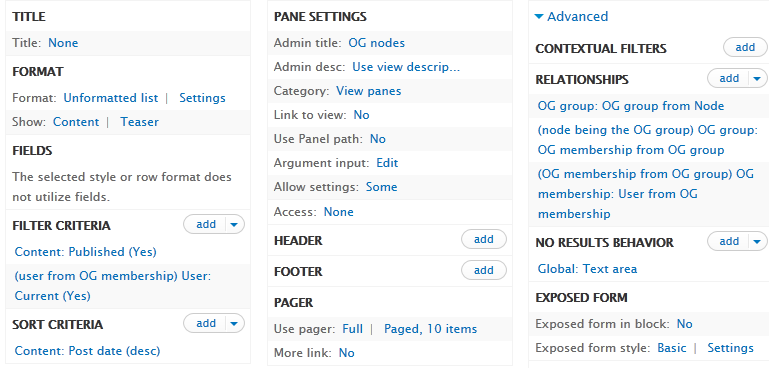
There is certainly performance implications, but since we're only using this view in an editing popup, I'm not overly concerned.
A simpler example would be to add a relationship to user based on authorship or revisions and then set the filter criteria to (user) User: Current (Yes) to get nodes authored/revised.
This is definitely a workaround and doesn't solve the problem per se, but I thought I'd share a solution for some use cases where we would typically use contextual filters.
Comment #4
tostinni commented@fabsor is there a technical reason for references dialog not being able to use contextual filters ?
If so, is there another possibility to dynamically pass some arguments to the view ?
I was trying to add some to the url of the search button, but adding a contextual filter to the view raise the results bug.
Thanks.
Comment #5
kalpeshhpatel commentedHello there, I had the same problem as I wanted to list titles that belongs to current logged-in users only.
I managed to resolve it by using filters as follows:
(It requires Views PHP modules to be installed.)
1) Selected Filters
2) From the available options I selected "Global: PHP"
3) After that I added following code in Filter Code section.
4) Saved the view.
It resolved my problem and worked as expected.
I know that this is not workaround for the bug, but I though this may help someone having similar issue.
Comment #6
adaddinsaneI have the same problem using OG to filter. The workaround in #5 has nothing to do with the OG issue.
Actually it's a genuine bug in the code, because there is absolutely no reason why an embedded view can't handle arguments, it can.
My client (I'm a contractor, solving this was part of my day job) is using SVN so I can't do a proper patch but it's really simple. This:
Should be:
Obviously a left-over from when the function had two arguments.
Now it works perfectly.
Edit: in fact the "array_splice" would more logically be "array_slice" since we're not doing any replacement.
Comment #7
oranges13Thank you @adaddinsane! Here's a patch with his fix, verified working on my installation.
Comment #8
oranges13Comment #9
xamanu commentedWorks fine for me. Thank you oranges13!
Comment #11
rogical commentedfixed in dev