

 The 2026 Drupal Business Survey is open. Your response will help shape the future of the Drupal business ecosystem.
The dev version for drupal7 has an option for selecting the color of a background for a crop.
We'd like to set the background to transparent.
When we enter 'transparent' in this field, the background is black.
#transparent is the result.
Should this work?
Am I doing this incorrectly?
Is this a feature that was lost in the upgrade?
Thanks in advance for any comments.
peace,
michael
| Comment | File | Size | Author |
|---|---|---|---|
| #2 | transparent_canvas.png | 101.11 KB | dman |


Comments
Comment #1
fietserwinCrop is not an effect provided by the imagecache_actions module but by Drupal core (as id Scale and crop). Moreover crop does not have a background color field as, apparently, it is assumed that it will only make the canvas smaller.
So what effect do you mean?
BTW: For some effects, leaving the color/HEX field empty will be interpreted as transparent.
Comment #2
dman commentedIt was also intended that RGBA values would be supported in color selectors.
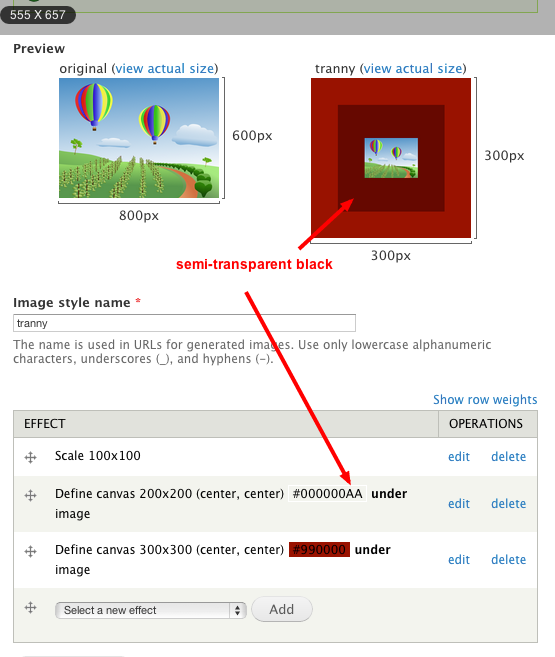
eg #000000FF is transparent white, and you can define a canvas with that.
As ever, convert to PNG if you want that to turn up in the result.
Comment #3
dman commentedOnly for the imagecache actions side - not for core crop (though define_canvas also will crop as a side-effect)
We could probably add that to the docs there.
Comment #4
shaneonabike commentedI don't think I understand fully... I tried something to the effect you suggested but still get a black background in one area. I tried by setting the background to transparent to start, but it still ends up with a black section. Here's what I used... am I totally wrong here??
* Define canvas left:2 right:2 top:2 bottom:2 Transparent under image
* Change file format Convert to: png
* Scale width 991
* Crop 991x398