All,
I am attempting to create a view slideshow by following the guide at http://www.brightwebsitedesign.com/how-to-install-views-slideshow-module.... As part of the guide, I am supposed to add an image field to my custom content type. In the past, when I attempted to add an image field, I was unsuccessful, and created a work around by adding IMCE to my CKEditor (works great). However, because the guide specifies the image field, I decided to give it another go.
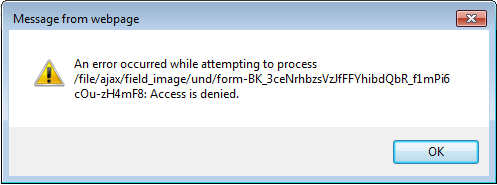
At the moment, when I try to upload an image, I receive a (very frustrating) popup reporting that "An error occurred while attempting to process /file/ajax/field_image/und/form-BK_...letters and numbers...: Access is denied." Any ideas where it is attempting to access? Nothing appears to be written to a log file.
Current setup: I've tried several image fields both public and private paths. The public (and private) path is usually sites/default/files. I've tried adding "subfolders" in the image field setup, but that hasn't had an effect.
On an interesting side note, the "default image" can be uploaded, and the "default_images" folder is created (by the uploader) along the public path.
Any suggestions would be greatly appreciated.
Casey


Comments
Comment #1
pixelsweatshop commentedAppears to be an issue with Jquery update. See #1064890: Update jQuery Form to 2.64. Closing a duplicate and moving to that issue queue. If this is not related to your issue, feel free to reopen.
Comment #2
cmccracken commentedI don't use the jQuery update module, but some modules I have do use jQuery.
Casey
Comment #3
Fidelix commentedThis is NOT fixed.
I'm using Drupal 7.9, jQuery Update 7.x-2.2:
With jQuery Update enabled:
Firefox throws:
Chrome throws:
With jQuery Update disabled, the image upload works just fine.
WITH jquery update enabled, both jquery.form.js (from core and jquery_update) are being loaded, I don't know if that's the standard behavior:
Comment #4
hintbw commentedAre you running ckeditor as well? I have started getting these errors on my site and I am running ckeditor for the "body" section of a node type that also has a file/image field. I can only upload items in Internet Explorer when I disable ckeditor on the node edit/create screen, upload the file to the file/image field, and then re-enable ckeditor for the body textarea once the file is uploaded.
Comment #5
Fidelix commentedNo, I'm not using CKEditor or any WYSIWYG editor (WYSIWYG module is disabled).
hintbw, are you using Drupal 7.9 and jQuery Update 7.x-2.2 ?
Comment #6
mardok commentedI have the same problem, I'm using views jqfx and views jqfx imageflow. When I try to upload a png image I receive the popup with Ajax error.
Comment #7
berdirThe problem with this is that the jquery.form.js from core is not compatible with jquery 1.5+.
jquery_update does replace the used js file when adding it as a library, but e.g. ctoools is currently not doing this correctly, see #1377332: Ctools should include jquery.form as a library
This issue can probably be closed, because it's not an issue with jquery_update but how other modules are loading jquery.form...
Comment #8
Anonymous (not verified) commentedI'm having this issue using CKEditor with an Image field directly below it.
Using the image field you can browse and select a file, but immediately upon clicking "upload" you get a popup error that reads:
I think this might have something to do with the iframe in ckeditor, because if you switch to plain text or code view the error is gone. Also, this error only exists for me in IE9.
I don't have JQuery Update installed, so I'm fairly certain it's not related to this module. I also applied the patch to Ctools on #13 from the above link (in #7), but it didn't help.
I apologize for posting this here, but I've done a lot of searching and this appears to be the only post that has aggregated issues exactly like mine. At this point I'm thinking this is either an ajax issue w/ Ctools or something specific to CKeditor or Image modules, but can't find any relate issues posted there.
Comment #9
rascheri commentedI have the same problem.
I have Drupal 7.12 installed.
I have CKEditor Module 7.x-1.6 installed
I have CKEditor 3.6.2 installed
When I enable the CKEditor module the upload of an image or the upload of a file fails.
When I disable the CKEditor module the upload of both files and images works correctly.
I do not have jQuery or AJAX modules installed.
Is there a permanent solution to this problem?
Comment #10
arturs.smirnovs commentedsubscribing...
Comment #11
agoradesign commentedI also have the same problem with D 7.12, CKEditor Module 1.8 and CKE 3.6.2 installed.
It's also IE9 only and I've observed another interesting behaviour: as soon as I click with the mouse into the CKEditor textarea, the upload works perfectly, but before not. Does anyone of you have a clue, why it behaves like this?? I'm sure, the others sharing this problem can observe the same behaivour...
Comment #12
denzilkrause commentedsubscribing
Comment #13
damontgomery commentedI believe this is an issue with the CKEditor module and the jquery.form.js files being loaded multiple times.
I had similar issues using a different set-up without CKEditor module, but using WYSIWYG with CKEditor and it was solved by loading the jquery.form.js files as libraries instead of directly.
You might try switching to the WYSIWYG & CKEditor set-up or working with the CKEditor group to solve the issue.
JQuery Update is working correctly, I believe, it's the other modules that continue to load old versions or duplicates of files and it's outside the scope of jquery update to deal with those issues.
I have had success integrating fixes into Ctools, but some module maintainers are less interested. I'm sure they will be more interested when Chrome actually drops support for layer.X and layer.Y and their code stops working all of a sudden.
Comment #14
Bestpoint commentedsubscribing
Comment #15
beder commentedsubscribing
Comment #16
Bestpoint commentedI solved this problem for me by installing an old librarie of CKEditor 3.5.2 with the wysiwyg module.
Works fine in IE.
Comment #17
fvquicke commentedUpdating the CKEditor module to version 1.9 seams to resolve this issue.
Comment #18
ParisLiakos commentedi confirm this had to do with ckeditor.
I updated to latest version and this is fixed
Comment #19
Anonymous (not verified) commentedThe problem with the core file field seems to be this http://drupal.org/node/1241332#comment-5854980
Patch works for me, someone have a better and cleaner solution?
Comment #21
orenroth commentedThats solve my problems:
http://stackoverflow.com/questions/6774231/jquery-form-plugin-uncaught-t...
just switch jQuery.form.js with the new version - https://github.com/malsup/form/blob/master/jquery.form.js
two steps:
1. remove the old jquery.form library, just do this on your template.php file:
function YOURTHEME_js_alter(&$javascript) {
unset($javascript["misc/jquery.form.js"]);
}
2. add the new library
Comment #22
nguyentran commentedHi orenroth,
I have followed your guide but not work (with IE8). Sorry. Any other idea.
Comment #23
invincible1388 commentedFor me disabling the jquery update module worked... :)
Comment #24
Gik000 commentedThis suggestion (#21) worked! Thank you.
Just one thing...
I suggest you all to put the hook _js_alter into a module insted of in theme...
function my_module_support_js_alter(&$javascript){
unset($javascript["misc/jquery.form.js"]);
}
Thank you very much orenroth.
Comment #25
cthshabel commentedThanks #21 and #24 for confirming!
I can't believe it, but this solved my problems. I was chasing something else all along.
Including: scripts[] = 'js/jquery.form.js' in my themes .info file and using hook_js_alter to remove the old worked perfect.
Comment #26
kokoko commentedIs there any video tutorial