this is really weird, and i'm totally out of my league on JS-related bugs. however...
environment:
- safari 2.0.4
- totally fresh HEAD checkout
bug:
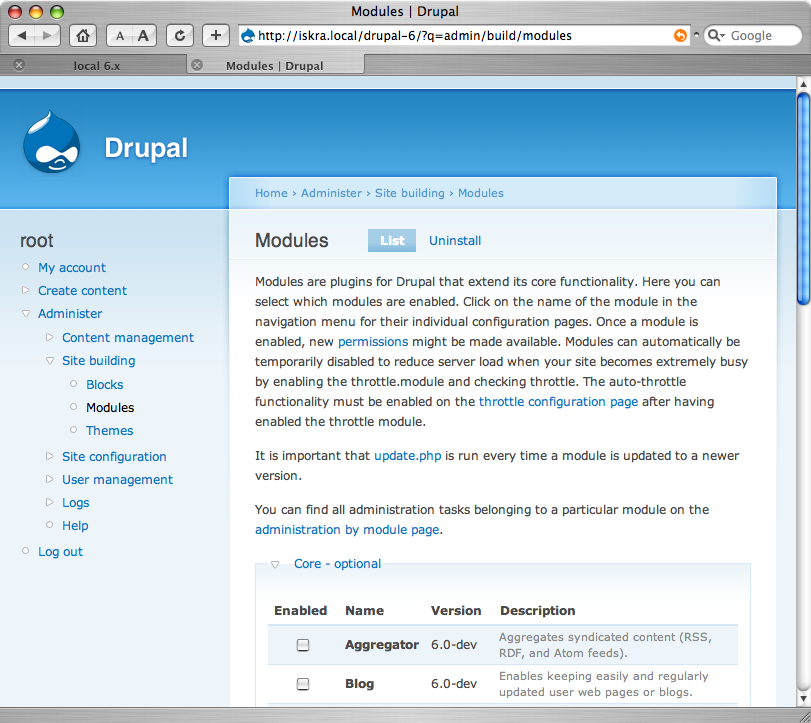
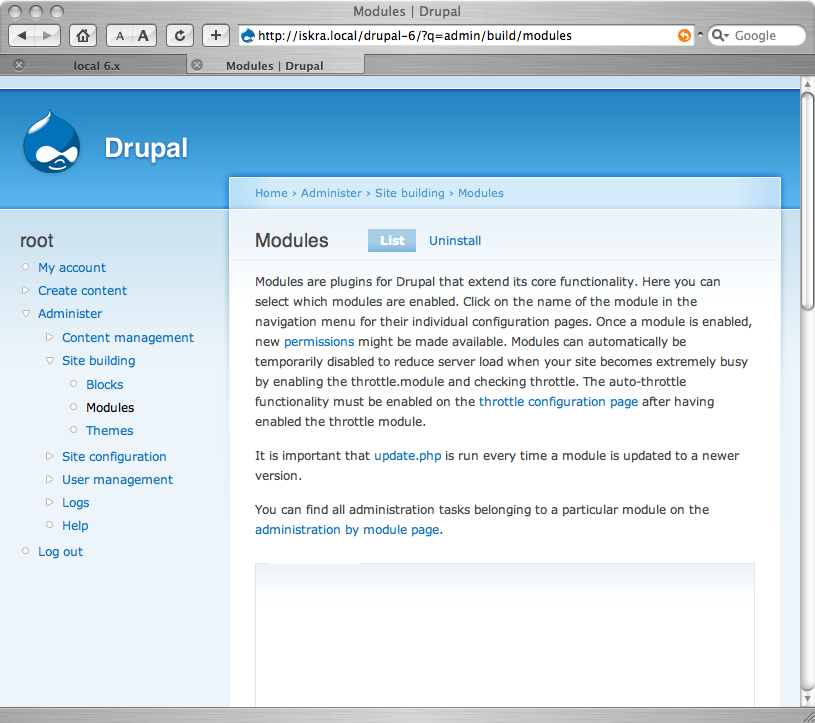
- when you land on the admin/build/modules page, the body of area where the module info and checkboxes is supposed to be is just blank.
- reloading the page doesn't help
- if you resize the window vertically, nothing changes
- if you resize the window horizontally, everything magically appears
- if you disable JS in the browser and reload, everything works fine (without collapsible fieldsets being collapsed, of course).
i both emptied my browser cache and rebooted my laptop, just to be sure, and it's still happening...
attached is a screenshot of the "empty" page, prior to a window resize. i'll post a followup of the same page after shrinking the window horizontally a little bit.
never seen this in 5.x, so i'm assuming it's something specific to 6.x at this point... more info available on request.


Comments
Comment #1
dwwnot that it's too interesting, but here's a screenshot of the same page, just after resizing the window (no page reload). after resizing the window, if you reload, the form disappears again until you resize again. hope these are enough clues for a jQuery expert to figure out what's going on. ;)
Comment #2
dwwFYI: hunmonk suggests that the sticky headers stuff is to blame. i'll experiment with ripping that code out and seeing if it makes any difference. i'm about to hop on a train and will be out of net contact for a while, but i'll report back if that solves the problem whenever i'm back online.
Comment #3
dwwand lo, disabling tableheader.js "solves" the problem, so the bug definitely lives in there.
Comment #4
dwwComment #5
dvessel commentedJust did some testing and it's some bizarre interaction between tableheader.js, collapse.js and Garland. You take anyone of those out of the equation and the problem disappears. Tried to find the root cause but couldn't do it.
Comment #6
webchickStill an issue. I'd call this critical; we certainly can't ship Drupal 6.x with it behaving like this. :P
Comment #7
Steven commentedAs has been said before, this is a browser bug. The underlying DOM state shows the content as visible, Safari is just deciding not to render it. It's even more obvious because the bug is only fixed by resizing horizontally, not vertically. But in JavaScript, those two cases are indistinguishable: they both fire onresize.
We need to distill a stand-alone testcase for this and send it off to the WebKit folks. Due to the crazy interaction of factors, it'll probably be the entire page + CSS + JS, as removing one item from the equation solves the problem.
Anyone?
Comment #8
dwwwell, perhaps it's a jQuery bug, since http://drupal.org/node/146462 (the update to jQuery 1.1.x) fixes this problem. once that's committed, we can mark this issue closed, too.
Comment #9
dwwsadly, the patch finally committed to http://drupal.org/node/146462 didn't end up fixing this, because it left out some changes from the earlier version of the patch i had tested. attached patch seems to work, and both solves the problem reported in this issue, and tableheader.js still works. i don't understand enough jQuery to know about the specifics of the changes in this patch, i'm just harvesting code from Gurpartap Singh's original patch in #146462.
Comment #10
Stefan Nagtegaal commentedAh baby, yeah baby! This is ready for inclusion baby!
(Sorry, I did not even knew we had "scrolling table headers".. I missed a spot when reviewing the other patch :-( )
Comment #11
Gurpartap Singh commentedWhy do you need to parseInt(.css('height')) when this results in the same thing .height()? Does it have any problems with safari in particular?
Comment #12
dwwno idea. i just took all 4 hunks from the previous patch. if someone wanted to do a binary search on those hunks to figure out which ones are actually required to get this working on safari, be my guest. ;)
Comment #13
Steven commentedIf the odd syntax is needed to fix the bug in Safari 2, it should be documented as such.
Further proof that this is a browser bug: Safari 3 doesn't have the same issue.
Comment #14
wim leersConfirming this issue and subscribing.
Comment #15
Stefan Nagtegaal commentedI updated the patch and added the suggested comments to it. It looks like this is Fixing IE 6 scrolling tableheader issues to.
Please test and review the patch.
Comment #16
dwwThanks for bumping this, I was sad to discover that the recent jQuery 1.1.3.1 upgrade for core didn't fix this bug, and was going to go find it when it jumped to the top of My issues tracker anyway. ;)
My only gripe is that the comments mention fixing browser bugs, but don't explain what part of the fairly complex line is the work-around. The key point seems to be that
.height()and.weight()don't always work, while.css('height')and.css('weight')do. That is what the comment should say.Are there other parts of core's jQuery code that are vulnerable to the same browser bugs? Did anyone grep for
.height()and.weight()in misc/*.js? Is there somewhere more general we should document this limitation to defend ourselves from this browser bug when writing jQuery?Thanks,
-Derek
p.s. Testing the patch works great for the safari bug I originally reported on admin/build/modules. ;) Don't have access to IE6 to say anything about that...
Comment #17
dvessel commentedI got a fix! All that's needed is a property of "position: relative;" for the fieldset. How freaking random. :\
I'm just not sure where it should go. inside defaults.css so it affects all fieldsets or admin.css?
And is all that parseint() needed anymore?
btw, there's a patch for another Safari issue that prevented us from using "display: block" for resizable textfields do to the teaser split patch. Anyone mind looking over that?
http://drupal.org/node/163361
Comment #18
dvessel commentedHere's a patch. This happens in Garland and Pushbutton. I didn't dig deep enough to see what they share to have them both affected. I guess this can happen to any theme so it's applied to system.css.
Comment #19
Gurpartap Singh commentedThere was a particular problem with display: block in system.css. It always showed the textarea when it should be hidden on page load(initially, as on node/add/page). Please refer to http://drupal.org/node/146462 for discussion on teaser.js/textarea.js problems. Maybe you can come up with a better solution?
Comment #20
dvessel commentedSorry to sidetrack.
Gurpartap Singh, I have. It was a bug involving jQuery. It fixes an issue with Opera also. look at http://drupal.org/node/163361. Would be great if someone reviewed it.
Comment #21
dwwI just confirmed that #18 solves the problem on Safari. The patch itself is tiny and includes a reasonable comment.
I'd RTBC this right now, but a) I don't have an easy way to test other browsers, and b) I don't have answers for your questions in #17. But, I hope this (or something like it) goes in soon! ;)
Thanks,
-Derek
Comment #22
dvessel commentedHere it is again with parseInt() removed where it seemed unnecessary.
.width() already returns an integer while .css('paddingLeft') doesn't. Removed from the latter.
Otherwise, single style change is the same.
Comment #23
dww- Confirmed that #22 also solves it on Safari. ;)
- Also confirmed that table header still works as expected with the changes to simplify tableheader.js.
- Patch still looks reasonable (and makes tableheader.js itself look more reasonable).
It'd still be nice to see reports from folks with other browsers in here before we RTBC, but so far, this seems ready to me...
Comment #24
steinmb commented- Added patch II #22 but it dosn`t do it for me: Safari Versjon 2.0.4 (419.3)
--
Stein Magne
Comment #25
dww@steinmb: I'm not sure what you're saying with "but it dosn`t do it for me". You mean the bug is still there, even with the patch applied? If so, I don't believe you, since I already confirmed the patch solves the problem with Safari 2.0.4. ;)
A) Did you disabled the JS aggregator on your site?
B) Did you clear your browser cache after applying the patch?
I'm guessing either or both of those didn't happen, which is why you continued to see the bug after applying the patch. Please re-confirm what you're talking about, and be specific, or else you'll delay an otherwise good patch from getting into core.
Thanks,
-Derek
Comment #26
steinmb commentedSorry about writing so very very short post :-/
I have now reset Safari, cleaned local Safari cache, restarted Safari, but still empty modules list.
Turned off all caching i Drupal, admin/settings/performance including JS cache.
It can be something I do wrong. Any way to manually flush the Drupal JS cache?
Running the very latest Apple security update: http://docs.info.apple.com/article.html?artnum=306172
Mac OS X 10.4.10 (8R218)
Kernel-version: Darwin 8.10.0
--
SMB
Comment #27
dvessel commentedYou must also turn off CSS aggregation in Drupal. The fix was a single ruleset inside the style sheet. I have the exact same version as you and it's been solid. The patch fixes the modules page and had no side effect for anything else.
Comment #28
steinmb commentedI had all of them all off (including CSS) but it will not work...
I then turned Drupal chache on/off, JS on again, Force reload of the "modules view" in Safari two times (Did not work with only one time) and then i worked! No I am not a mad person :) Checked files/css and files/js they both get cleaned up when I turn the cache on/off. Very very very strange...
This is from my logfile when it started working again:
locale 08/13/2007 - 21:57 Parsed JavaScript file misc/textarea.js.
locale 08/13/2007 - 21:56 Parsed JavaScript file misc/collapse.js.
locale 08/13/2007 - 21:56 Parsed JavaScript file misc/tableheader.js.
locale 08/13/2007 - 21:56 Parsed JavaScript file misc/drupal.js.
locale 08/13/2007 - 21:56 Parsed JavaScript file misc/jquery.js.
Cheers!
--
Stein Magne
Comment #29
dvessel commentedTried testing in IE6.. Breaks really badly but it's not from this patch. Is there an issue for that? tableheader.js should be simply disabled in IE.
FF 2 on win/mac is okay.
Comment #30
dvessel commentedForgot to test in Opera 9.23. It's all good.
Comment #31
kkaefer commentedUnder the condition this patch solves the problem in Safari 2 (I can't test it as I'm using Safari 3), I'll RTBC this patch. It works in IE7, also with multiple tables on a page.
Comment #32
gábor hojtsyThanks for all the testing. Committed!
Comment #33
(not verified) commented