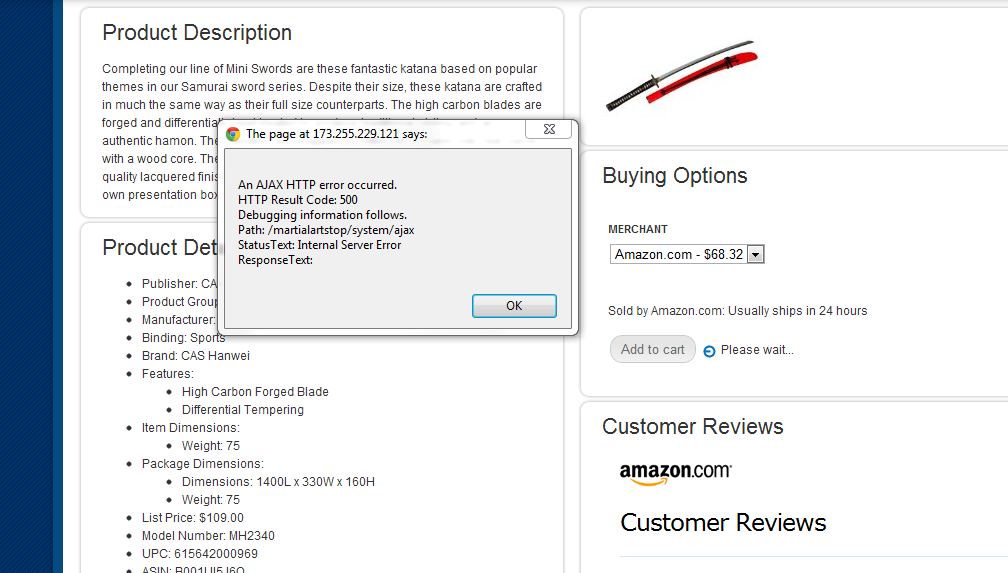
I get this error when clicking on Add to Cart, and only while using Panels. There is a similar issue here: http://drupal.org/node/1257670 where a form isn't found. That error is solved by using the latest dev version (which I am doing), but doesn't fix my issue.
In amazon_store_item_offers.tpl.php I have the line: module_load_include('inc', 'amazon_store', 'amazon_store.pages'); at the top. That's where amazon_store_addcart_form_validate() lives, so the error is surprising to me.
I've cleared cache, reinstalled the module, etc.



Comments
Comment #1
rfayPlease try this. I see that the addcart form is also called in the search results.
Comment #2
SnackBucket commentedI still get the error with the patch applied.
If I have time today I'll step through the code and see if I can figure out what's up.
For reference, I've attached a screenshot of exactly what I'm getting.
Comment #3
rfayThanks - I didn't know it was in the AJAX callback. That's interesting information.
What we need is a definitive description of how to recreate this.
Comment #4
SnackBucket commentedI am able to reproduce this error with a fresh install of Drupal 7 with only ctools, panels, amazon, and amazon_store installed.
Enabling the panels page page-amazon_item and clicking on Add to Cart gives me the same error as I posted in #2.
While playing around, I also found I get the same error if I just insert
into a template file.
Comment #5
rfayif you add a
drupal_set_message(print_r(debug_backtrace(), TRUE));
at the point of failure, it will show you what the call trace is.
Thanks for your work on this!
Comment #6
Gamesbro commentedsubscribe.
I do not receive the error on the main page of the Amazon store here when I add to the cart.
No Error in cart
I do receive the error message here when I try to add to cart on the products pages.
Error in cart
http://img252.imageshack.us/img252/1998/capturexx.jpg
Comment #7
chien_fu commentedNot sure if the error I'm getting is related to this thread or not. I've attached a screen shot.
I'm getting the error at the same time, when the Add to Cart button is pressed, but it is an AJAX HTTP Error 500.
Please let me know what this might be related to.
Thanks.
Comment #8
rfay@chien_fu, if you get a 500 error, it probably means there's an error in your apache or php logs. Take a look there. Does the patch in #1 solve the problem for you?
Comment #9
chien_fu commentedThe patch didn't seem to do anything.
The error I get in apache log is:
PHP Fatal error: Call to undefined function amazon_store_addcart_form_validate() in /var/www/martialartstop/includes/form.inc on line 1432Line 1432 is the "else" portion of this function:
Comment #10
chien_fu commentedI still haven't been able to fix this error. Any suggestions?
Comment #11
kingdee40 commentedA couple things that might help reproduce this.
1. I have page managers "/amazon_store/item/%asin" enabled so the store is displaying through a panel.
2. Look up a product in "Amazon API -> Test" page and add to cart.
Once I disable "/amazon_store/item/%asin" path everything works.
Comment #12
manuelmp commentedDoes anyone have a solution for this problem Amazon Store? It is exactly the same when you press the Add Cart
Thanks
Comment #13
rfayHas anybody tried #1 ?
Comment #14
rfayFixed in http://drupalcode.org/project/amazon_store.git/commitdiff/8b77a9f
I wasn't able to figure out a really satisfactory solution. I'm not sure if this is a problem with AJAX, FAPI, or ctools, but *one* of them isn't getting the right file loaded at the right time, and I couldn't figure out any solution but to always load amazon_store.pages.inc.
But I believe this will solve the problem. Please test the dev version when it updates.
Comment #15
manuelmp commentedExcuse my ignorance rfay, as I can try the # 1?
Thanks
Comment #16
rfay@manuelmp, a fix has been committed. #14. Please update to the dev release.
Comment #17
manuelmp commentedrfay, once installed the # 14 has solved the original problem "Call to undefined ..." but now after adding the product to the cart, when you press the "view cart" message "There are no items in you cart" and the "Continue Shopping". Why can this happen? thanks
Comment #18
rfay@manuelmp, I can't replicate that.
Please open a new issue with complete details. And I recommend that you start without panels. Also make sure you mention what the ASIN is of the item you're having trouble with.
Comment #19
manuelmp commentedrfay after some checking, actually works, although in some article and not for any MP3 donwload.
Thank you very much for your help
Comment #20
rfayyeah, the Amazon API doesn't support any downloadable products.