Hi There,
Thanks for this great module! and info for installation. I have spent most of the day getting something to work and am still struggling. Hopefully you could help?
The problem I'm having is that some images is showing some of the time. example: It would load 1 image and then another, then the images disappear, like its meant to read images, but not displaying them. sequence is different all the time. show, show, missing, show, missing, missing, show, show, show, missing, missing.
I don't really know how else to describe it, but am really frustrated with this.
I am trying to set this up as a header rotating images on all of my pages. Using blocks, I added a new block and placed it in the header section. Here is the code I placed in there.
[slideshow: 2,rotate=3, continuous=0, random=true, layout=none, height=156, width=720,
img=|../../../sites/default/files/banners/header_1.jpg|||||,
img=|../../../sites/default/files/banners/header_2.jpg|||||,
img=|../../../sites/default/files/banners/header_3.jpg|||||,
img=|../../../sites/default/files/banners/header_4.jpg|||||,
img=|../../../sites/default/files/banners/header_5.jpg|||||,
img=|../../../sites/default/files/banners/header_6.jpg|||||,
img=|../../../sites/default/files/banners/header_7.jpg|||||,]
Could you please advise me as to what I could possibly be doing wrong?
Thanks in advance.
Mseraphim


Comments
Comment #1
mseraphim commentedHi there,
Is there anyone that could please maybe help me on this matter?
I've loaded firebug with this and the image is attached.
Thanks in advance,
Mseraphim
Comment #2
mseraphim commentedComment #3
mseraphim commentedAnyone?????
Comment #4
peterholthoffman commentedMy slideshow is mostly working and the definition looks like this:
I would suggest trying a slideshow definition that is as exactly like mine as possible and seeing if that works. If it does, change one thing at a time until it breaks.
What I mean by "mostly works" is that, if I leave the page and then come back the slideshow is stuck in whatever state it was when I left. Also, the target ("_blank") doesn't work -- the link opens on the same tab/window as the original website.
Comment #5
mseraphim commentedHi Peterholthoffman,
Thanks for your reply.
My images are still doing the same thing. It shows images and then it doesn't, then it does, then it doesn't.
I just uploaded my site, but it is currently in maintenance mode. You can look at it - just follow the link.
My Website
Here is the code I used in the block, very similar to yours.
Do you have any idea what it could be? It is doing it on my localhost and on the uploaded server.
Thanks in advance,
Mseraphim
Comment #6
peterholthoffman commentedI don't see any reason in the slideshow configuration for it not to work. I think you could save some characters by leaving off the leading "../../.." as I don't think it's necessary (when debugging, simplify whenever possible).
When I visited the site in Firefox 8.0, I saw no banner images at all. In IE 8, I get a broken image but clicking on it brings up the image. It looks as if the slideshow is running, going from one broken image to another. In Safari 5.1.2, I get the same slideshow of broken images. Chrome is the same.
I think the script is OK and there's some issue with the images or the permissions on them.
OK, I see now. The URL to the image is http://localhost/../../../sites/default/files/banners/header_2.jpg
There's something in the overall configuration that seems to not be set right (i.e., somewhere the name of the site isn't set).
Comment #7
mseraphim commentedHi There,
Thanks, I fixed that problem of the "localhost", and it is showing the images now, but still not right.
Have a look at the site again please, My Website, and let me know what you think?
This is the code I used:
I also have another question, not as important, but still relative. On the left-top and left-bottom of where the images are showing is two little marks which is rather messing up the scene. Any idea how to get rid of them? See Attachment.
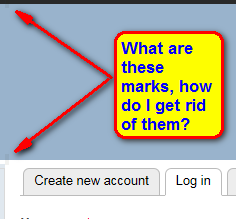
I see that you are in the US and I'm in South Africa, so there is such a big time difference.. Hope to hear from you this afternoon - Your early morning. 8am by you means 16pm by me.
Comment #8
mseraphim commentedNevermind the markings. They are just code. I took it out by clearing the color of it to none in style.css.
Comment #9
peterholthoffman commentedHi,
(Read to the end before doing anything.)
I've been looking at this for a while now and I see the issue you described but I don't know the cause.
I think it may have to do with the sizes of the images which range from 45951 to 118565. I come to that hypothesis because it seems the patter of irregularities is consistent and depends on which images are on each side of the transition.
Perhaps you could:
If that runs smoothly, the (unfortunate) solution would be to somehow get the images to be closer to being the same size. Or maybe figure out why the size matters and fix that. I checked the images in my slideshows and they are all pretty close to being the same size (totally by accident).
If the file sizes is not it, I would try to debug the JavaScript to see if there's some loop where it runs unevenly for some reason. Unfortunately, that is beyond what I know. I've only just started to use Firebug to try to see what's going on there and I can see I've got a lot of learning to do in that area.
I suppose the other possibility may be some sort of cache issue.
I just noticed you have "random=true" but I'm not seeing a random order. As a result, I'm suspicious of the code running in that section. I would try removing the reference to random first and see if that fixes things. It won't break things as you're not getting a random order now. :-)
Comment #10
mseraphim commentedFound out why it was doing it.
It had nothing to do with the image sizes (Off course they shouldn't be too big else it would take some time to load, but anything under 150kb should be fine.)
I followed your suggestion to make all file sizes the same, but did it for images 1 to 6 with actual numbers on it, so that I could see the random function as well. I wanted the random function because I don't want the images to start from 1 every time someone clicks on a link. It does seem that the random function is a problem - see below.
The problem with irregular display was twofold:
1. I copied the "code" before the [slideshow......] and "/code" after it. That is why it was showing those two small marks and also throw my images out like - show, none, show, show, none, show, none, none etc.... So after I removed that it was more like, show, none, show, none, show, none etc.
2. The random function also caused the same problem as in 1 above, so I took it out.
So that part works great, but now how do I get all the images to show directly after each other, because now it shows image and then disappear, then show, then disappear?
Do you have a website on so I could see how yours is showing?
I also see what you were saying earlier regarding it working partly: If goes through the images but when you go to a different tab in firefox and then back to the site, then the images doesn't move.
Where are the developers for this module?
Can't they share some light on it?
Mseraphim
Comment #11
rhouse commentedMaintainer here. I can't replicate this problem. You can find a perfectly operational slideshow here:
http://bunyamountains.com/conferencecentre
The code that runs it is:
We don't want random order on that site, but in a preview I tested it and the slideshow still shows correctly.
However, tests on a local test site showed that the "_blank" target is not getting through to the final code, so that is a problem that will need looking at.
Comment #12
mseraphim commentedThanks for your help. I eventually decided to go with the rotating banner module as I have been struggling with slideshow creator for few weeks.
It took me a bit of time (like 1 hour) to install and had to run one patch, but it is working very well. Neat and easy interface. If only it had a random feature to it because I don't want the sequence to start from the first image every time I click on a link.
Anyways, thanks again.
Mseraphim
Comment #13
donSchoe commentedhi ron, i just upgraded my drupal to d7 and also updated the slideshow creator to 7.x-1.2, and i can confirm the problem of martin. some images wont show up even if the url is correct.
my setup:
my slide:
cheers,
donschoe
edit: temporary demo at http://uxlab.htw-berlin.de/ ...
Comment #14
donSchoe commentedsame workaround as in #1230280: Slideshow misplaced: removing
Convert line breaks into HTML (i.e. <br> and <p>)option from the text format which the slideshow creator is using fixes this issue.(it would be nice to fix this with the module, but at least this stuff working now :)
Comment #15
rhouse commentedYes, when I first started using this module I noticed it was very sensitive to filter order. I just got into the habit of doing it one way that worked, and now I have become the maintainer I have to start thinking "Do weird stuff!" to test it, rather than "Do safe stuff".
Comment #16
rhouse commentedHopefully this is also completely fixed in 7.x-1.3.