

 Come together with the global Drupal community in Rotterdam, 28 Sept – 1 Oct 2026. Sessions, contribution, connection, and Early Bird savings until 8 June.
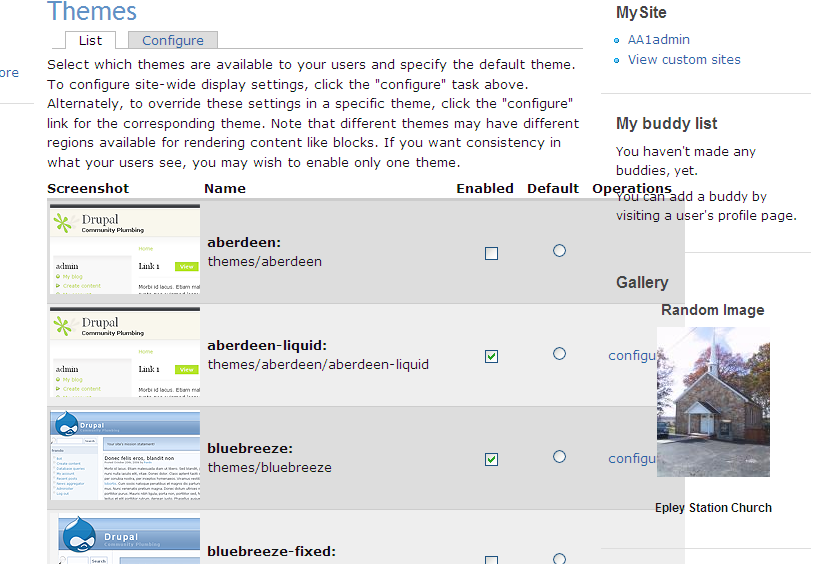
In the Themes section of the admin area, the right side of content body area overflows on top of the right sidebar making it hard if not impossible (depending on how many themes are showing) to click on the config link.
Also, get the same type of overflow in the gallery mod area (Gallery2). The main page looks normal but when you go to the sub sections (add / edit functions) you get the same type of overflow from the center body section. See attached screenshots.
Everywhere else, the theme works great. I have looked at the CSS sheet but did not see anything that was creating this problem.
PLEASE HELP! Thanks EGP
| Comment | File | Size | Author |
|---|---|---|---|
| Overflow in the theme section of Zen.png | 100.47 KB | GarP |

Comments
Comment #1
add1sun commentedWell, admin tables are always going to be a certain width and all themes can only do so much with the space given. The thing to do is to set a different admin theme that gives you more space for admin tables. I'm not sure if you are using zen fixed there but I normally have my main site in one theme and then pick a fluid theme (either the regular zen, garland or bluemarine) for admin and only use one or no sidebars in it so I can get max real estate.
Comment #2
(not verified) commented