Teasers ARE very important part of our webpages as they make up the first appearance
of how the site appears and also gives an overall view of the current content.
Yet, managing teaser content ( since this is cms and its all about managing content )
is daunting as the way it is currently and many users feel we should have sufficinet options,
neither too simple to be scanty nor too complex like js thingies which are non-intuitive
compared to two (optional) simple text box approach and have no chance to get interfered with wysiwyg editors.
My suggestion is as follows :
Teaser Options which admin can set ( various settings for various node types ):
administer » settings » content types » a specific content type ( eg. blog ) » workflow
Teaser or summary or intro or whatever it is called
default options
radiobuttons - choose any one
disabled
enabled , automatic teaser [ first 'n' words from content ]
enabled, teaser text area box [ separate stuff from main content ]
enabled , automatic teaser with thumbnail picture [ 1st image ]
enabled, teaser text area box with thumbnail picture [ 1st image ]
if teaser text area is enabled
radiobuttons - choose any one
keep the text box above the body text area
keep the text box below the body text area
Collapse teaser text area option
check box
if teaser text area is enabled but user keeps it empty
radiobuttons - choose any one
automatic teaser
node title
full post
if teaser with image
radiobuttons - choose any one
left align image with wrapping text
right align image with wrapping text
image ,line break, then text
text, line break, then image
How many words if automatic teaser
text(number) input or number dropdown
What code if custom break wanted [ rather than 'n' words ] in automatic teaser
text input
example code <--teaser-->
Show Teaser on specific pages:
radiobuttons - choose any one
Show on every page except the listed pages.
Show on only the listed pages.
Show if the following PHP code returns TRUE (PHP-mode, experts only).
Best regards


Comments
Comment #1
webchicksubscribing. we might want to do some research on this to see how other platforms (e.g. WordPress, Joomla!) handle this.
Comment #2
Chill35 commentedSubscribing too. The teaser is one of the most important, if not the most important asset of a content management system. There's a community aspect to many CMS, but mainly, these systems manage... content. The way that Drupal works, a page becomes the FULL content of ONE article (on page q=node/x). On every other page, you will see USUALLY the nodes in their teaser view. And in my opinion we should have minimal control over what that teaser will be.
There are two main weaknesses about the teaser in Drupal core. And the HTLM comment
<!--break-->is not one of them.There should be IN CORE a way to make a teaser be what it really is, semantically-speaking : something that will grab your interest and make you want to read the FULL thing. It can be a summary, it can be the beginning sentences WITHOUT the picture that finds itself in the markup. It can be the beginning with the first image that finds itself in the markup but in a thumbnail format. So there should be, at minimum, the possibility for an added textarea for the teaser.
This added field could be turned on and off. And all the presentation of this part of the node form could be customized in the administrator control panel. Misty's detailed recommendation is simple enough yet complete and flexible and I totally support it.
Just like we can set in the administrator control panel the length used to chop off a content to make a teaser automatically, we should in my opinion add the option to add a read more LINK, inline with the teaser, when the teaser differs from the content. It is not obvious at all that there is something more to read, from a "read more" link that finds itself separate from the text. It is a very significant improvement in usabiliy to know right off from reading text and coming to the end of it, that there is more to read.
I am aware that much can be done in the node template, but placing a link INLINE with the teaser is not easy because it requires to modify the teaser.
There is a contributed module that does that, and does it poorly in my opinion (at best it can). It is functional but bloated (to no fault of the module's maintainer). It uses all of this code to add a simple link inline, a functionality that requires ONE LINE of code change in core (minus the admin settings), and I will come to this next :
From ed_readmore.module (only an excerpt!) :
Wereas all that is required in core is ONE line changed in node.module in the function node_prepare() :
On the next line (next to the modification), the existing call to check_markup takes care of adding the ending
</p>or</div>(or whatever) to make the HTML of the teaser correct and valid, if such tag is necessary.Caroline
A coder's guide to file download in Drupal
Who am I | Where are we
11 heavens
Comment #3
misty3 commented@webchick
It may be good idea to look at WP etc but it may be even better if they look
at us [ Drupal ] to see some newwe path of doing things :-)
While Joomla is something I personally find totally unuseful and do not understand why
so much hype is there about it, WP is sort of ok but very primitive compared to current
Drupal 4.7x/5x.
On the top of my head WP has a separate collapsible text box to enter "excerpt"
in addition to the body text area,
which if you keep empty automatically takes first 'n' words from the body text.
Thats a fairly simple intuitive interface.
[ I add this link http://codex.wordpress.org/Template_Tags/the_excerpt ]
Geeklog 1.39 to 1.41 ( current) or even previous versions used to have a separate box
for intro if I remember correctly. Can't remember exactly whether e107 has something similar.
What I wrote above was not just my made-up but , apart from the need I feel, I have seen
many users on the Drupal forum asking 'how-to' things in those lines - they probably did not submit issue or left after not finding sufficient answers ( left forum not drupal ).
Best regards
Comment #4
Chill35 commentedMisty, excellent title for this feature request : workflow.
I have a WordPress blog at wordpress.com.
The Excerpt is not the same as the Teaser, in WordPress :
It's a little unfair to Drupal to compare Wordpress and Drupal because Wordpress comes in core with its own stable WYSIWYG editor. Hence you can include the
<!--more-->'quicktag' by putting your cursor at your breakpoint and clicking on a cute little icon. OR, alternatively, you can edit your content in the HTML window, accessible through a tab, where you can write down your comment just like we do in Drupal.The differences between Drupal and WordPress in the HTML view is that Drupal uses
<!--break-->, while Wordpress uses<!--more-->and Wordpress creates a readmore link at the place where we have defined our break. (See my request for an inline readmore link, like it's done in Wordpress, for Drupal, above).Comment #5
Chill35 commentedBy default, we have a readmore link like that in WordPress when the teaser is displayed :
After he said all that he had to say, I told him that he should get moving or I'd be on him like a limpet. He looked at me with shock on his face and said more...
Comment #6
Chill35 commented'Split post with More tag (Alt-t)' is the title of the cute little icon in the WYSIWYG window in WordPress.
It adds a line INSIDE the WYSIWYG window between the teaser and the rest of the content. It does not split the window into 2 windows (FYI, I am not saying that this is the best solution).
Underneath... there is a collapsible field for the optional Excerpt.
End of Wordpress review for me.
Comment #7
misty3 commented@Chill
Thanks for the WP review, and clearing the confusion.
Thus, the more button actually inserts a more tag in the body-text
which in wysiwyg view is a formatted word: more, and in raw view is
<!--more-->So, if I intend to have for teaser something different stuff from the actual body I cannot do that . [ BTW, I do not like the way WP have ?no option for plain text box and makes wysiwyg compulsory ]
To me WP approach is not at all suitable.
Best regards
Comment #8
Chill35 commentedFor me neither. It limits what the teaser can be, considerably.
The community at Wordpress probably realized that limitation and tried to fix it with the Excerpt. The Excerpt is a relatively new widget at wordpress.com. I don't know how long it's been made available in the version of wordpress one can download from wordpress.org. But I know it's relatively new at Wordpress dot COM.
The Teaser and the Excerpt should be one and the same thing.
The readmore link is a fine thing, though, that should become an option in Drupal core (it is a default in Wordpress). I mean by this that : it should become a checkable option on the teaser configuration page in the Administration Panel.
Comment #9
BioALIEN commentedSubscribing. While I understand the urgency and great need for this, please refrain from double posting. Lets stop posting on http://drupal.org/node/133702 and concentrate on this thread.
Since this is talking about a new concept, we need to prototype it from a usability stand point. Anyone wants to generate some screenshots so everybody is 100% clear on what this issue is about?
Comment #10
Chill35 commentedIt's Webchick who asked misty to open this new issue (http://drupal.org/node/107061) if he 'felt strongly about it'.
Webchick says :
That's the context.
Now I think that Webchick has given us a strong clue here : it's not in the Drupal deciders' agenda to add options to the teaser ('our goal in core is actually to provide *fewer* configuration options').
I was willing to give some time to this most likely lost cause. I provided the information that Webchick requested.
Now unless core developers pay attention to this thread, my friendly recommendation to all of you is not to waste too much energy and time on this.
Comment #11
misty3 commentedThanks a lot Bio and Chill.
Regarding the *fewer* configuration options' imho
`fewer` is a very relative terminology, we look forward to a cms so that we can manage `c` or content with `fewer` hassles. What we probably mean is optimum options.
To anyone who is logically approaching the structure and function of drupal, the inflexiable approach to teaser is striking - there has been several non-resolved discussions w.r.t this - one such
http://drupal.org/node/107898#comment-187212
@Bio : I will post a screenshot as soon as I can.
Best regards
Comment #12
BioALIEN commented@Chill35, don't be so negative. Although this is considered a feature request, its not too long before its tagged as a usability bug.
@misty3, great I look forward to those screenshots. Hopefully they'll capture the attention of all concerned.
Comment #13
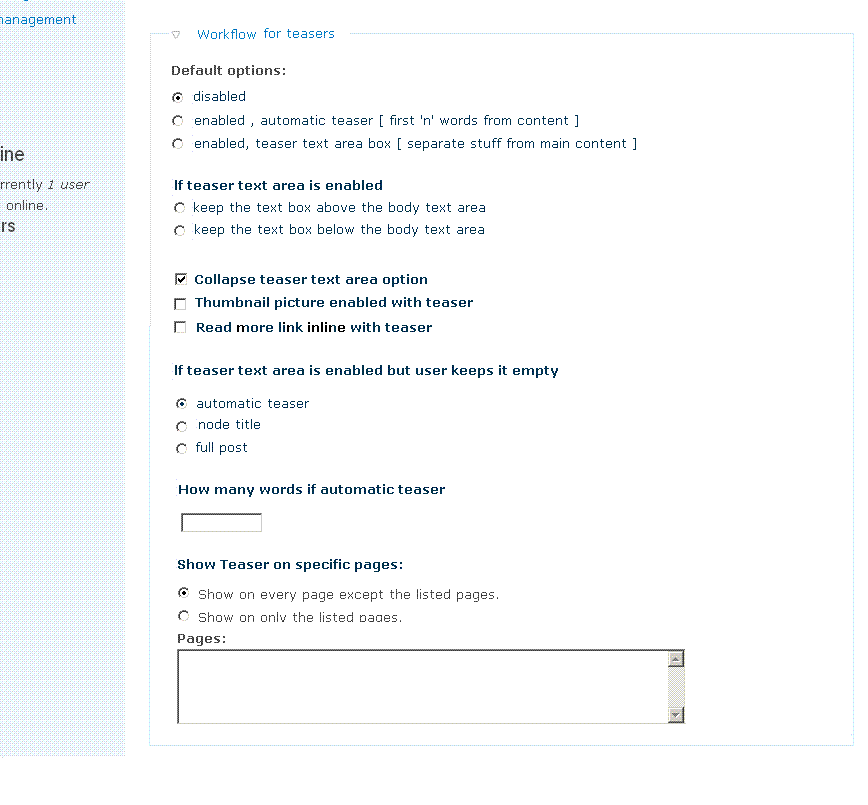
misty3 commentedHere's the screenshot for a specific content or core node type.
I left out some image options for sake of fewer configurations.
For example on :
administer » settings » content types » a specific content type ( eg. blog ) » workflow
» the following screenshot ( by defaullt this thing remains collapsed )
Comment #14
Chill35 commentedI think that what we have here is good, Misty.
Fields that are irrelevant to a selected option could be disabled (it's hard to show like that on a screenshot).
Also, if we want an inline read more link, I think it's swell to do it that way. In core, the text would be translatable, i.e. would use the t() function. Hence, one could change the text for that inline link.
My 'read more link inline with teaser' hack in core wasn't very good, because it didn't produce a URL. It's important to produce a URL, i.e. a link that starts with http://mySite.com/, because teasers are displayed in feeds.
Here's my new hack :
In modules/node/node.module, find the node_prepare() definition.
Notes (for drupal hackers) :
1. The read more link is a URL that points to the alias as in http://website.com/my-article-about-my-trip
2. Replace the class and title attributes with what you want. The title attribute is what's used in English by default for the read more link that's with the other $links.
3. Replace the displayed text with your own text. (By the way, the following entity,
→is an arrow : →). Use 'FALSE' as last argument for the l(), as I have done above, so that entities are displayed. Otherwise, you'll get something likeRead more →instead of Read more →.4. Don't forget that you'll also have a read more link with your other links, that links to your full post. You can get rid of that other link of course, and there are many ways to do that. (But you don't have to.)
Caroline
11 heavens
Comment #15
misty3 commentedThanks Chill. This seems to be a very very good supplement.
I guess contributing code is more important than screenshots :), so congrats !
BTW, the screen shot I gave is for the admin panel only , the site users / visitors will
see only one or two options according as the admin chooses.
I hope there are some more feedback / development on this.
Best regards
Comment #16
BioALIEN commentedmisty3, thanks for wipping the screenshot (#13). Some of the proposals here are rather radical and from experience, it'll definately stop it from going to core. I don't see why we can't extend and compliment the existing Drupal workflows. I'll wip up my own screenshots if this post is not clear enough unless misty3 decides to update hers.
Here's my feedback on the screenshot:
1) Default options: This needs to go into the Admin > Content > Content Type: Workflows fieldset and defined as a checkbox for enabling/disabling teasers on a content type basis.
2) If teaser textarea is enabled: This is cruft and not necessary. But this will be irrelevant if CCK hits core.
3) Collapse teaser textarea: same as 2.
4) Thumbnail picture enabled with teaser: same as 2 and maybe should stay as a contrib module.
5) Read more link inline with teaser: yes this is needed, but it's template specific. My gut feeling is this should live in the Global theme settings page.
6) If teaser textarea is empty: Steven's committed patch already takes care of this now. Alternatively if CCK hits core, one can specify a minimum word count therefore making teasers compulsory. Then again, if we're specifying all this by content type then why would we reach such condition?
7) How many words..: Same as 6. However, we already have an option in Admin > Content > Post Settings to specify a global teaser size. IMO, this should be broken down into per content type there.
8) Show teaser on specific pages: Same as 1. If we have teasers per content types then why the need to do url targetting? For any other complex needs, views.module is your friend.
So all in all, there's not a single page to handle all teaser functionality, it's spread out and each part lives in its corresponding zone where it belong.
Feedback welcome.
Comment #17
misty3 commentedHuge thanks, BioAlien
>> 1 )This needs to go into the Admin > Content > Content Type: Workflows fieldset
Yes, this is what I wrote or at least what I was meaning. Handling teaser as workflow
per content type rather than globally. The picture was meant to be there for each content type on each content type setting page.
>> 2,3 - If a separate teaser text box is enabled and the end-user does see it,
its an UI decision for the admin to keep it above or below the body text area
and by default collapsed or not.
>> 4 - With advent of huge use of images ( or media ) in web , the need for images
is getting very basic , imho - thus an option to enable or disable thumbnail at one go
eliminated needs for another module.
Eg. currently, I will like to have thumbnail images for my blog teasers BUT do not know
what complex path or additional module load I have to take to produce this.
>> 6 - If an user keeps teaser text area empty, the system does not force any error message
but just silently uses the automatic teaser ( first 'n' words of the content ) . To me, this
is really more enduser-friendly.
>> 7 - How many words.....IMO, this should be broken down into per content type there
Yes - I also feel that - I was suggesting that in the attached gif, which is meant for per content type.
>> 8 - Show teaser on specific pages:
Yes you may eliminate that ( though it comes handy when we have same content type, say blog, for core and for something like OG too - we may need different views for core blog and OG pages. `Views `is good but very resource intensive as in shared hosting )
Best regards
Comment #18
sylvaingirard commentedSubscribing.
What's the current status of this feature request? Since it didn't make it into D6, my guess is that no one actually picked this up, technically, that is...
Comment #19
thinkling commentedSubscribing and also curious about current status.
(Right now I'm debugging the interaction of excerpt and ed_readmore modules on D5.x)
Comment #20
catchI think we could provide a bit of configuration in core - at least 1. no split 2. teaser splitter jQuery widget like now 3. hard split (maybe with the summary checkbox) - I currently do 3. with a cck field on one site because getting people to write a two sentence summary was impossible otherwise.
This is likely to be something that comes up if the 'body' field becomes implemented via field.module as well - or at least, if it is, then we'd want to make sure that an implementation could handle some of these different use cases.
Comment #21
Susurrus commentedsubscribing
Comment #22
kh86 commentedsubscribing
Comment #23
Augusto Ellacuriaga commentedSubscribing
Comment #25
SeanBannister commentedsub
Comment #26
mradcliffeIt looks like this feature request died somewhere around 2008. I'm not sure why it's categorized as a bug report.
Comment #27
alan d. commentedAnd the result was a text with summary widget body field, so I'm not sure why this is still open :)