

Closed (cannot reproduce)
Project:
Ubercart Addresses
Version:
6.x-1.0
Component:
Checkout
Priority:
Normal
Category:
Bug report
Assigned:
Unassigned
Reporter:
Created:
21 Nov 2011 at 18:10 UTC
Updated:
13 Jan 2012 at 09:15 UTC
Jump to comment: Most recent file


Comments
Comment #1
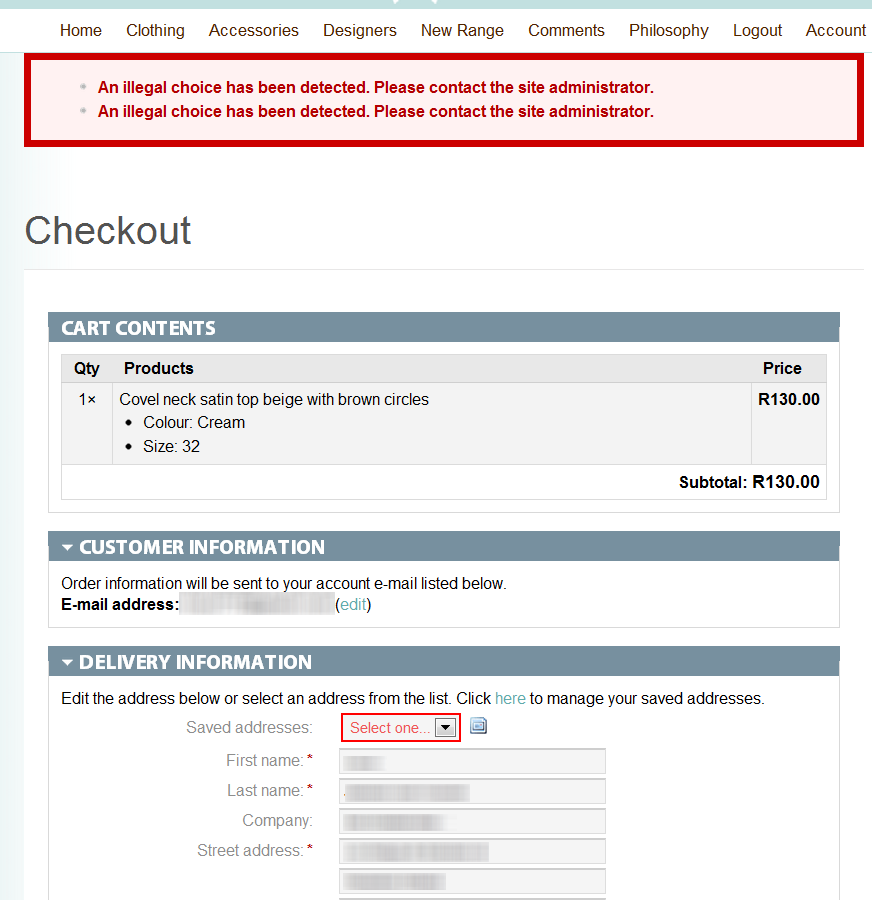
megachrizHm, that's odd. Selecting a saved address from the dropdown is not a requirement, even if the address form is not prefilled.
I do have seen the error message above before. Previously, it had something to do with the zone and country fields. An error like this is reported before:
- #934268: An illegal choice has been detected. When changing country on user registration page.
- #973208: create new account not work if content_profile used
This error only seem to occur in a specific setup of modules, because I can't reproduce this error in my local installation, where only Ubercart Addresses, the required Ubercart modules and a few optional Ubercart modules are enabled. I hope to kick this problem with Ubercart Addresses 6.x-2.x, which is near to an alpha release.
Questions to examine if the error is caused by the zone/country fields:
- Can you confirm the error has something to do with the zone and country field? Does the error still occur if you disable these two fields (which can be done at admin/store/settings/checkout/edit/fields)?
- Does the customer's default address have a country that's different from the default store country? Does the error also occur when the checkout form is prefilled with an address which country is the same as the default store country?
Questions to examine if the error is caused by an other module:
- Can you tell me which modules and versions you have enabled?
Comment #2
ratinakage commentedHi there,
You are right that its tricky to reproduce... This error is only occurring for one customer that I know of on my site... I actually needed to use the masquerade module to log in as that customer to see the error!
The error doesn't appear for my administrator user. I checked and the country of the customer's address is the same as the country of the site in general. The error also doesn't happen if you click the button to make the shipping address the same as the billing address...
I am also using Flatrate, Auto-calculate shipping, Ubercart Views and a a few others...
Thanks!
Comment #3
megachrizDoes the error also appear for the specific user if you disable the country and the zone fields? (See the attached image to see the page where you can disable these fields)
One user reported having issues with the zone field and that was caused by not having the permission "access content": #1154344: Zones won't update when changing countries.
Does the user have a role with the permission "access content"?
Comment #4
ratinakage commentedYeh, sorry to tell you but the problem still exists when I disable those 2 fields as you mentioned.
Hope that helps...
Comment #5
megachrizThat's interesting. That means the problem is caused by something different as "usual". It could be caused by a combination of modules, but it can also be something else I'm not aware of.
Do you have any custom made modules on the website that alter the checkout form?
Does the problem exists by this specific customer only or do multiple customers have this problem? Please login in with a few other users using the the masquerade module and check if the problem exists with them too. You could create a few test users, if you don't want to mess with existing users. Test if the problem still occurs when you login with:
1. at least 2 users with the same roleset as the customer by which the problem occured;
2. a user which has the same number of addresses in the address book;
3. a user with no addresses in the address book.
If the problem exists in all the cases, then it's very likely the problem is caused by a combination of modules. In that case it's a matter of enabling/disabling modules to find out which one interferes.
If the problem only exists with that one and only customer, then I'm very curious what addresses that customer got. Can it be that there's a special character in one of the customer's addresses that is somehow causing the error? I know the complete address line is used for the select addresses form element.
Comment #6
ratinakage commentedI am using this contributed module: http://www.ubercart.org/project/Auto-Calc (#22 has the updated version). That module does affect the checkout page. Its quite a useful module if you have different shipping costs for different conditions (such as country).
I tried with another user of the same role who also has a saved address and it worked fine for the other user.
Comment #7
megachrizI use the Auto-calculate Shipping module too, but not the same version as you. However, I don't think the error is caused by that module. Because the error seems to be user specific, I'm curious what saved addresses the customer got. Can you send me a database dump of the customer's addresses? For example, if it's user ID is 17:
SELECT * FROM uc_addresses WHERE uid = 17Then I'm able to check if the error has something to do with the saved addresses. You can make database dumps with phpMyAdmin.
I'll send you a private message, so you can e-mail it to me (otherwise the customer's data would become public).
Comment #8
megachrizI wasn't able to reproduce this problem, so I'm closing this issue. Feel free te reopen this issue in case you can provide more information.