Needs review
Project:
Corolla
Version:
7.x-2.x-dev
Component:
Design
Priority:
Normal
Category:
Bug report
Assigned:
Reporter:
Created:
22 Nov 2011 at 09:15 UTC
Updated:
10 Apr 2013 at 09:55 UTC
Jump to comment: Most recent file


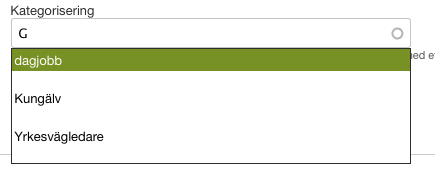
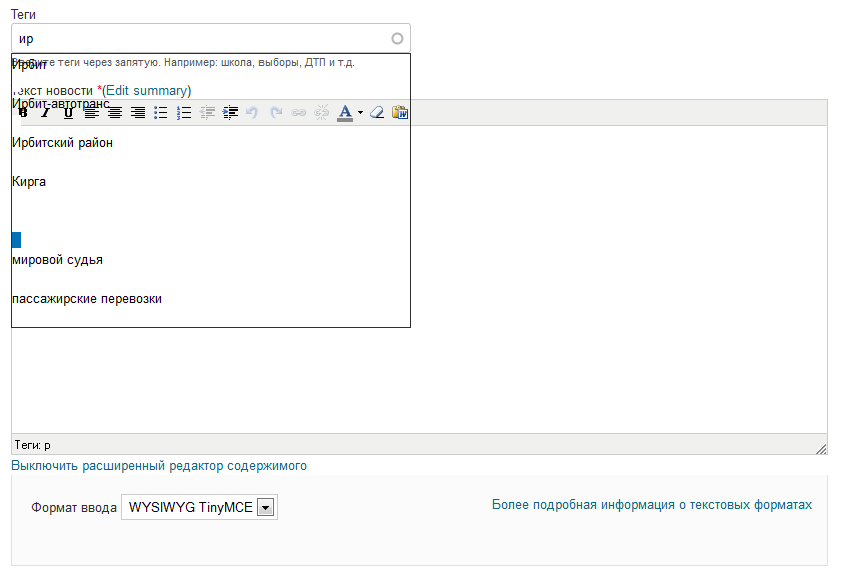
CSS wrong work with autocomplete widget.
Please see screen shot.
| Comment | File | Size | Author |
|---|---|---|---|
| #3 | Screen Shot 2012-02-06 at 4.29.52 PM.png | 10.6 KB | adnasa |
| autocomplete widget.png | 20.93 KB | sashken2 |

Comments
Comment #1
adnasa commentedYes, I found the same problem on this widget too.
tagging this to a bug.
Comment #2
Jeff Burnz commentedComment #3
adnasa commentedI just solved as followed
The example is trivial, but works
Comment #4
zilla commentedhow did you implement this? did you alter CSS directly, or did you use a module to alter CSS without touching core css in theme? i'm having the same issue with transparencies.
Comment #5
adnasa commentedI added my own .css file to override the theme css .
Comment #6
zilla commentedwas this fix moved into the recent 7x-2.2 release?
Comment #7
Jeff Burnz commentedNot as yet, updates for Corolla are scheduled, I am working out a new schedule at the moment, will advise.
Comment #8
Jeff Burnz commentedThanks adnasa, I implemented basically the same solution, but placed the colors in color.inc and used the text color (#2e2e2e) for the hover with #fff white text, so there is always enough contrast to read the list.
Pushed it to dev. Cheers.
Comment #10
Alexander Matveev commentedWhat about not hover, but active? After it was selected by arrow keyboard keys
Comment #11
Alexander Matveev commentedMust be this rule I guess:
#autocomplete li.selected