

Closed (fixed)
Project:
Flex Slider
Version:
7.x-1.x-dev
Component:
Documentation
Priority:
Normal
Category:
Task
Assigned:
Reporter:
Created:
24 Nov 2011 at 08:16 UTC
Updated:
9 Oct 2017 at 20:33 UTC
Jump to comment: Most recent, Most recent file

Comments
Comment #1
vmkazakoff commentedCarlitta87, you need to download sourse code of slider from http://flex.madebymufffin.com/, and put it in libraries directory of your site.
Comment #2
nicolas@webstanz.be commentedRequires: Libraries (missing)
I use the flex slider module in one project and it works very good. > http://wz2011d7.webstanz.be/
For an other project, i put the module in sites/all/modules and the library in sites/all/libraries/flexslider and the result in the module page for flex slider is: "Requires: Libraries (missing)"
I don't understand... why it don't work in this project?
If someone had an idea?
thanks...
Comment #3
jduguid commentedHey Nixx76,
I'm still trying to get this working too. But have you also installed the Libraries module? I believe that module is require also and may account for the error message.
Comment #4
nicolas@webstanz.be commentedYep,
The kit http://flex.madebymufffin.com/ is uploaded in sites/all/libraries. I have the same path that recommended in the read me.txt
>http://locajd.webstanz.be/sites/all/libraries/flexslider/jquery.flexslid...
So, i don't understand.
Comment #5
nicolas@webstanz.be commentedHi jfduguid,
Indeed, I just forgot to install the Libraries module... It works now.
Thanks
Comment #6
njellis commentedHello, any suggestions would be appreciated. We have the exact same problem, except libraries is installed and enabled.
With Libraries installed and Enabled we first attempted to use drupal's install-app process. FlexSlider did copy to and was listed, but when enabled, we get the following: "FlexSlider library not found. Please consult the README.txt for installation instructions." (Readme contains only dev info).
Then tried to download it from the link http://flex.madebymufffin.com/ then FTP FlexSlider-1.8 to /sites/all/modules (after deleting the original FlexSlider). Tried to Enable again -- same error.
We are using the AT Commerce 7.x-2.0-beta2 based on AdaptiveTheme 7.x-2.x.
I have tried to enable this on another site as well with the BlueMasters theme with the same result.
Thanks !!
Comment #7
minoroffense commentedYou need to name the library folder you downloaded as following
flexslider/jquery.flexslider-min.js
Note the case of the folder name
Then, the libraries module will look for that folder in the following locations in this order:
That should work.
Comment #8
njellis commentedAwesome. That took care of it. I had relabled the folders under the modules trying to get them to work, but somehow missed under libraries. Thank you so much.
For others out there, if you encounter similar problems - for us we needed to make sure of the following
The downloaded content from http://flex.madebymufffin.com/ needs to be extracted to sites/all/libraries/flexslider. NOTE: You will need to ensure it's simply called "flexslider" not "flexslider1.8" or anything else as the final folder. Also as minorOffense noted some servers are case sensitive so make sure it's all lower case.
Comment #10
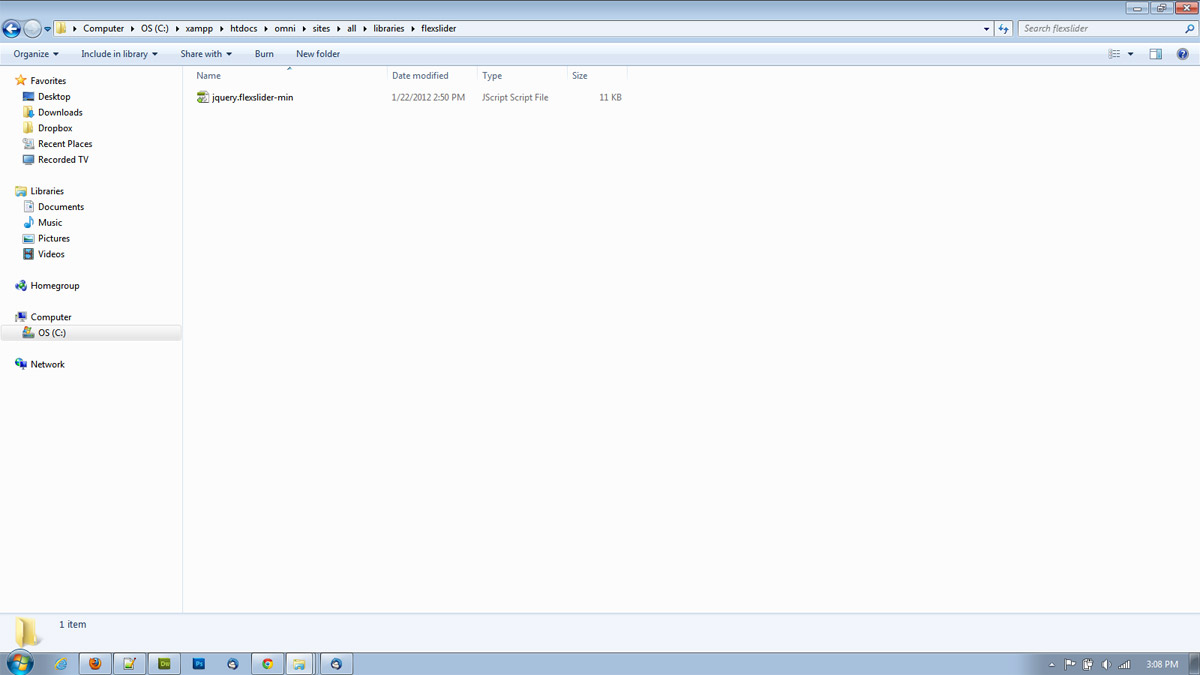
friendlymachine commentedI think this is still an issue. I have tried this on two different machines and have triple checked the paths, spelling and capitalization before posting this - still getting the 'not found' error on both. I'm attaching screenshot of where I have it just in case another set of eyes can see what I'm missing.
Comment #11
marcus178 commentedYes this is a problem, I have checked and triple checked that everything is correct but it won't let me install as it thinks the library is missing.
Comment #12
minoroffense commentedAre you running Drupal on windows?
Comment #13
marcus178 commentedNope, it's on a mac installed locally using MAMP
Comment #14
Jeff Burnz commentedI believe the confusion may be due to the documentation in the README not being followed correctly or its a bit unclear - it was to me to begin with, until I looked at your implementations of hook_library and hook_library_alter and saw it needed three files, not one.
You actually need three files in
sites/all/libraries/flexsliderThe README says to rename the folder, but there is heaps of other crap in there I didn't want so I created a folder called "flexslider" and copied in only one file (jquery.flexslider-min.js), after adding the other two things worked.
Maybe explicitly state the three files that are absolutely required?
Comment #15
friendlymachine commentedYes, this fixed it for me. Not at all clear you need all three. Thanks!
Comment #16
minoroffense commentedFor the next build, I'll change the install requirements to no longer check for the unminified copy of the library. I'll instead add a check on the admin form when enabling debug mode to notify the user to install the unminified copy.
Thanks for the feedback and sorry for the confusion.
Comment #17
minoroffense commentedComment #18
minoroffense commentedThis will be fixed in rc3.
Sorry for the delay.
Comment #19
rovoPossibly update the documentation to the Github link for the library:
https://github.com/woothemes/FlexSlider
I haven't been able to access the referenced URL for days:
http://flex.madebymufffin.com/
Comment #20
drew reece commentedHere is a silly patch correcting the URL to the library.
The links to the docs & options remain unchanged since they don't seem to be on github.
Comment #21
minoroffense commentedSome fixes are in a previous commit.
I made one specifically for #14 here http://drupalcode.org/project/flexslider.git/commit/33cd345
Comment #22
Jenness87 commentedI know this is an old post, but thanks so much! I was having this same issue and I can't believe it was because of one uppercase letter. Thanks again.
Comment #23
emettler commentedSo, I tried to install this - couldn't get the library recognized so I decided to uninstall Flexslider. Did so - and I'm still getting the error message on my site. Help!?
Comment #24
emettler commentedNevermind - I just realized that my error is "The imagesloaded library was not found!" I've tried downloading this and putting in it all/sites/libraries/imagesLoaded directory but no joy - anyone?
Comment #25
emettler commentedAnd realized the error was caused by upgrading to Libraries 2.0 - Equal Heights module has a dependency that isn't working!
Comment #26
giupenni commentedSame problem with Flexislider 7.x-2.0-alpha1 and Libraries 2
Comment #27
ncy commentedIf you copied the folder "FlexSlider-master" directly to your
sites/all/librariesdirectory and then renamed it "flexslider", check the permissions. The folder was set to700for me, so try doing achmod 755on the folder. You will need to do this on theimagesfolder as well to get the left/right arrows to show up.Comment #29
Adrião Neves commented#27 Did the trick for me. Thank you.
Comment #30
David Findthebird commentedI copied the folder "FlexSlider-master" removed the "master" part but forgot to remove the capitals "FlexSlider" , this didn't work either.
When I renamed it to "flexslider" it worked like a charm
Comment #31
alislis commentedThe way suggested #27 is really works! I had the problem "library is not detected" and this method helps me, thanx!