

Closed (fixed)
Project:
Drupal core
Version:
7.x-dev
Component:
system.module
Priority:
Normal
Category:
Task
Assigned:
Issue tags:
Reporter:
Created:
13 Apr 2007 at 09:15 UTC
Updated:
2 Jan 2014 at 23:34 UTC
Jump to comment: Most recent, Most recent file




Comments
Comment #1
sutharsan commentedMoving all usability issues to Drupal - component usability.
Comment #2
pasqualleComment #3
birdmanx35 commentedI am picky!
Comment #4
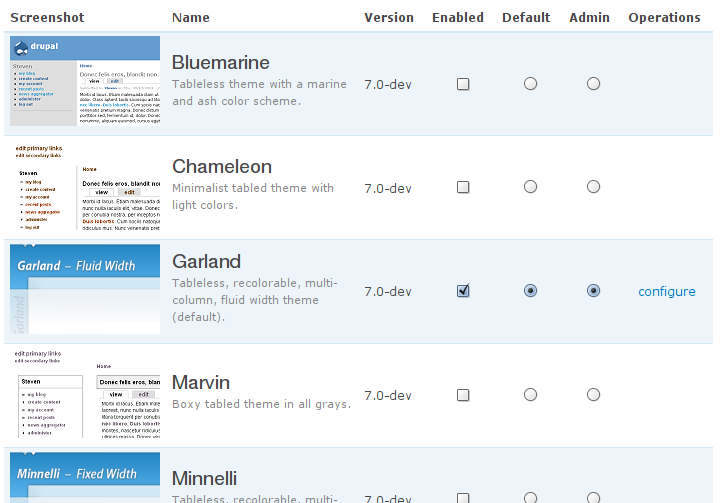
ultimateboy commentedIt might take a bit of rewriting of the help text, but why not make this part of the main theme page? I am envisioning something like the following screenshot:

Comment #5
yoroy commentedMore here: http://groups.drupal.org/node/15672
Comment #6
lilou commentedFront-end / Back-end is better :
http://www.flickr.com/photos/30032901@N04/2922043198/sizes/o/
Comment #7
ultimateboy commentedI actually think that front-end and back-end will not be understood by non web gurus. I think that "administration theme" is more clear. You did you mention if you liked the idea of combining these into a single page. Is this the right direction?
Comment #8
lilou commentedFor me, combine this two settings on the same page is more logical.
Comment #9
dave reidHaving the administration menu setting under admin/settings never made sense to me.
Comment #10
Anonymous (not verified) commentedA slick thing would be a carousel to select the themes. In support of
lilou at #8UltimateBoy at #7 a radio button on the admin/build/theme page to choose the administration theme would be good; similar to the default radio selection.For the carousel idea, I would see admin/build/theme the page for the carousel and admin/build/theme/list as a page for the select themes in the current style. The carousel page you would have the options to Active and Deactivate the theme. The list page you would have the options of choosing the default, choosing the administration theme and configuring the themes.
Comment #11
yoroy commented#10: the idea is that hopefully we can remove the UI (not the functionality!) for enabling multiple themes from core, thus removing the need for the 'Enable' radio button.
A caroussel would only be interesting if themes have larger thumnails than what they come with now I think. Current thumbnails provided by themes are too small to warrent a view-per-item display.
#7: Yes, merging the site and administration theme settings on one page is the way to go.
Comment #12
dave reidHere we go! Let's get this in D7! Patch for review, but FYI we still need to figure out what to do with the 'Use administration theme for content editing' option (the 'node_admin_theme' variable). I have no idea where it should go or if we should keep it.
FYI
'#default_value' => variable_get('admin_theme', 'garland') ? variable_get('admin_theme', 'garland') : variable_get('theme_default', 'garland'),is that way because on D5/6 the admin_theme variable was stored as '0' and we want to get the actual theme name.Comment #13
dave reidUsability is now a tag, so removing from title
Comment #14
dave reidScreenshot for review.
Comment #15
wretched sinner - saved by grace commentedDisclaimer: I have not looked at or tested the patch, only viewed the screenshots
The only problem that I see with this approach is a situation where you might enable an administration theme for a reason (like testing a new theme being developed) while having multiple themes enabled. Then, after testing the new theme, you want to revert to having the user's default theme as their administration theme. With radio buttons, there is no way to unselect all the radio buttons, thereby returning to the default setting.
To get around this, I see two options. The first is to have a final "user's theme" button, however this could confuse admins as it does not fit for either the enabled or default columns. The other option could be to move the existing dropdown list to be under the main theme selector, maybe in a collapsible fieldset, which would combine it on the same page as the other theme selections, and keep the current behaviour. This fieldset could then also contain the 'Use administration theme for content editing' option, as it makes no sense unless a specific administration theme is selected.
Comment #16
dave reidOk, here's a different attempt from #14. Moved the admin theme to a local task tab at admin/build/theme/admin. Also converts the node admin variable to a more flexible 'admin theme paths' textarea that is easier to use. Attached screenshot as well.
Comment #18
pasqualleThe two radio button columns (Default and Admin) next to each other looks terribly. I would suggest to remove those columns from the table and make them a "select" type fields above the table.
The "Use administration theme for content editing' option" could be also above the table..
And I would also move the enabled column to the first place, as it is on page admin/settings/language
Comment #19
pasqualleok, I crossposted.
the #16 looks better..
Comment #20
dmitrig01 commentedChange "admin" to "administrative theme" because the word "admin" is used *nowhere* in the interface
Comment #21
dave reidDiscussed with webchick about the options for the admin theme page:
1. Subtab at admin/build/theme/admin (like #16) but it would seem silly to have a user picking a theme without seeing the pictures (like admin/build/theme/list). But now we have two pages that are essentially the same thing.
2. An 'Administration theme' collapsed fieldset underneath the current theme selector in admin/build/theme/list. This seems to make the most sense as it keeps all the theme selection options on the same page, but keeps the admin options out of the way.
New patch w/ screenshots implementing option 2. This option is growing on me much faster than the others.
Comment #22
webchickI'd like the usability team to chime in on this, but I'm cool with #21 if they say it's okay.
Comment #23
alexanderpas commentedI like #21 over the others... but i feel there is room for improvement... (just don't know where.)
Comment #24
yoroy commented#21 looks like the way to go,
- showing the fieldset initially collapsed is ok, it's a bit of an advanced/secondary task on this page.
- on this page you'll have the thumbnails above to know what you are choosing.
- we're removing yet another /admin page, hooray!
An empty text field for additional paths to show the admin theme on is *not* easier to use though. It actually moves doing the actual work over to the user. More flexible yes, but clicking a checkbox is a lot easier and involves less thinking than looking up a path and typing it in, wildcards ("huh? what's a wildcard?") and all.
Is there a need to make this part more flexible? Should it be part of this issue? Let's keep the 'show on node/edit pages' checkbox for now and discuss the added options for admin theme in a follow up issue.
Otherwise, good work and would love to see this committed.
Comment #25
dave reidyoroy, you make a good point. The added flexibility of the admin theme paths textarea should be a separate patch (I bet there is an existing one out there somewhere). Here's a revised patch based on yoroy's suggestions.
Comment #26
davyvdb commentedI want to point you guys to http://drupal.org/node/346573 also to close the circle. These two are very related.
Comment #27
yoroy commentedYes, that would be the follow up :-)
Comment #28
chx commentedI know I am not an UI person but I dig #12/#14.
Comment #29
chx commentedCant we marry the REALLY nice table based approach with the collapsed fieldset holding only the paths?
Edit: explanation, take #12/#14 , remove configure link, add collapsed fieldset with just a textarea for paths.
Comment #30
webchickIf someone sits down and fixes #292253: Remove the per-user themes selection from core it's possible we could revisit the UI here. But I think it's unacceptable to have two radios and a checkbox as the UI. It's already confusing enough as it is.
For now though, this patch is a dramatic improvement because it makes these settings actually findable.
However, according to http://acquia.com/files/test-results/modules_system_system.admin.inc.html we have no tests for the administration theme, so we should add some while we're touching this part of the code.
Looking through the patch I didn't see any other glaring things, and #21 has usability team +1, so as long as the tests get written I am cool with committing this.
Comment #31
dave reidRevised patch with tests that I might have made a little too extensive, but they cover all the admin theme stuff, including the 'Reset to defaults' button.
Comment #32
webchickWow, GREAT!!
Two quick nits on that test:
Comment #33
dave reidFixed webchick's concerns and the fact that I didn't have a proper 'description' value for the test class, oops. Changed the test to not use minnelli since /themes/garland also matches the minnelli theme. So now, just using stark and garland.
We also discussed using XPath to check for the exact css files in
. But I think that is something best left for our future actual theme selection test where it should test that all the proper css files have been included properly.
Comment #34
dave reid(08:53:04 PM) webchick: davereid, now the only thing that's not tested here is the admin theme without the node_admin_theme => TRUE
(08:53:19 PM) davereid: webchick: Actually, the reset to defaults covers that
(08:53:34 PM) webchick: Well. No. Because it never resets node_admin_theme to FALSE.
(08:53:44 PM) webchick: It works because you've set the site theme and admin theme to be the same.
Alright, I think this test is good now. Posting for final review.
Comment #35
dave reidRevised because webchick is picky tonight.
Comment #37
dave reidWell...frak me. That's what I get for being a smarty pants.
Comment #38
webchickYAY! Committed to HEAD. :) Thanks so much!
Comment #39
yoroy commentedGreat! Thanks Dave Reid.