

Closed (fixed)
Project:
Bibliography Module
Version:
7.x-1.x-dev
Component:
User interface
Priority:
Normal
Category:
Bug report
Assigned:
Unassigned
Reporter:
Created:
8 Dec 2011 at 17:58 UTC
Updated:
25 Mar 2013 at 00:10 UTC
Jump to comment: Most recent, Most recent file




Comments
Comment #1
lpeabody commentedMy fix for this at the moment is trolling through the database looking up the specific entries in biblio_field_type_data and changing them to what I need.
Comment #2
lpeabody commentedremoved
EDIT: Sorry Ron, I have too many issue pages open, I meant to put this in another thread!
Comment #3
rjerome commentedI'm not exactly sure what you are referring too, but if it's working, it's all good.
Comment #4
lpeabody commentedNothing is actually fixed, I just posted in the wrong thread >_>
Comment #5
rjerome commentedAhh that explains why I didn't understand what you were referring to :-)
I can't reproduce your original issue. Can you confirm that that there actually something set for the default title on the admin/config/content/biblio/fields page with the Publication type set to common.
As an example, the two attached image show the "common" and "journal article" specific entries for the biblio_secondary_title field. If you check the "common" check box the "common" title should be displayed on the field for all publication types, otherwise the "type specific" title is displayed for that field.
Comment #6
natukThe common labels are missing for me as well. See attached screenshots.
Comment #7
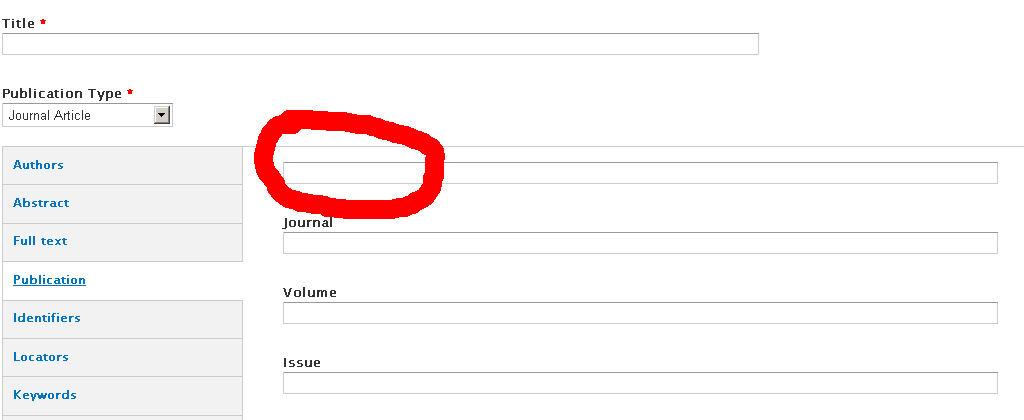
dpnewb commentedI am experiencing the same issue. It prevents users from adding new Journal Article content since they don't know what the field is supposed to be and it is configured as a required field. Notice that on the Add Content page for a Journal Article on the Publications tab the Year field is missing the label.
Comment #8
johnsonj commentedAny word on this bug? I'm experiencing the same issue.
Comment #9
Anonymous (not verified) commentedSubscribe
Comment #10
Anonymous (not verified) commentedThis is really silly, but I found a temporary fix(?). For some reason when I made sure that none of the fields were "required", all the labels displayed properly. Is there a status update on this issue?
Comment #11
enochRoot commentedI'm only missing the Label for the 'Year' field. [7.x-1.0-rc4]
Comment #12
rjerome commentedI think this is fixed in the -dev version (at least I can't reproduce it in the -dev version), so if someone would like to test that theory and report back that would be great. I am planning on issuing a new rc release within the next week so it would be good to know if this is still an issue prior to the next release.
Comment #13
autopoietic commentedI found that resetting all types to default initially resolved the problem of labels not showing up.
Even when the labels are then customised again, they display correctly. This appears to work in both 7.x-1.0-rc4 and 7.x-1.0-rc5.
Unfortunately I do not believe this is a solution for us, because we have content in some custom publication types, and though the reset seems to leave these types available (we could then re-edit labels) the biblio settings page for the custom publication types give the following error:
Comment #14
rjerome commentedI believe I found the issue causing labels to go missing and fixed it.
http://drupalcode.org/project/biblio.git/commit/2978e01