

Closed (fixed)
Project:
FitVids
Version:
7.x-1.3
Component:
Miscellaneous
Priority:
Normal
Category:
Bug report
Assigned:
Unassigned
Reporter:
Created:
18 Dec 2011 at 19:17 UTC
Updated:
24 Oct 2012 at 21:30 UTC
Jump to comment: Most recent, Most recent file




Comments
Comment #1
moloc commentedIs that Media added with a module like Media YouTube or another one, which uses the Media Internet Sources API module? Which module is it?
Comment #2
user654 commented.
Comment #3
moloc commentedI am not able to reproduce this issue with the same youtube video.
Can you reproduce this with other videos from youtube?
Does this issue also occur on the site ?q=media/8 (this is your video in the screenshot).
Comment #4
user654 commented.
Comment #5
user654 commentedI also use Chrome browser.
Comment #6
moloc commentedAs this issue also occur in media/*, this seems to be a Media: Youtube issue or a conflict with other CSS settings (for iframe?).
As i can see from the Media:Youtube Code, the width and height attributes for the HTML-elements are set. So i think its best have a look on this values.
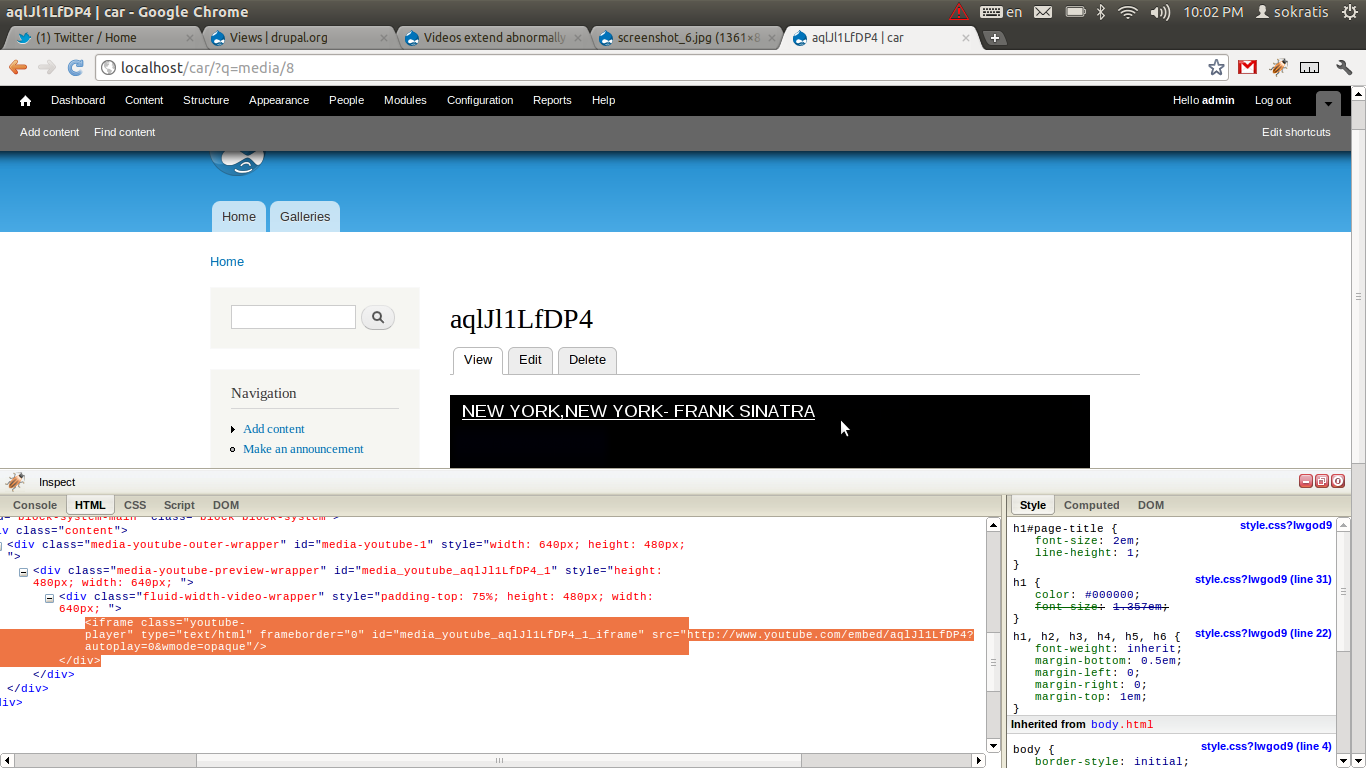
0. Go to ?q=media/8
1. Right klick on the titel --> Inspect Element (using Google Chrome, see attached screenshot)
2. in the bottom you can see the title selected (see screenshot).
3. open the html-elements by clicking on the arrow (see screenshot again).
4. click on the "iframe" -> this line should now be selected
5. make a new screenshot an attach it here.
I think with this information, we may can see whats going wrong.
(Which version of Media:Youtube do you use?)
Comment #7
user654 commented.
Comment #8
user654 commented.
Comment #9
user654 commented.
Comment #10
user654 commented.
Comment #11
moloc commentedAs it is a FitVids library issue, i move it to FitVids module.
It seems, that the generated padding-top value in the library messes up the video height. If i remove the padding-top value from the library, everything seems to be fine.
(Just to mention: The library generates a div-element in the head of the html element! This is not a valid markup!)
Comment #12
derekahmedzai commentedThe styles are injected into the page by the FitVids.js script - this module is just a wrapper for that script.
You might want to ask at the project page (at GitHub).
Comment #13
derekahmedzai commentedIf you're still getting padding issues, try getting the latest version of the script from https://github.com/davatron5000/FitVids.js
Comment #14
murrayw commentedI've been experiencing similar problems with the latest version. The advice given by Moloc in #11 is good. Removing the css padding-top part of line 71 of fitvids seems to work.
.css('padding-top', (aspectRatio * 100)+"%")No more expanded videos.
But wait, there's more. If you are using the media_youtube module to pump out the HTML then it will put hardcoded style attributes into a couple of divs which wrap the iframe. This stops fitvids doing what it wants to do because the container is wrapped tightly around the iframe. I found that I could override these html styles in CSS by doing:
I now have fitvids working. Woot.
Comment #15
murrayw commentedAnd here is the patch which worked for me in #14. It was applied to the library directory, not this module.
Comment #16
murrayw commentedHi all. One last update. I heard back from the maintainer of the FitVids library and apparently the padding-top is key to the way it works. So, you should probably scrap my pearls of wisdom in #14 and #15. Don't go changing the FitVids library.
https://github.com/davatron5000/FitVids.js/issues/56
One solution is to remove the media-youtube-preview-wrapper div from /media_youtube/includes/themes/media-youtube-video.tpl by implementing you own version of it in your theme.
Getting rid of that div stops the images videos from blowing up vertically. The video appears to display OK. However, I am not sure what the knock on effects of this will be (if any) for media_youtube.
Comment #17
dsbrianwebster commentedmurrayw. Your fiix in #16 works, but by removing that DIV the JS no longer replaces the object embed with the iframe as the class ".media-youtube-preview-wrapper" is the selector used the HTML5 detection of file: media_youtube.js.
Personally, and this is a topic for another post, I think all the detection javascript should be cut out of media_youtube, media_vimeo etc and we should just serve up the iframe and let the providers handle the rest. See - http://drupal.org/node/1555276.
Until that day comes, here's a purely CSS fix that solved this issue for me. no need to edit the tpl files.
Comment #18
murrayw commentedDoh! I was almost there. Thanks Delicious Simplicity. That works for me.
Comment #19
dsbrianwebster commentedOne additional adjustment. I noticed that there were still some inconsistencies, mainly if you start with a narrow (mobile) with and scale the videos up from there. The css in media_youtube/css/media_youtube.css was doing it. One style in particular.
Revised CSS to add to your theme to combat the problemo:
Comment #20
xalexas commentedmurrayw #16 works also on Vimeo! Thanks.
Comment #21
derekahmedzai commentedThe new dev release (7.x-1.x-dev) strips out the wrapper divs automatically, so no need to add extra CSS.
Comment #22
murrayw commentedI've checked the new 1.7 release and can confirm that it works for YouTube when our CSS has been removed. However, there is still a problem with Vimeo. Looks like the current dev will still have this problem as well.
Here's some HTML for reference for Vimeo:
Comment #23
derekahmedzai commentedThanks, a new dev release should appear soon, which does the same for Vimeo.
Are there any other media plugins that we need to watch out for?
Comment #24
derekahmedzai commentedThere's a new release (1.8) on its way that should sort out Vimeo, too.
Comment #25
dddave commentedBefore this module starts to jump through the loops please see the effort taken here: #1555276: Clean up theming function, Use recommended iframe player by default, without js and for media_vimeo here: #1715438: Update code and bring it in line with the latest Media Youtube release. Fixes numerous issues.
I can vouch for the fact that both media_youtube and media_vimeo work fine with fitvids.js thanks to these changes.
Comment #26
derekahmedzai commentedI've been following those changes - which are very cool - but thought I'd add some interim fixes until those media modules get released. Then I'll probably remove them, or make them optional.
Comment #27
dddave commentedCool. Appreciate your efforts. Thanks!
Comment #28
murrayw commentedThanks DerekAhmedzai for rolling the latest updates into 1.8. Good stuff.
Comment #29
derekahmedzai commentedThanks, I'll close this now.
Comment #30
RobW commentedWith the latest Media: Vimeo dev, no
!importantor Vimeo-specific styles are needed. We'll try and get a stable out soon so that you can remove those styles from your module entirely.Comment #31
benjohnstone commentedCouldnt figure why it wasnt working for me, checked everything again and again - finally figured out the youtube embed code that uses youtube-nocookies.com as the src url wasnt getting swapped out so I needed to add http://www.youtube-nocookie.com to the 'custom iframe urls' field.
works sweet for me now