

 Come together with the global Drupal community in Rotterdam, 28 Sept – 1 Oct 2026. Sessions, contribution, connection, and Early Bird savings until 8 June.
I was told by the developers of the Views module that this module would accomplish what I need.
I would like to construct the following query:
SELECT
    l.field_last_value AS Last,
    f.field_first_value AS First
FROM
    field_revision_field_last l INNERJOIN field_revision_field_first f
ON f.entity_id=l.entity_id
ORDER BY Last;
I can't find any documentation on using this module, but I stumbled upon the checkbox in the field configuration to set each field as a base table. However, when I try to create a new view, I see no means to change the View's base table from "node" to something else. Is there documention on this module somewhere that google and the drupal search just isn't spitting out? I never would have thought that trying to make a user list would be so difficult. I'm new to drupal, but have many years of C, C++, SQL and PHP experience and I've worked on several OSS projects at sourceforge.
Thanks,
Kevin
| Comment | File | Size | Author |
|---|---|---|---|
| #4 | FatherFarm.png | 21.36 KB | xcorex |
| #3 | new-view.png | 11.9 KB | solotandem |


Comments
Comment #1
solotandem commentedWhy do you assume you need this module? What use case did you describe to the developers of the Views module that led them to suggest this module?
Reading into your statements, "I'm new to drupal" and "trying to make a user list" makes me wonder whether views out-of-the-box would meet your needs. It is quite simple to "make a user list" with views.
If you determine you need this module, then create the view using one of the field tables as the base table and join the other tables using relationships. For example, use field_revision_field_last as the base table.
The documentation you need is on using views. This module simply exposes the field tables as a base table to views. As a base table, you have access to each of the columns in the table. The rest is views.
Comment #2
beakerboyMy question to the Views team is here (http://drupal.org/node/1373908). You say, "create the view using one of the field tables as the base table and join the other tables using relationships" I get how to join other tables to the base table using the Views UI, but I fail to see an option when I create a new View in version 7.x to specify what the base table is. It always defaults to node. In the filters area when I go to add a new field to the query it only has; content, content revision, file usage, global, and search. There's no "User" or "Profile", or any other database table for which I've selected to allow use as a base table. The relationships section has even fewer options to add to the query.
Beyond the checkbox saying "Expose as Base Table" when configuring a field outside of Views I see no new options within the Views UI. It's not obvious how to make this base table selection within the Views UI.
It turns out it is not so simple to create a user list in Drupal 7. I've seen may questions on the main Drupal forum asking about this. The fact that Views defaults to node means only user who have posted content will be listed. My website is for a non-profit with dues paying members, some of whom will never create content on the website. I would still like to list their names in the members list.
Kevin
Comment #3
solotandem commentedFrom the Views UI, when you add a new view, you should see a form with a section like the attached snippet. In the "Show" select element, you would select the field table you "exposed" as a base table. The default value is "Content" which implies the node table. You could select "Users" to display a list of users, with any of the fields you have attached to them.
Again, from your description of what you are trying to do, I would conclude you do not need this module. Views out-of-the-box should work well.
Comment #4
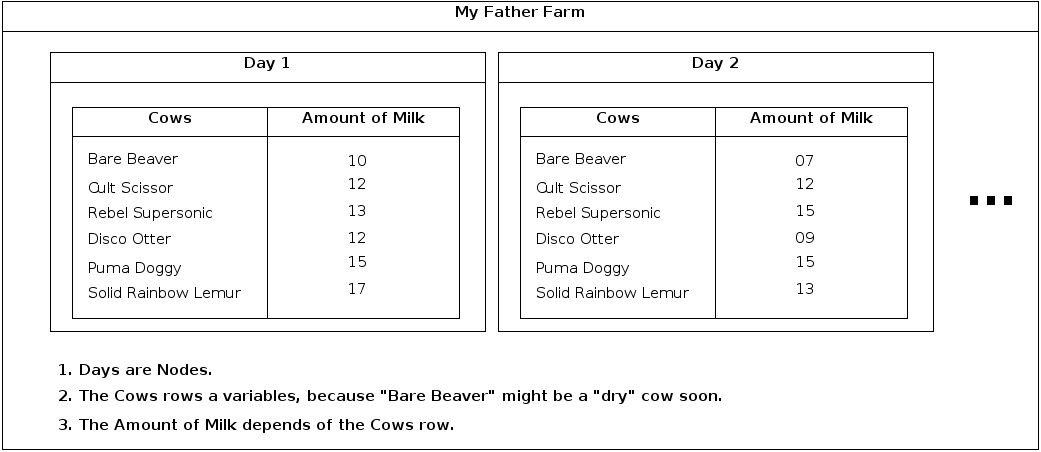
xcorex commentedIs it possible to do it with Views Field?
Mockup attached. Thanks.