

 The 2026 Drupal Business Survey is open. Your response will help shape the future of the Drupal business ecosystem.
There seems to be a sorting error when the custom-fields are displayed in
/cart/checkout/
and
admin/store/settings/checkout/edit/extrafields
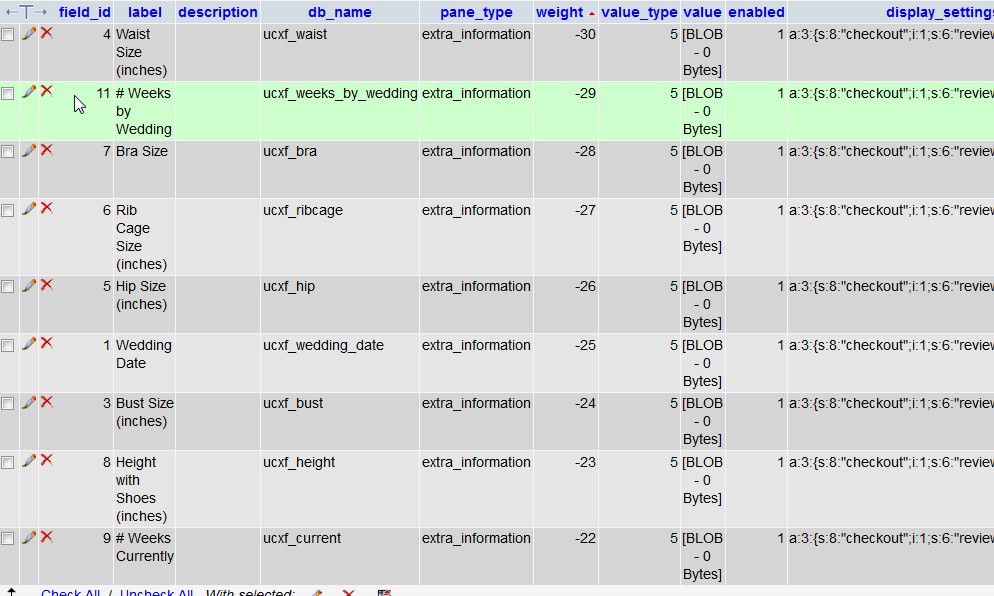
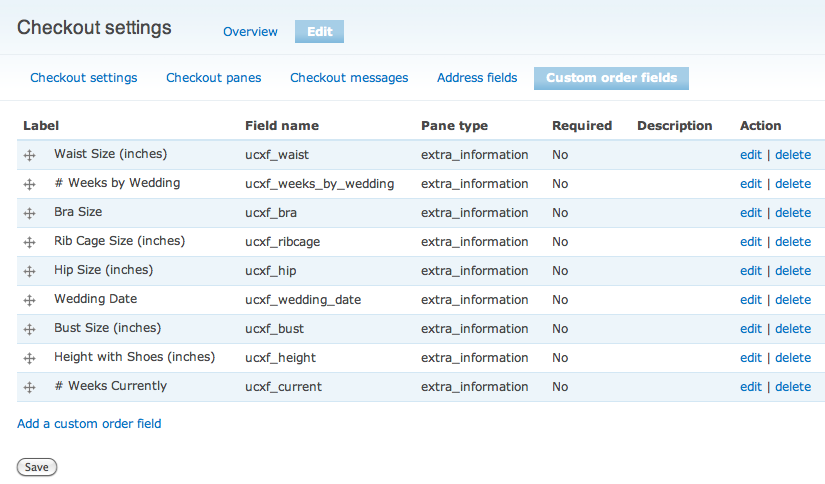
Moving the 'order' and clicking save correctly updates the "Weight", but the sort-order is natural-order in the admin and public page.
What I did for installation:
- 2.0 alpha was working
- copied over the 2.0 beta
- uninstall / install in the modules
- (It may have errored and then i copied over 'missing' files from 2.0 alpha)
Versions:
- Drupal core 6.22
- Ubercart 6.x-2.7
Fix:
- When i manually re-ordered the database records, it displayed fine
| Comment | File | Size | Author |
|---|---|---|---|
| #8 | mysql.jpg | 123 KB | maknet |
| #7 | admin.jpg | 47.78 KB | maknet |
| #7 | checkout.jpg | 20.69 KB | maknet |
| #6 | 1376298-phpmyadmin.png | 65.4 KB | megachriz |
| #6 | 1376298-custom-order-fields.png | 77.11 KB | megachriz |
Issue fork uc_extra_fields_pane-1376298
 Show commands
Start within a Git clone of the project using the version control instructions.
Or, if you do not have SSH keys set up on git.drupalcode.org:
 compare

Comments
Comment #1
maknet commentedIf you want to re-order the table's natural order, you can manually adjust the weights (through the admin) and run:
ALTER TABLE `drupal_uc_extra_fields` ORDER BY weightComment #2
megachrizIt took a while before I had time to take a closer look at this issue. I can confirm the weight of fields in the Extra information pane is completely ignored in both checkout and in the admin section. Previously the fields were ordered by weight when loaded from the database (in 6.x-2.0-alpha1), but with the redesign this piece of code get lost.
I've committed a fix for this issue. The fix cares that order by weight is back again in the database query. It also reorders the fields with uasort() in case the fields are not loaded all at once (this probably can only happen in modules that extend Extra Fields Pane).
Thanks for reporting the bug! The fix will appear in the dev version from December 29, 2011 or later.
Comment #3
maknet commentedI'm not sure if the current 6.x-2.x-dev is the right version, but when i tried to install it, it re-orders fields when i drag and move them, but when i click SAVE, it re-orders them in very strange ways!
(For instance, I moved the bottom field to the 2nd last position)
Thanks.
Comment #4
megachrizI can not reproduce your problem. Can you try it again with the latest dev? The development release has been updated.
Comment #5
maknet commentedSame issue. Using beta1 seems OK.
When i overwrite the /sites/all/modules/uc_extra_fields_pane directory with dev2, it doesn't sort properly. (Do i need to install it or migrate it in a different way? Did the schema change?)
When i view the weights in the admin, they aren't in order. Like -24, -23, -26, 5, but they aren't following the "natural order" either. I can manually adjust the weights and it will save properly. But the display is still off.
When i move fields up or down, i can't seem to deduce the pattern.
I have attached the SQL if that helps.
Comment #6
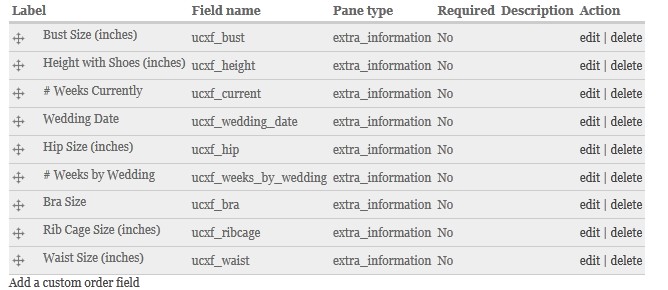
megachrizThe custom order fields are now ordered by weight when shown, which did not happen in 6.x-2.0-beta1 (this is the bug I've fixed in dev). They won't be ordered in their "natural order" again. You will have adjust the weight of each field to get them displayed in the order you want (reorder them by dragging the rows on the custom order fields pane and then hit the "Save" button). Do you still encounter problems when you adjust the weights?
From beta1 to latest dev
Replace the old uc_extra_fields_pane folder (beta1) with the new one (6.x-2.x-dev). In this case there were no changes in the schema, so you don't need to run update.php.
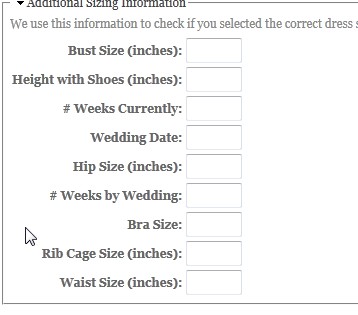
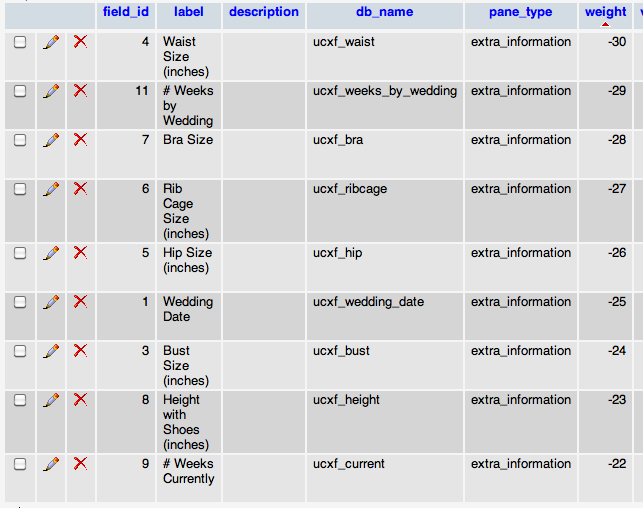
I've installed your SQL, but I can't still reproduce your problem. With me, the fields are order by weight on the custom order fields page, the checkout page and the order administration page. I've attached some images so you know the way how I see your fields. One screenshot is from phpMyAdmin; I've ordered the rows by weight there also. What do you mean with "But the display is still off"?
Can you explain your problem in more detail? I may have gotten it wrong.
Comment #7
maknet commentedI have attached my screen-shots.
Not sure if contacted me would be a better way to solve this?
Perhaps there's a library or some caching thing i need to do to "install" the new version? (I un-installed the module, uploaded the new files, and then re-installed it).
Any other ideas would be appreciated.
Comment #8
maknet commentedPHP-myadmin screen-shot (sorry, couldn't EDIT the previous post).
Comment #9
megachrizI'm puzzled here. I've no idea how Extra Fields Pane causes this behavior. It could be a conflict with an other module you've installed (other modules are free to alter forms), although this issue seems to be very rare.
To be sure you have the latest version of Extra Fields Pane installed, check the available updates page: admin/reports/updates. It should list Extra Fields Checkout Pane 6.x-2.x-dev from 2011-Dec-30 (it can also be 2011-Dec-29, the 2011-Dec-30 date may be a local date here). I once had an issue with a module that kept being the old version although I replaced the module folder with the latest version. I discovered I had accidentally the module folder two times installed and Drupal picks the first one it finds. Drupal first checks the module folder for the specific site, for example "sites/default/modules" or "sites/www.example.com/modules", then it checks "sites/all/modules" and if it still didn't found the module, it checks the modules folder at the root of the Drupal site, which should only contain the modules from Drupal core.
You can empty the caches, but I doubt it is a caching problem. Extra Fields Pane doesn't cache the fields' order. It only does some caching that is valid for one request only: it makes sure fields are not unnecessary loaded from the database twice during one request. Read http://drupal.org/node/42055 to learn ways to clear caches. You can also empty (truncate) all tables in the database that start with "cache" (or "drupal_cache" in your installation) to clear all caches.
Comment #10
maknet commentedUnfortunately, the 2011-12-30 version still doesn't work. I also verified there is only one module-version installed. (Nothing in /modules or /sites/all/default/modules)
Manually changing the DB weight-field yields random sorting-patterns as well.
(It kind of looks like it is remembering most of the values, and then when you change the weight, it remembers that in relation to some other field)
I guess i'll try to do a little core-hacking on my end. :)
Can you please point me in the direction of the sorting function?
I'm hoping it's a PHP version, library or non-compiled module issue that's localized.
Worst-case, i guess I'm reverting to the beta1, which sorts fine using "natural-order", but then wouldn't have the tokens properly displaying.
Thanks.
Comment #11
megachrizThe sorting happens in the file UCXF_FieldList.class.php. For the custom order fields admin page the method
UCXF_FieldList::getAllCustomFields()is called. This method callsUCXF_FieldList::loadAll()which loads all fields from the uc_extra_fields_pane table (because most of the times all extra fields are needed). After that, it builds up an array that only contain custom order fields. Finally, before the fields are returned, it sorts the array by the field's weight property, using the PHP function uasort(). This function needs a callback function to do the comparison. The callback function that is used isUCXF_FieldList::sort()which contains similar code as the Drupal core function element_sort(). The difference is thatelement_sort()only works with arrays that have a property called "#weight" andUCXF_FieldList::sort()only works with UCXF_Field instances that have a property called "weight".I hope you can help with debug this, as I can't reproduce the problem yet. I've tested the module with PHP 5.2.9 and PHP 5.3.2.
Below you can find the code in UCXF_FieldList.class.php which deals with sorting the fields.
UCXF_FieldList::getAllCustomFields()
UCXF_FieldList::sort
Comment #12
maknet commentedHere's what i've found:
- When i comment out lines #144, #157, #169 and #187 (which call uasort()), everything works as expected now. I can re-order the weights in the admin (or in Mysql) and it's perfectly reflected in the public site.
- 2.x-dev-dec30 never gets inside the UCXF_FieldList::sort() function (don't know if it's because it's reserved-word or some funky class-thing?)
- The sort() function DOES get called if i move it outside of the class and call it:
function mysort() { ... }With mysort(), it works as expected. Then again, commenting out the uasort() function already works as expected, so I can't draw any conclusions about moving it outside the class.
Maybe uasort() isn't really necessary?
Anyway, hope that narrows things down? (Maybe i have a non-standard php.ini config?)
Comment #13
maknet commentedFound it!
Before PHP 5.2.3 you have to call:
uasort($fields, array('UCXF_FieldList','sort'));and not
uasort($fields, 'UCXF_FieldList::sort');Comment #14
megachrizThanks for tracking down the cause of the error! :)
You are right it looks like the uasort() is not necessary, but it is there to be sure the fields are in the right order when retrieved. A custom module is able to use the Extra Field Pane API to load a single field. If Extra Fields Pane retrieves the custom order fields later in the same request, the single field will be on the top of the list. The uasort() prevents that fields are displayed in the wrong order. I know it's a very uncommon situation.
I've tested your proposal change (posted in #13) and it has not any side effects on my installation. I will check in this change soon (I don't have time to do it today). Thank you again!
Comment #15
maknet commentedThanks for the great updated module and prompt replies!
Looking forward to the 'official' version so I can get rid of my hacked-core. :)
Comment #16
megachrizThe fix proposed in #13 has been committed.
Comment #17
megachriz