Hi,
I'm having a hard time figuring out how to use Context Layouts. I have followed the documentation that comes with D7 to the end, which is straight-forward (ie. this http://drupalcode.org/project/context.git/blob/refs/heads/6.x-3.x:/conte... but the one bundled with D7). I'm confused as to how this module works after you modify the .info file.
I was directed to this module from the Node Page Template module (http://drupal.org/project/node_page) that was never ported to D7 and was told I could achieve similar results with Context Layouts. I want to be able to switch between Page Templates on a per node basis (not per Content Type). The Node Page Template module allowed users to choose from a drop-down between Page Template to assign to a Node.
Can anyone walk me through how to get this module working after the .info file step?
I've tried the following:
- Moved the Context block into my content area
- Went to admin/structure/context and Added a Context called "page_layout" and added a condition for Node Type: Basic page.
Anyways, I'm not following how this module works or how I can achieve a way to switch Page Templates per node with Context Layers.
If anyone can help, that would be greatly appreciated. Thanks.


Comments
Comment #1
clem.chuang@gmail.com commentedThere is a good example,Cube theme,Although it is in development in current,it can be used to explain how the context layout module works.
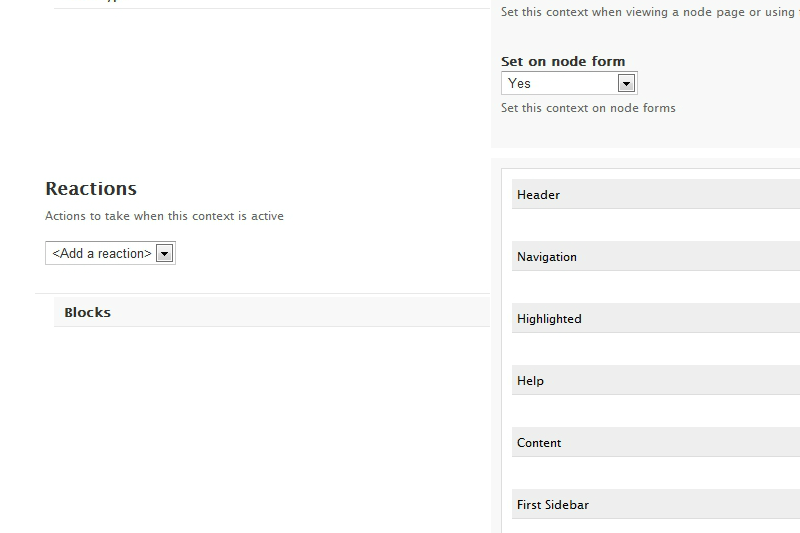
Install and enable this theme,then go to 'context'(/admin/structure/context),click 'Add',add 'Blocks' reaction,you will find a 'Layout' field at right which is the stuff this module gives you.The values in 'Layout' field are defined in the info file of 'Cube' theme,you can open this file with a editor and learn to write a new one.
Comment #2
hixster commentedand the 'per node' bit?
Comment #3
rafinskipg commentedI used cube layouts style, and it works great with context .
Define wich layout to use in the "blocks" reaction.
Comment #4
rafinskipg commentedTo use layout per node, use also Context Node http://drupal.org/project/context_node (7.x ) or Context By Node (only in 6.x http://drupal.org/project/context_by_node )
Comment #5
rafinskipg commentedI change the status of the issue, it works as designed, but im still thinking there is a lack of documentation about this. You found usefull comments here, but this could be in the README.txt.
Tasks:
- Include in the README.txt how to define a layout.
Example of a layout in mytheme.info:
Comment #6
sorensong commentedI'm having strange issues too. Here is what I have in my .info file:
; Layout: Wheel Dislpay
layouts[columns][name] = "Wheel dislpay"
layouts[columns][description] = "Page formatted for wheel display."
layouts[columns][stylesheet] = "wheel-display.css"
layouts[columns][template] = "wheel-display"
layouts[columns][regions][] = "content"
It WAS working just like this but now it's not. I've cleared cache a dozen times. I've tried with "Context layouts" both enabled and disabled (even though it says "Once you have layouts enabled" in README). No cigar. No option to choose layout.
Completely dumbfounded.
Any ideas?
Comment #7
rafinskipg commentedCan you post your full info file?
Have you installed / updated any module since you where working OK?
Comment #8
ishmael-sanchez commentedGoing on the assumption that this support request was sorted out since it's 3yrs old.