

Closed (fixed)
Project:
Extra Fields Checkout Pane
Version:
6.x-2.0-beta1
Component:
Miscellaneous
Priority:
Normal
Category:
Bug report
Assigned:
Reporter:
Created:
19 Dec 2011 at 18:52 UTC
Updated:
15 May 2012 at 06:53 UTC
Jump to comment: Most recent file


Comments
Comment #1
megachrizYou can print values in the invoice by using tokens. However, it seems that the tokens for fields in the extra information are not properly generated. I'll work on a fix.
Comment #2
megachriz(it's a bug)
Comment #3
megachrizI've checked in a fix for this problem. I also changed an automated test and added code to test the token values that are being generated.
The fix will appear in the dev version dated December 29, 2011 or later.
Comment #4
maknet commentedHey, thanks for the quick work!
Any suggestions on the best way to display the values?
Do i just use:
<?php echo $information_ucxf_fieldname; ?>or is there a better method, i think using tokens you just mentioned?
Thanks.
Comment #5
megachrizYes, you need to insert template variables that are based on the tokens defined by this module. If you want to know more about tokens, you can read the documentation of the token module. Ubercart create template variables based on these tokens. Normally, a token looks like this:
[token-variable]But for the invoice templates Ubercart creates template variables, for the token above the template variable will become this:
$token_variableIn reply #1 of the issue #1123388: extra fields not showing up in customer invoice mail I've explained how to use Extra Fields Pane tokens in Ubercart templates.
You'll need to wait a little longer until this fix appears in the dev version. Development snapshots are created by drupal.org only once (or twice?) a day. Unfortunately a new development snapshot was created just before this fix was checked in.
Comment #7
maknet commented2.x-dev seems to work OK for me in terms of the invoice.tpl.
However, I can't seem to find the actual area where you update the different fields.
I thought it was somewhere like here:
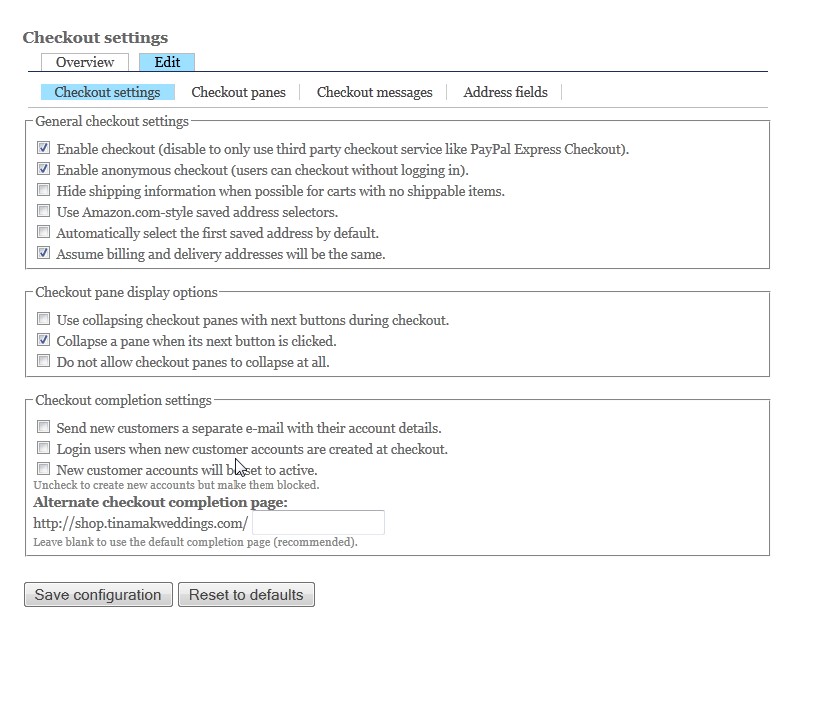
/admin/store/settings/checkout/edit
or did i screw up my installation / upgrade?
Thanks.
Comment #8
megachrizYes, you should be in that section.
From the README.txt:
Near the bottom of both pages you will find a link to add extra fields (below the table). (Note: in the Drupal 7 version the link for adding address fields is placed above the table).
Comment #9
maknet commentedI don't see the link anywhere.
I also don't see any sub-menu link for "extra fields", which i vaguely recall was there, but I don't see on my local or live server.
Any ideas on what the next step to debug is?
(I'm not sure if the DB is the correct version, or even how to check this).
Comment #10
maknet commentedOK, I see the link again.
I 'uninstalled / re-installed' the module and it seems to show up now.
Not entirely sure what the alpha1 / beta1 / dev2 does exactly. But that seemed to do the trick to get the sub-menu in the checkout configuration page.
Comment #11
megachrizOn the screen11.jpg you posted, there is a link "Add an address field", when you click that, you will get a form to add a new extra address field.
About the menu's not showing up: it would probably have been enough to flush caches (particular the menu cache). The modules "admin_menu" and "devel" have handy links to flush caches (for the devel module you need to enable the block "Development" first).