
Match Data to Drupal Fields
Drupal 7 will no longer be supported after January 5, 2025. Learn more and find resources for Drupal 7 sites
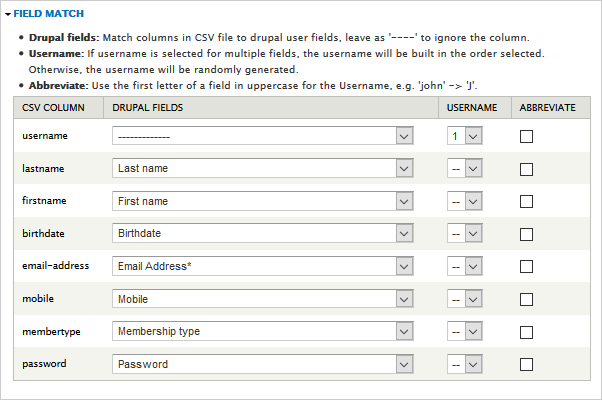
Match data rows from the CSV-file to the Drupal fields of your website. The contents of line 1 from the CSV-file appears under "CSV column". The column "Drupal fields" let you select the Drupal fields that exists for user accounts that data from that column in the CSV-file go into.
To import a username select "1" on the Username column in the row that has the username data. You can use more than one row of data to create a username, for instance if one row of data has first names and a second row has last names a username such as 'Jane Smith' can be generated by choosing 1 on the first name row and 2 on the last name row.
Tick the column "Abbreviate to use the first letter of that field in uppercase as part of the username.
Help improve this page
You can:
- Log in, click Edit, and edit this page
- Log in, click Discuss, update the Page status value, and suggest an improvement
- Log in and create a Documentation issue with your suggestion
