

 The 2026 Drupal Business Survey is open. Your response will help shape the future of the Drupal business ecosystem.
I've installed the 7.x beta module into my site. I'm experiencing issues with the overlay background width.
IN FIREFOX & EXPLORER: When the lightbox appears, the black transparent background is generated at 100% width and height. However, when the first image loads, the background changes to 980 pixel-width, not covering the entire background. A window with a width less than 980px generates a horizontal scroll.
IN SAFARI: The background is generated to the exact pixel dimensions of the browser window. A change in the windows size does not change the size of the overlay background.
Upon inspection, it appears the width and height of 100% for the background overlay is being overridden by an inline style tag on the div. Is this inline style generated by JavaScript? I'm comfortable in CSS/HTML, but do not possess the skillset to troubleshoot the JS. Help please! Screen cap attached.
| Comment | File | Size | Author |
|---|---|---|---|
| #6 | overlay_background_size_issue-1377936-6.patch | 1.14 KB | dsutter |
| #4 | LightBox2_overlay_issue-0.png | 1.71 MB | Diogenes |
| #3 | lightboxOverlay.jpg | 123.23 KB | Diogenes |
| Lightbox2OverlayBackgroundBug.jpg | 627.24 KB | edub70 |



Comments
Comment #1
yukare commentedI do not have this. The width is not fixed at 980, it is the with of the window, so a small window gives less than 980.
Do you have this on a live web site where i can see it ?
Comment #2
marsalcsaba commentedHi,
I added this entry in my theme css and works fine.
#lightbox2-overlay {
width: 100% !important;
}
Comment #3
Diogenes commentedI encountered the same problem and came across a fix that worked for me. It was in response to a bug reported in Marinelli.
The fix there was to change line702704 in lightbox2/js/lightbox.js from$('#lightbox2-overlay').css({'height': pageHeight + 'px', 'width': arrayPageSize[0] + 'px'});to
which is another way of doing what marsalcsaba did.
I don't use the Marinelli theme; this one is a Zen derived theme in D7. The attached .jpg shows what happened. The whole theme is based on body width set by a single css rule. The body is centered in the viewport using a margin-left & margin-right set of auto.
The overlay here appears to be the body width and begins on the left side of the viewport, so the overlay only partially covers the screen.
This problem was manifest in recent versions of IE 9 and Opera, but not in Firefox, Google or Safari as tested on a Win 7/i5 system.
There - changed status from 'needs more info' to needs review.
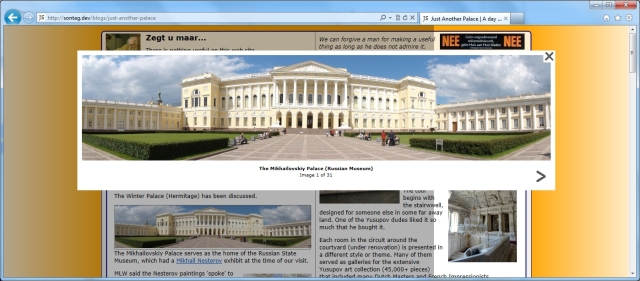
UPDATE - oops - posted too quickly. Encountered more problems with the overlay, this time across all browsers -- FF, IE, Google, Safari, Opera. The overlay would not extend down to the bottom of the viewport , only partially, and would stop at some point determined by another element. The class? The type? The lightbox2-overlay size is calculated at runtime (I think).
I dealt with the issue by setting different options in LightBox2 -- there are so many ways to configure this module! Increased the border size to 50px, opacity to zero, background to black, text to silver, and voila, a nice inset window for viewing the pic and caption that does not look totally stupid.
http://sontag.ca/blogs/just-another-palace
to see the end result.
Comment #4
Diogenes commentedThis is more info on the post above -- applied the Marinelli fix as mentioned, thought the problem was fixed, but then discovered it was not.
Attached is a .png of 3 successive screen shots of the same page at different scroll points. The overlay here stops at the bottom of some other pictures in the same group.
The .png is an illustration of the problem before changing the options mentioned above.
BTW - Awesome module Stella, et. al.
Comment #5
dsutter commentedComment #6
dsutter commentedThis is working for me so far - simply make the overlay 100% width and height and don't change the height/width settings upon resize.
Comment #8
joseph.olstadcommitted, thanks
fixed in dev 7.x-2.x branch
Comment #9
kentjames1980 commentedI've just updated to 7x-2.2 due to having a warning that the previous 7x-1x was no longer being maintained.
Following several issues with my site with the light box not appearing, image settings defaulted back, I have one issue and that is the overlay is only extending down half the page and the gallery is down the bottom of the page so therefore no shadow overlay is shown around the lightbox?
Comment #10
kentjames1980 commentedI have tried with no luck so far?
Comment #11
kentjames1980 commentedComment #12
joseph.olstadIf this was working previously it may have been because of custom css in your theme. This was fixed to avoid the extra css. Also, please run update db after module upgrade.
Or restore your 1.x module and go back to 1.x.
If you can reproduce on a vanilla bartik theme and vanilla d7 with views then please let us know.
Comment #13
kentjames1980 commentedVery limited custom css, its running on Mayo.
The site page is http://www.kentgardening.com/Garden-Maintenance-In-Kent
I only moved up to 2.x because drupal kept moaning at me! :-)
Comment #15
joseph.olstadHi kentjames1980 , I've reverted the patch from comment #6 , I'll release a new version 7.x-2.3 without this patch. Download it and it should fix this problem.
I looked at your css but its aggregated (a setting) so a bit tough to pin point. For now I'll revert the patch to be safe.
thanks for your feedback.
Comment #16
joseph.olstadHi kentjames1980, download 7.x-2.3 and upgrade to that
https://www.drupal.org/project/lightbox2/releases/7.x-2.3
comment about your website , looks very nice. If you're looking for an easy way to improve the site performance, check out the boost module, its the easiest to set up static caching solution, works wonders, lightning fast static cached pages load in a flash.
I tried to contact you but for some reason the contact form for your profile wasn't available.
Comment #17
kentjames1980 commentedHey Joseph
Switching to 7.x-2.3 fixed it, thank you for the fast fix and updates :-)
Also thank you for the feed back on the site, yes it has been running slow recently and I am yet to find the cause but will certainly look into the boost module for short term.
Long term I am actually looking at re-theming it once more but thats another job :-D
Thanks again.
Comment #19
joseph.olstadAfter seeing regression issues with the above patch, its probably best to leave this change on the theme level, by css overrides on the theme. I'm guessing that the other 120,000 installations made on other sites have dealt with this as they see fit in their theme. So best to leave it generic as is.