I'm trying to install the module VSDDblock 7.x-2.x-dev on a website.
I have the following modules installed and enabled:
- Views 3.x-7.x-dev,
- Views Slideshow 3.x-7.x-dev,
- Libraries 7.x-1.0,
- Views Slideshow DDblock 7.x-2.x-dev
- Vsdupright1060V1-3.
The modules are installed and enabled, as usual.
The contents of the "custom" folder of the file vsdupright1060V1-3.rar was installed inside the theme folder, as instructed in the readme.txt.
Required fields were created in the type of content that uses the VSDDBlock.
A view was created using and synchronizing the fields of the content:
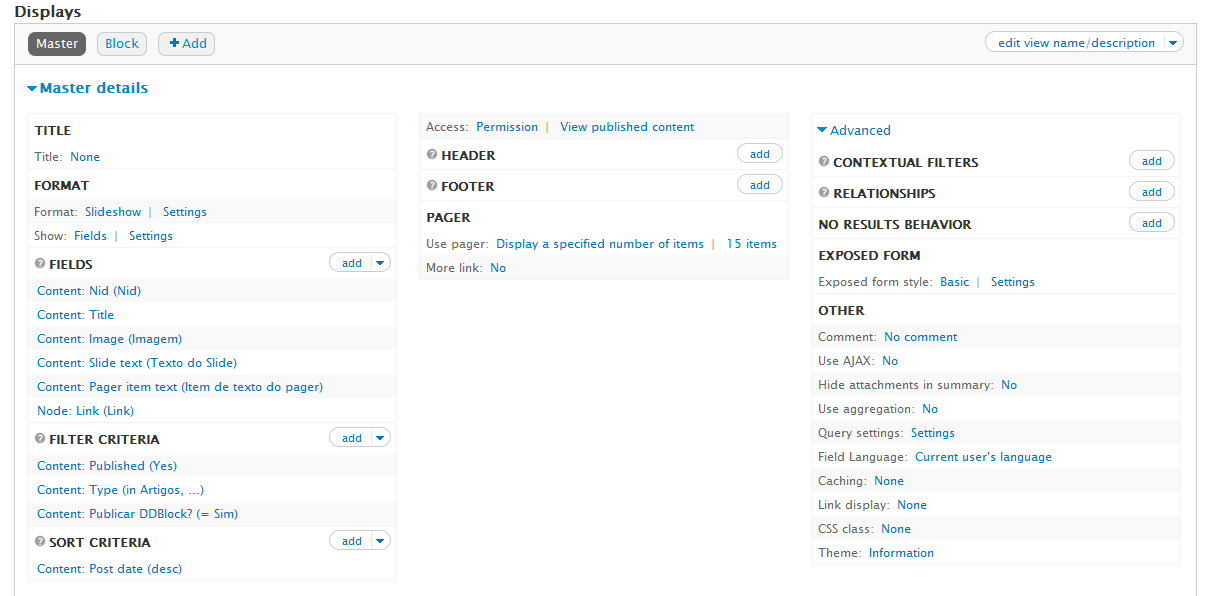
All settings are standard, but the chosen template (vsdupright60p), or otherwise, are not displayed, and in debugging information, there are call to the chosen template:
Pager Settings => array (
  'delta' => 'ddblock_ptbr_default',
  'debug_info' => 'drupal',
  'output_type' => 'view_fields',
  'pager' => 'number-pager',
  'pager_container' => '.custom-pager-item',
  'pager_event' => 'click',
  'pager_position' => 'top',
  'pager2' => 1,
  'pager2_position' =>
  array (
    'slide' => 'slide',
    'pager' => 'pager',
  ),
  'pager2_pager_prev' => 'prev',
  'pager2_pager_next' => 'next',
  'pager2_slide_prev' => '',
  'pager2_slide_next' => '',
  <b>'template' => 'vsdupright60p',</b>
  'view_name' => 'ddblock_ptbr',
  'view_display_id' => 'default',
  'nr_of_items' => 3,
  'nr_of_pager_items' => '3',
)

Number of pager items  => 0

View - name => 'ddblock_ptbr'

View - display_Id => 'default'

Number of slides => 3

Content first slide => array (
  'node_id' => '373',
  'slide_title' => '<a href="/seven/articles/article-one">Article ONE</a>',
  'slide_image' => '<img typeof="foaf:Image" src="http://localhost/seven/sites/default/files/ddblock/soci-002.jpg" width="509" height="340" alt="" />',
  'pager_image' => '<img typeof="foaf:Image" src="http://localhost/seven/sites/default/files/ddblock/soci-002.jpg" width="509" height="340" alt="" />',
  'slide_text' => '<p>Article One - Text of article one</p>
',
  'slide_read_more' => '<a href="/seven/articles/article-one">view</a>',
)
What's wrong?
Tks.






Comments
Comment #1
ppblaauw commentedWhat are the settings when you click on the settings link behind, Format: slideshow in the views configuration page?
Do you have a link to the site?
Comment #2
astutonetThe site is still under localhost.
Transcribe all configuration would be difficult, then follows the image of the entire configuration.
Tks.
Comment #3
astutonetHow is the default skin?
It seems that the VSDDBlock is failing to complete the call to the selected skin (vsdupright60), because during the analysis of the html code we can see the call to the default skin:
Thus, despite the selection of the skin in the configuration, the slides are displayed one below the other without the chosen theme.
Am I right?
Comment #4
astutonetToday I've been reviewing the DBLOG and probably I found the error that causes the non-display of the templates.
Please see the message of DBLOG in the attached image.
This may be the cause of failure?
Thank you.
Comment #5
astutonetHi.
Some solution or idea about this issue?
Tks.
Comment #6
astutonetHi @ppblaauw.
No answer to this issue yet? What we can do?
Tks.