Closed (fixed)
Project:
BlueMasters
Version:
7.x-1.3
Component:
Code
Priority:
Critical
Category:
Support request
Assigned:
Reporter:
Created:
29 Dec 2011 at 13:08 UTC
Updated:
2 Jan 2012 at 08:44 UTC
Jump to comment: Most recent file


Great theme!
I need help to insert the front-page slideshow with different pictures for different inner pages.
I tried to copy the
| Comment | File | Size | Author |
|---|---|---|---|
| #4 | bluemasters-slideshow-1.jpg | 614.42 KB | gtsopour |
| #4 | bluemasters-slideshow-2.jpg | 522.05 KB | gtsopour |
| #4 | bluemasters-slideshow-3.jpg | 717.21 KB | gtsopour |


Comments
Comment #1
pwhiteside commentedHi there,
If copying the slideshow from page--front.tpl.php to page.tpl.php results in a static image it sound like the javascript is not loading on the new page.
Instead, because I don't know how the js loads or is pulled by Drupal, you could try renaming page--front.tpl.php to page.tpl.php. If the slide show works on a normal page then it means that all the code needed is in that sheet.
If so I would instead of copying the slideshow out try copying the content from page.tpl.php to front--page.tpl.php, replacing the blocks. The end sheet then renamed to page.tpl.php
I hope this helps,
Best wishes, Phil the Whiteside of life.
Comment #2
Gabo11 commentedHi, thanks for the help!
Unfortunatly that doesn´t sole my problem.
I got the slideshow working also in inner pages (the problem was in template.php where i deleted the "if" line), but now i have the same slideshow for all the inner pages.
So the result is that i have 2 slideshow: 1 for the home and 1 for all the inner pages.
I need to be able to costumize the slideshow for every inner page.
I tried to create a new block to insert in the banner region (that now is active also in the inner pages) copying the code of the slideshow and activating the view only in the node that i want but, of course, it doesn´t work!!
I think that the block could be the best solution but i get only the empty frame of the slideshow and vertical navigation bottons.
I think that the problem is in the Javascript but my knowledge is zero in java.
New ideas??
Thanks!
Comment #3
gtsopour commentedComment #4
gtsopour commentedHello Gabo11,
Firstly, I would like to thank pwhiteside for the continuous support.
Gabo11, I will try to guide you in order to achieve the result you want. I'll describe this process into discrete steps.
1. Firstly, you should also print Bluemasters's banner region in page.tpl.php. Currently banner region is only printed in page--front.tpl.php.
So copy the following code from page--front.tpl.php
to page.tpl.php bellow div header
(exactly bellow </div><!--EOF:header-->)2. As you already said, you should remove the if scenario from template.php
From
To
3. Cut the following code both from page.tpl.php and page--front.tpl.php
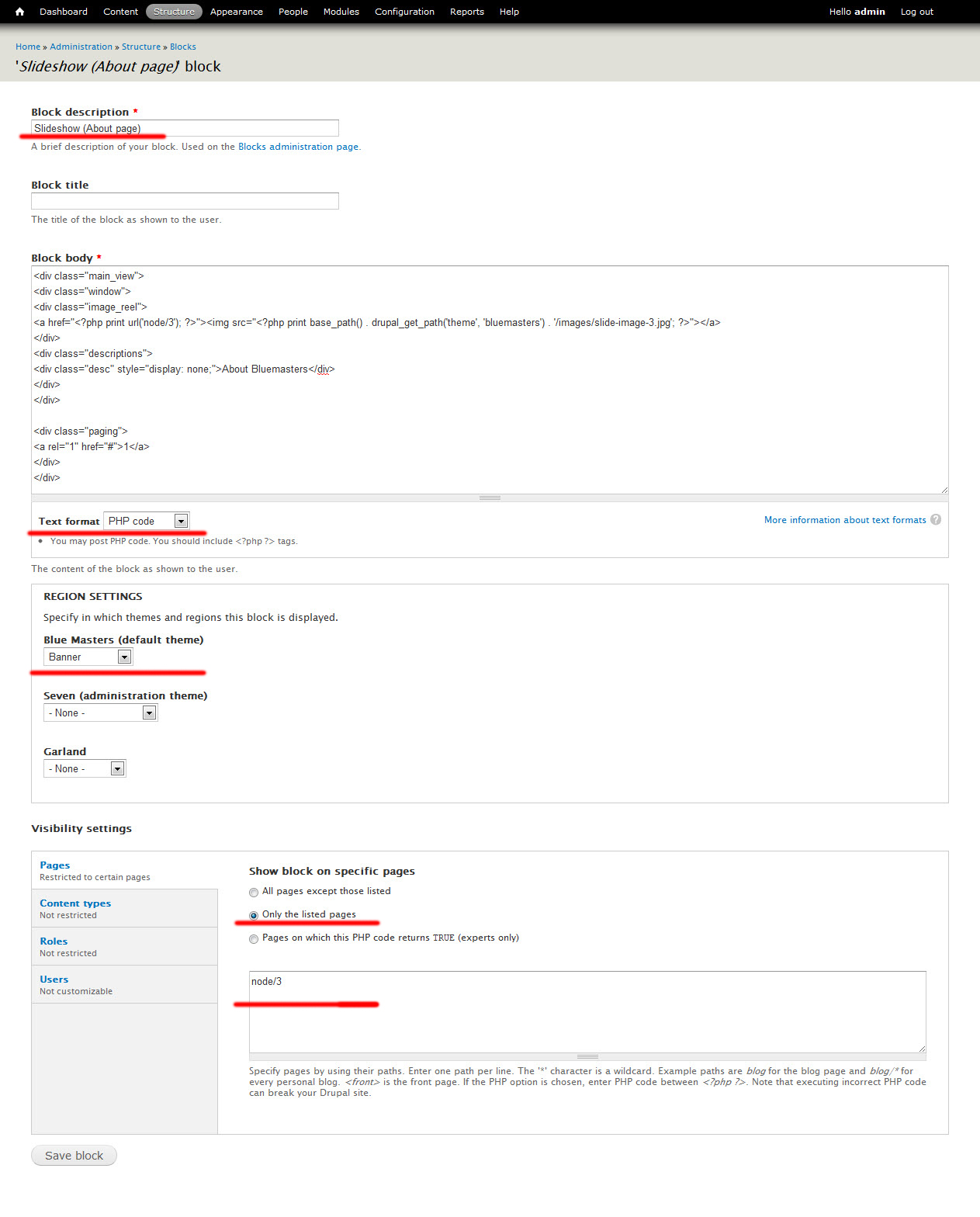
and paste this code to a new Drupal system block which you should create through Drupal user interface admin/structure/block
YOU SHOULD GIVE TO YOUR BLOCK PHP INPUT FORMAT (or configure the code from PHP to HTML)
SEE ATTACHED bluemasters-slideshow-1.jpg
SEE ATTACHED bluemasters-slideshow-2.jpg
print render($page['banner']);4. Now you should create as many blocks as different slideshows you want. After this creation you should configure each block visibility through Drupal block's user interface (Visibility settings at the bottom of block configuration: Only the listed pages).
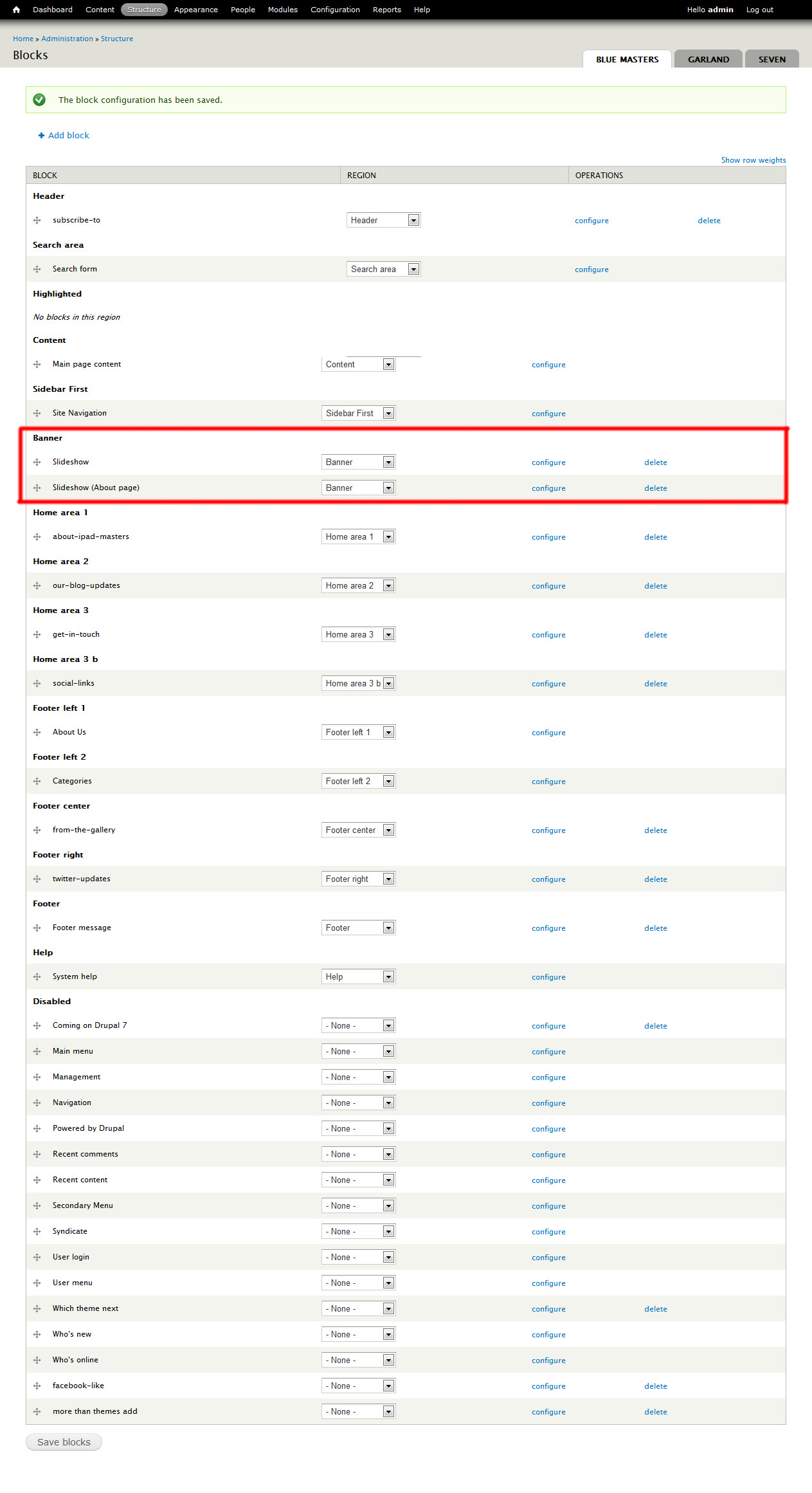
5. Finally, you should place all your Slideshow blocks inside banner region.
SEE ATTACHED bluemasters-slideshow-3.jpg
Thanks
/George
Comment #5
Gabo11 commentedThank you!!!
You gave me a great help! With really good information and step by step description that made my problem look like was so easy to solve!
Now i like even more this great theme!
Thanks again for the perfect support!
Gabo11
Comment #6
Gabo11 commentedComment #6.0
Gabo11 commentedwrong php file name.