

Closed (fixed)
Project:
Advanced Views RSS Feed
Version:
7.x-1.x-dev
Component:
Code
Priority:
Normal
Category:
Bug report
Assigned:
Unassigned
Reporter:
Created:
31 Dec 2011 at 19:41 UTC
Updated:
23 Dec 2014 at 17:53 UTC
Jump to comment: Most recent




Comments
Comment #1
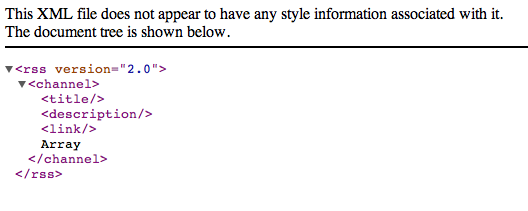
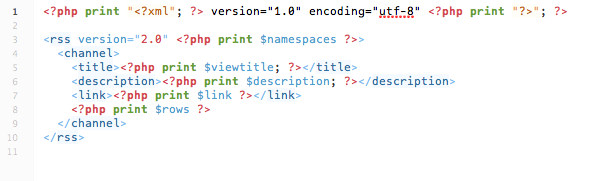
bjlewis2 commentedJust to clarify, I've entered the exact code from the default template (sites/all/modules/views_rss/views/views-view-views-rss-fields.tpl.php) into every suggested tpl.php file and every time it gives what you see in the third screenshot above.
I would like to add additional information for iTunes into the feed. I was able to do this in the default template file (the one in the views_rss/views folder), but that restricts me to only having one podcast feed (and I want two). Also, it means I've had to hack the module, and I don't really want to do that.
Thanks for everything!
Comment #2
drwits commentedany luck with this? i too am trying to make a podcast rss feed to work with itunes specs... really need this theming functionality. i have the exact same error.
thx
Comment #3
bjlewis2 commentedNope. I've decided to use FFPC (FileField Podcaster). I used it in D6 and it was fantastic. There's not an official D7 release yet, but you can use Git to download the dev version and use that. It seems to be working pretty well, I'd have to imagine they'll roll an official release in the near future.
Comment #4
drwits commentedfor the record... seems i can get the least specific to work... views-view-views-rss-fields.tpl.php but the more specific ones don't work. i really hope this gets fixed to i can have multiple versions.
thanks
Comment #5
maciej.zgadzaj commentedYes, I've noticed it happening too, after rescaning template files, or sometimes after changing the content of a tpl file. What always helps though is simple cache flushing, and everything gets back to normal. I am working on version 2.x right now (just pushed 6.x-2.x-dev before a sec), so I guess I'll have a closer look at this issue too at one point.
Comment #6
maciej.zgadzaj commentedThis has been fixed in the most recent version of 7.x-2.x-dev (just pushed to d.o).
Comment #7
bjlewis2 commentedmaciej.zgadzaj, you're amazing!
Comment #8
ice5nake commentedI seem to be having a similar problem in the D6 version. Does this have a separate issue anywhere?
Comment #9
eiland commentedBump for D6, although I do get some result when I modify the modules' own .tpl.php-files...
Comment #10
eiland commentedComment #11
maciej.zgadzaj commentedPlease do not re-open already closed issues and do not change their settings, instead open a new one, providing more details - your view configuration, template file names and locations etc.
Comment #11.0
maciej.zgadzaj commentedmaking the images lists so that they stand out a bit from my explanitory text
Comment #12
iburge commentedThe views_rss template overriding is doing the exact same issue that was originally posted. I've been sure to dump the cache & rescan templates but nothing changes. I've ensure the code was not the exact same as well.
Comment #13
iburge commentedI am unable to override the the views-view-views-rss-fields.tpl.php file. I've uploaded to my themes directory, changed the code and flushed the cache. I've tried to use all of the more specific naming conventions that are listed in my views "Theming" information. I've been sure to change the change the theme to mine as well under "Theming" information. I'm using this module to customize rss feeds for facebook.
I am using Drupal 7.3 and Views_Feed 7.x-2.0-rc3
Comment #15
maciej.zgadzaj commentedPlease do not reopen already closed issues.
Also, branch 7.x-1.x is not supported anymore.