

Closed (fixed)
Project:
Import HTML
Version:
5.x-1.x-dev
Component:
Code
Priority:
Minor
Category:
Bug report
Assigned:
Unassigned
Reporter:
Created:
26 Apr 2007 at 09:44 UTC
Updated:
11 Sep 2007 at 01:20 UTC
Jump to comment: Most recent file

Comments
Comment #1
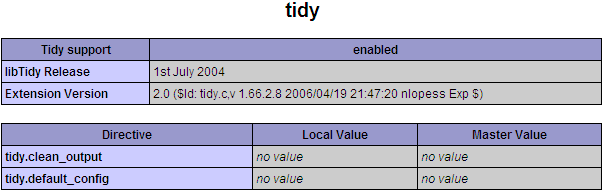
dman commentedThe binary is only looked for if the php extension is not detected.
Can you confirm it's showing up in your phpinfo?
"Found 'tidy' binary" - implies that a file called 'tidy' was found in your PATH, or in the executable path set in the import_html configs.
"It didn't run right" says that running it with -v (to retrieve the version) failed.
It should have displayed the command that failed (in fact I'm sure it did but you didn't post that vital bit of info). Try running that command from the command line (when in drupal root) and seeing what the problem is.
Comment #2
thierry.beeckmans commentedthe php extension shows up in phpinfo.
I haven't set the path correctly, thought it wasn't necessary becouse it should use the one that's delivered with php5.
When I placed include_once drupal_get_path('module','import_html').'/install-htmltidy.inc'; in import_html.module the error dissapeard telling me "PHP Tidy Extension enabled OK".
Now I tried the Demo, and a lot of errors shows up in a debug div block
The first drupal-style error shows
user warning: HTMLTidy failed to parse the input at all! It's probably very problematic HTML. A working version of tidy IS at c:/www/php/ext/ isn't it? I ran c:/www/php/ext/ -q -config D:/drupal/sites/all/modules/import_html/coders_php_library/xhtml_tidy.conf "/htm8399.tmp" and it returned: 1 in D:\drupal\sites\all\modules\import_html\coders_php_library\tidy-functions.inc on line 156.So I guess I have to set the path right, BUT because the extension gets recognized I cannot set the path (can still dive into the database offcourse).
The path is now set to c:/www/php/ext/ because I tried it that way first. Then later on I noticed that it couldn't find the required file install-htmltidy.inc
Comment #3
thierry.beeckmans commentedI changed include_once 'install-htmltidy.inc'; into include_once drupal_get_path('module','import_html').'/install-htmltidy.inc'; and I get the 'PHP Tidy Extension enabled OK' message.
A part of #2 was probably caused by caching...
The errors I get are:
passing throug a var, assigned with an empty string, can solve error 1.
But how about the rest...
Comment #4
dman commentedClearly, if the code is progressing past
then the check for extension_loaded( "tidy" ) isn't behaving.
For some reason (possibly this one) I'm a little more paranoid the second time around.
When testing in the settings page:
extension_loaded ( "tidy" ) ?OK. CoolJust before actually doing the action:
extension_loaded( "tidy" ) && function_exists('tidy') ?No. Damn.So your system claims to have the extension, but it doesn't support the basic function I expect the extension to provide. WTF?
I wonder if PHP did something sneaky to start hiding objects and I should use class_exists() or something instead...?
Try removing that second check : function_exists('tidy') from tidy-functions.inc
Otherwise I really dunno. Try the commandline option instead :-(
Comment #5
thierry.beeckmans commentedI added in my code a manual check for the php5-tidy in function xml_tidy_file($filepath), after the else I left your check...
Now I can see the Preview, but in the body stands '
'
I certainly go into that
Comment #6
thierry.beeckmans commentedI was searching at a wrong place, idd replacing function_exists with class_exists does do it.
Now I get error about not proper utf-8... probably that solved it all when it's in the right charset
Comment #7
dman commentedIt certainly sounds like progress.
Try adding
'output-encoding' => 'utf8'
as one of the configs
http://tidy.sourceforge.net/docs/quickref.html#output-encoding
http://tidy.sourceforge.net/docs/quickref.html
I've not encountered this before, but it is certainly something to handle. I've hit XML vs non-UTF8 a few times in other places
Comment #8
dman commented(try not to change the title unless it's actually explanatory)
Comment #9
thierry.beeckmans commentedI kicked out the stuff I placed in function xml_tidy_file($filepath), that was the wrong place I was talking about ;-)
And I suddenly did realize that I not only had to change the charset from the pages but also had to delete all the 'microshit' out, now it goes through your module with success.
Just a question, I thought it did handle images, or doesn't it with pages done through the demo?
btw, fabulous module, congrats. Sometimes I really like the DOM, it has so many possibilities.
Comment #10
thierry.beeckmans commentedAbout the UTF8 problems, I still had weard signs in the html.
I thought that you had to pass the charset like $tidy->parseString($data, $config, 'utf8');
I did that and the signs are correctly converted.
There is still one problem left, there are these signs: �
Dunno if I can skip those with the template...
Could it be the images only gets copied when the page is submitted?
Comment #11
dman commentedno images in the demo - just one file, text/template testing.
When importing images we need subdirectories, relative paths, etc. That doesn't happen until you are attempting a full directory tree. Demo is just to get you through these sort of issues :) and to tune your import template.
As you've seen, choosing XSL processing has a bit of overhead attached to it, but when it works ... :). Damn glad I'm not doing it via regexps any more!
Comment #12
dman commented