

Closed (fixed)
Project:
References Tabs
Version:
7.x-1.x-dev
Component:
Documentation
Priority:
Normal
Category:
Support request
Assigned:
Unassigned
Reporter:
Created:
12 Jan 2012 at 04:53 UTC
Updated:
26 Jan 2012 at 23:20 UTC
Jump to comment: Most recent file




Comments
Comment #1
bforchhammer commentedThanks; I've added "manage display" to the instructions on the module page.
That should be it, actually. Create a new piece of content, reference something; tabs should appear instead of the "list of node titles" (or "list of rendered nodes"), which would normally appear as the output of the node reference field.
Hm, if that doesn't help I can try to create a few more screenshots later... or can you maybe send me a link to your test page, so I can describe it better?
Comment #2
IWasBornToWin commentedI think "reference" is where I'm cofused? I have been able to create a view with a block which uses tabs and now see a tabbed list of nodes this way. But other than that, I'm not sure what "reference is meaning. Wouldn't this need to be from a view? It needs to be where there are a list of nodes which would need navigation via tabs rather than menu's, title, etc. correct?
Perhaps a few screen shots may help. Like I said, I got it to work through a block in views but if there are other uses I'm interested. Thanks for the quick reply.
Comment #3
bforchhammer commentedWhile making screenshots I actually discovered bug which caused tabs not to appear on "full node" displays, if the "full" view mode was not explicitly enabled and configured. That's fixed now (changeset); please update to the latest dev version... :-)
Either way, here's also some screenshots of how it should work now:
1. Two content types: Parent and Child. Create a node-reference field on the Parent:

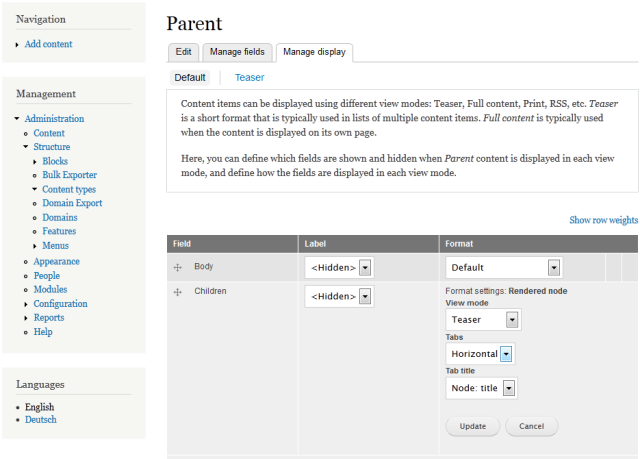
2. Configure the parent display to display the node reference field with tabs:
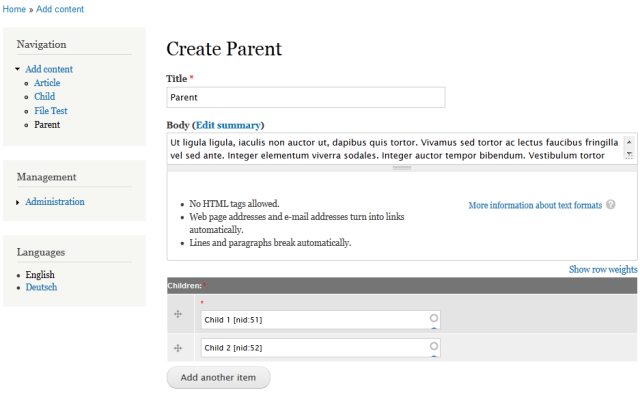
3. Create some Children and a Parent:
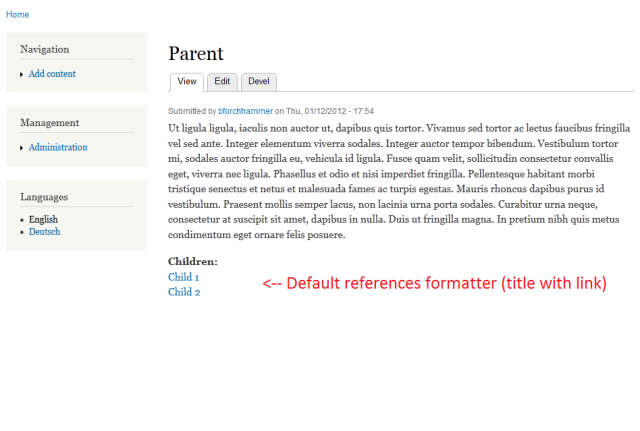
4. Now you should see children listed in tabs (instead of as links)

Hope this helps :-)
Comment #4
IWasBornToWin commentedThis is good, thank you. I am also able to only create just one node type, add node content, and then display it via block from view by using "tabs" format in the view settings. This is also handy for navigation.
Thanks
Comment #5
bforchhammer commentedYap. That's an (at the moment) undocumented extra feature ;-)
Comment #6
IWasBornToWin commentedWhile we are at it, and sorry if I should post this somewhere else, is there a way to add more than one field in the tab? Like, could I add a city, or an icon in the same tab? And if so, would I need to also create reference fields for them? And perhaps include them in a group or something?
Great module!