Closed (duplicate)
Project:
CKEditor 4 - WYSIWYG HTML editor
Version:
6.x-1.11
Component:
Code
Priority:
Normal
Category:
Bug report
Assigned:
Unassigned
Reporter:
Created:
17 Jan 2012 at 21:54 UTC
Updated:
10 Apr 2012 at 07:43 UTC


Hi.
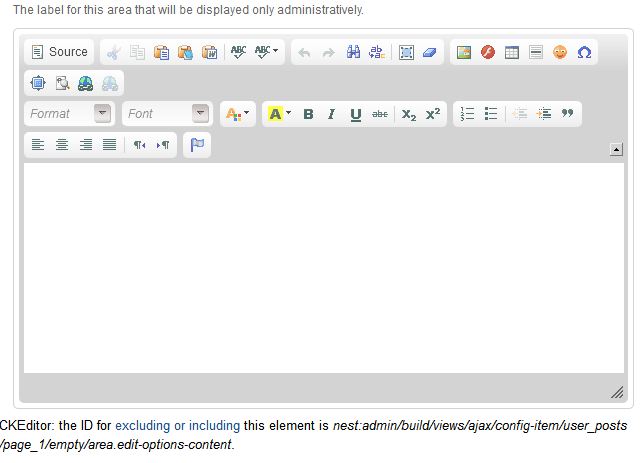
I am using CKEditor 1.8 with Drupal 6.22 and the latest version of Views. The full ckeditor is displayed in the Views Header/Footer/Empty Text Global Text Areas and will not save any text written. I have tried adding the exclude paths in their raw form and using wildcards, but none work.
I have included a screenshot showing the editor displayed in these text areas.
I sincerely appreciate any help you can offer.
BTW - this issue did not occur when using an older version of CKEditor and Views.
| Comment | File | Size | Author |
|---|---|---|---|
| CkEditor.JPG | 40.84 KB | moosh101 |

Comments
Comment #1
mkesicki commentedPlease try use DEV version of CKEditor module. There are fixes to Ckeditor module and Views .
Comment #2
krembo commentedStill happens in 6.x-1.11.
Comment #3
dczepierga commentedHi,
First of all update your CKEditor module to last DEV version and apply patch from last post in this issue: #1288664: [D6] CKeditor is not working in Views header and footer text areas.
Pls write after review does it help or not.
We need some review from community to apply this patch to GIT...
Greetings
Comment #4
krembo commentedI think it helped. At least in views I don't see any problems now.
Is this patch going to be added? The dev version is good, but it's a little problematically to put it on the production site.
Comment #5
mkesicki commentedI close this ticket as duplicate of #1288664: [D6] CKeditor is not working in Views header and footer text areas