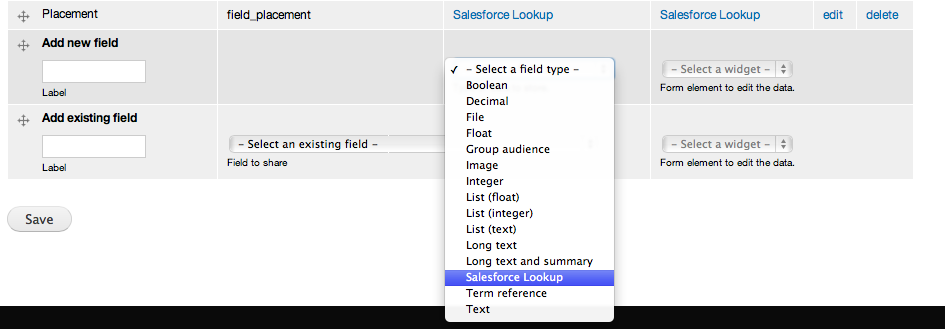
We have a node type with fields mapped to Salesforce, however many of the fields to be exported to are of the datatype 'Lookup'. This means whatever is exported to these fields MUST be a predefined value referenced from elsewhere in SF.

It appears that if the value doesn't match an SF ID then no data from Drupal's field is exported.

Comments

aaronbauman’s picture

Category: bug » support
Priority: Critical » Normal

You can either use a fixed SFID value or a nodereference field to send an SFID to a lookup field.

Also, you are describing the behavior without explaining how it differs from your expectations.
When you submit a bug report, you should provide a description of the issue, steps to reproduce it, and how you would like to see the issue addressed.

Fixdit’s picture

Thanks aaronbauman,

• Description: Field data mapped to Salesforce's 'lookup' fields won't export unless a pre-existing SFID referenced from another SF is submitted.

• Reproduce: Create a textfield attached to a content type and map it to your Salesforce field (lookup datatype on the SF side). Create a new node of that content type and enter a value into the field. On submit, the new node and the field's value should be exported and reproduced in Salesforce. However there nothing is saved on SF (blank).

• Possible fix: Lookup fields require a value referenced from another SF table in order to save data. We've created a work around using a custom autocomplete field in Drupal that queries SF to make sure the selection made by the user is an accepted SFID.

Hope this helps,

Ivan Ottinger’s picture

Hi everyone,

we need to have lookup-field-mapping feature available in our organisation as soon as possible, so I have decided to work on that by myself creating custom module. I would like to use it as a temporary solution until this feature is available in Salesforce Suite. Hopefully someone can profit from this small module as well.

Basically, this module provides extra "Salesforce lookup" field, which can be added into any content type. User then specifies exact name of Salesforce object which we want field to be attached to, and exact record name which exists in Salesforce database. It's not the final solution, I am planning to design it more user friendly later.

How module works: Module executes a query (based on user input - SF object and SF record) to get Salesforce ID of specified record and saves it to the SF record field.

To make it clear, module isn't working yet. I have one problem which I am struggling to solve:
When I add this custom field into content type and input value in this field when editing a node, it's saved correctly. But, as soon as I set mapping for this field in Salesforce Suite settings and edit/save the node, value is transferred to Salesforce but doesn't stay in the field anymore.

I guess it might be some bug in my code, but I have problems finding it. I think that, when user saves a node with "Salesforce mapped" fields, some function in Salesforce Suite is triggered which erases content of the field. But as I said, it should be bug in my code because when mapping other standard fields like text field, everything works correctly.

Thanks a lot, I appreciate any help.

Ivan

Source code

/** .install
 * Implements hook_field_schema().
 */
function sf_lookup_field_schema($field) {
  if ($field['type'] == 'sf_lookup_field') {
  	$schema['columns']['sfobject'] = array(
	  'type' => 'varchar', 
      'length' => 255,
      'not null' => FALSE,
	);
	
	$schema['columns']['sfrecord'] = array(
	  'type' => 'varchar', 
      'length' => 255,
      'not null' => FALSE,
	);
	
	$schema['indexes'] = array(
	  'sfobject' => array('sfobject'), 
      'sfrecord' => array('sfrecord'),
	);
	
	return $schema;
  }
}


/* .module

/**
 * Implements hook_field_info().
 */
function sf_lookup_field_info() {
  return array(
    'sf_lookup_field' => array(
      'label' => t('Salesforce Lookup'),
      'description' => t('SF Lookup field.'),
      'default_widget' => 'sf_lookup_widget',
      'default_formatter' => 'sf_lookup_default',
	), 
  );
}


/**
 * Implements hook_field_is_empty().
 */
function sf_lookup_field_is_empty($item, $field) {
  if ($field['type'] == 'sf_lookup_field') {
    if (empty($item['sfobject']) || empty($item['sfrecord']))	 {
	  return TRUE;
    }
  }
  
  return FALSE;
}


/**
 * Implements hook_field_widger_info().
 */
function sf_lookup_field_widget_info() {
  return array(
    'sf_lookup_widget' => array(
      'label' => t('Salesforce Lookup'),
      'field types' => array('sf_lookup_field'),
      'behaviors' => array (
	    'multiple values' => FIELD_BEHAVIOR_DEFAULT,
	    'default value' => FIELD_BEHAVIOR_DEFAULT,
      ),
    ),
  ); 
}

									  
/**
 * Implements hook_field_widger_form().
 */
function sf_lookup_field_widget_form(&$form, &$form_state, $field, $instance, $langcode, $items, $delta, $element) {
  $base = $element;
  
  if ($instance['widget']['type'] == 'sf_lookup_widget') {
    $widget = $instance['widget'];
	$settings = $widget['settings'];
		
	$element['#element_validate'] = array('sf_lookup_sfrecord_validate');
		
	$element['sfobject'] = array(
      '#type' => 'textfield',
      '#title' => t('SF Object'),
      '#default_value' => isset($items[$delta]['sfobject']) ? $items[$delta]['sfobject'] : NULL,
	);
		 
	$element['sfrecord'] = array(
      '#type' => 'textfield',
      '#title' => t('SF Record'),
      '#default_value' => isset($items[$delta]['sfrecord']) ? $items[$delta]['sfrecord'] : NULL,
      //'#element_validate' => array('sf_lookup_sfrecord_validate'),
    );	  
  }
  
  return $element;
}


/**
 * Implements sf_lookup_sfrecord_validate().
 */
function sf_lookup_sfrecord_validate($element, &$form_state, $form) {
/* 
  if ($form_state['complete form']['#form_id'] == 'field_ui_field_edit_form') {
    return; 
  }
*/ 
  
  $values = $form_state['values'];
  //$language = $values['language'];
  $field_name = $element['#field_name'];
  
  foreach ($values[$field_name][LANGUAGE_NONE] as $delta => $item) {
  } 
   
  try {
    $sf = salesforce_api_connect();        
    
    if (!$sf) {
      $link = l('Please verify that you have completed your SalesForce credentials', SALESFORCE_PATH_ADMIN);
      drupal_set_message(t('Unable to connect to SalesForce. !link', array('!link' => $link)), 'error' );
      return;
    }  
  }
  catch (Exception $e) {
    DrupalSalesforce::watchdog(SALESFORCE_LOG_SOME, 'Unable to establish Salesforce connection while issuing describeSObjects API call.', array(), WATCHDOG_ERROR);
  }
  
  // Query                 
  $query = "SELECT Id FROM ". $item['sfobject'] . " WHERE Name = '" . $item['sfrecord'] . "'";
  $result = $sf->client->query($query);
  
  if (!isset($result->records[0]->Id)) {  // if there's no result...
    form_error($element, t('There is no Salesforce record with such a name.'));
  }
  else {
  	$new_values = array(
      'sfrecord' => $result->records[0]->Id,
      'sfobject' => $item['sfobject'],
    ); 
    form_set_value($element, $new_values, $form_state);
  }
  
  //drupal_set_message(t('ICI ' . $item['sfrecord']), 'warning'); 
  //form_error($element, t('test'));
}


function sf_lookup_field_formatter_info() {
	return array(
		'sf_lookup_default' => array(
		'label' => t('Default'),
		'field types' => array('sf_lookup_field'),
		),
	);
	
}


/**
 * Implements hook_field_formatter_view().
 */
function sf_lookup_field_formatter_view($entity_type, $entity, $field, $instance, $langcode, $items, $display) {
  $elements = array();
  foreach ($items as $delta => $item) {
    $elements[$delta] = array(
      //'#markup' => t($display['type'], array('element' => $item, 'field' => $instance)),
      '#markup' => t("Salesforce record: " . $item['sfrecord'] . " Salesforce object: " . $item['sfobject']),
	);
  }
  
  return $elements;
}
kostajh’s picture

Status: Active » Closed (won't fix)

This would need to be submitted as a patch (and working) to be considered.

kostajh’s picture

Issue summary: View changes

Copy reworded.