

 The 2026 Drupal Business Survey is open. Your response will help shape the future of the Drupal business ecosystem.
i set up this module two days ago and setup google analytics account to go with the module. i entered in the google acount number into the settings but google still says waiting for data.
you can check the source of my site to see it's placed properly. i don't know how to fix it. the site is nintendo-wii-modchips.com
thanks
| Comment | File | Size | Author |
|---|---|---|---|
| #15 | google-analytics-module-error_2.png | 22.8 KB | enthusaroo |
| #14 | google-analytics-module-error_1.png | 22.8 KB | enthusaroo |
| #13 | google-analytics-module-error_0.png | 22.8 KB | enthusaroo |
| #12 | google-analytics-module-error.png | 22.8 KB | enthusaroo |


Comments
Comment #1
buddaLooks like your'e using 5.x-1.0 of the module rather than 11
The line at the bottom of your page should be split over a couple of lines:
<script type="text/javascript"><!-- _uacct = "UA-1686688-2";urchinTracker(); --></script>should be like:
Update your module.
Comment #2
linexpert commentedi just checked and i do have 5.x-1.1
are there any alternatives than this module?
Comment #3
pnc999 commentedHi, I'm having the same problem in that Google is not receiving any information. I've noticed that the src= location in my website is different to that shown in Google though. Would this be making a difference?
My site has the code: src="https://ssl.google-analytics.com/urchin.js" whilst Google in their code provides: src="http://www.google-analytics.com/urchin.js"
I am using 5.x-1.1
Thanks!
Comment #4
carusen commentedI have exactly the same problem with my site: www.vista4beginners.com
Yesterday I installed the new version of the module and since then Google Analytics does not work. It receives no data and my reports are empty.
This sucks! :(
Comment #5
buddaThe version in CVS has been fixed for a day or so. I've just tagged it as a release 1.2 so give it a go.
Comment #6
budda@pnc999
is your website running over https:// ?
The module checks if your site is running over HTTPS and switches to using Googles secure version of the analytics code.
Comment #7
wheatbix commentedBug Confirmed.
I am NOT running my website through a secure connection.
It looks like the java script is exactly like it says on this site, and Google Analytics is still not receiving information.
The update to the module has broken the module. Help someone please!
What Changed from the last release that would have made it not work?
P.S. I don't know PHP so I am no help, sorry.
Comment #8
wheatbix commentedBug Confirmed.
When this module is upgraded from Version 5.x-1.1 to 5.x1.2 the module stops reporting to google analytics.
I might suggest that the bug has to do with upgrading the module rather than the module itself. Can someone help here.
The Javascript in the header of the page source looks ok when it is served, but the info is just not getting through.
I have no PHP experience, so i am no help at all, sorry.
Comment #9
buddaI don't have a live Drupal 5 site to test this on at present so am pretty much doing all these changes blindly. I need feedback from somebody who can verify this problem.
Comment #10
pnc999 commentedHi,
I'm sorry - I've been away for a couple of days and although I installed an updated version of this module I didn't return to this issues page to report on what happened. My bad.
I installed version 5.x - 1.2 over the weekend and Google is now receiving data. Budda, in answer to your earlier question my site is not running a HTTPS version as yet but it is good to know that the module will detect that in the future.
Thank you for the quick response and my apologies for my tardy update.
Comment #11
buddaAll sorted then.
Comment #12
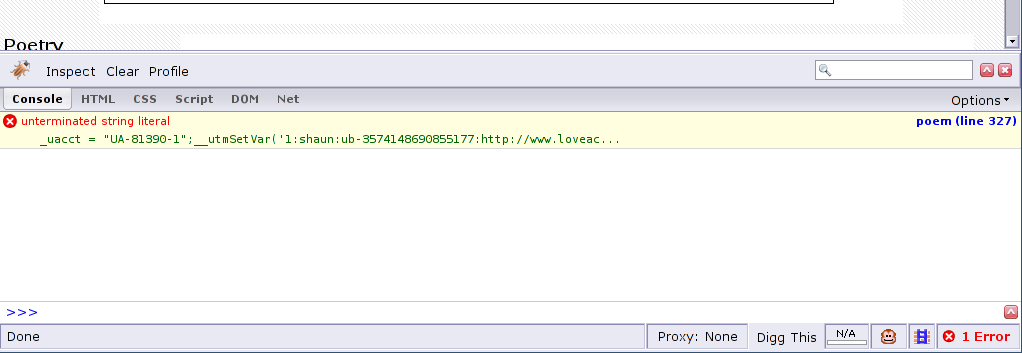
enthusaroo commentedActually, I hate to say this. I know you already changed the status of this issue to "fixed". But I am using the 5x.12 version of the Google Analytics module, but data is still not being sent to Google. I tried uninstalling the module and then reinstalling, but to no avail.
Also, I use the Firebug extension for Firefox, which is an extension that tells of any errors on a page. It shows the following error on this line:
453 I'm not sure whether or not this is the sort of the problem. Please help. I don't know what to do to fix this issue. I have attached a screen shot of the error.Comment #13
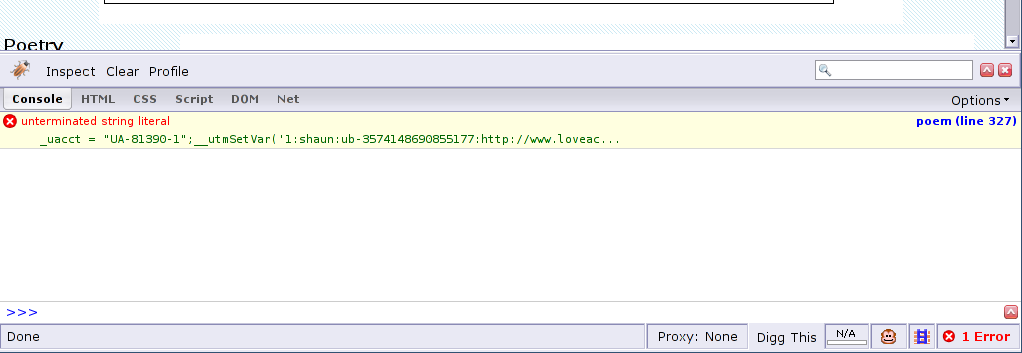
enthusaroo commentedActually, I hate to say this. I know you already changed the status of this issue to "fixed". But I am using the 5x.12 version of the Google Analytics module, but data is still not being sent to Google. I tried uninstalling the module and then reinstalling, but to no avail.
Also, I use the Firebug extension for Firefox, which is an extension that tells of any errors on a page. It shows the following error on this line:
453 I'm not sure whether or not this is the sort of the problem. Please help. I don't know what to do to fix this issue. I have attached a screen shot of the error.Comment #14
enthusaroo commentedActually, I hate to say this. I know you already changed the status of this issue to "fixed". But I am using the 5x.12 version of the Google Analytics module, but data is still not being sent to Google. I tried uninstalling the module and then reinstalling, but to no avail.
Also, I use the Firebug extension for Firefox, which is an extension that tells of any errors on a page. It shows the following error on this line:
453 I'm not sure whether or not this is the sort of the problem. Please help. I don't know what to do to fix this issue. I have attached a screen shot of the error.Comment #15
enthusaroo commentedActually, I hate to say this. I know you already changed the status of this issue to "fixed". But I am using the 5x.12 version of the Google Analytics module, but data is still not being sent to Google. I tried uninstalling the module and then reinstalling, but to no avail.
Also, I use the Firebug extension for Firefox, which is an extension that tells of any errors on a page. It shows the following error on this line:
453 I'm not sure whether or not this is the sort of the problem. Please help. I don't know what to do to fix this issue. I have attached a screen shot of the error.Comment #16
buddaLooks like the data being pulled from your users profiles are breaking the javascript, maybe due to use of quote characters etc. This is a bit of a seperate issue really.
if the data is not too sensetive, Could you post the full line of code (has shown in the screenshot) from your pages HTML source here?
Comment #17
enthusaroo commentedHey buddha,
Looks like the data being pulled from your users profiles are breaking the javascript, maybe due to use of quote characters etc. This is a bit of a seperate issue really.
Wow. Thanks for the quick reply. Sorry for the multi-post. I got an error when I tried to post, maybe a problem with my attachment. I guess I'm just breaking everything today. lol
Yes, you're right. It seems what is breaking it seems to be from my user page which does contain a lot of quotation marks. But strangely enough, the pages where I get this error are not from my user profile page, it's from every page on the site.
if the data is not too sensetive, Could you post the full line of code (has shown in the screenshot) from your pages HTML source here?
Sure, why not.
Here's the full text:
Comment #18
buddaHmm Drupal.org is buggered so i lost my reply.
Basically, the issue is due to the profile fields you selected in the Google analytics user segmentation.
you are trying to track an image of a map plus a whole node by the look of it!
Remove the offending fields from the segmentation field tracker.
Comment #19
enthusaroo commentedHey buddha,
Basically, the issue is due to the profile fields you selected in the Google analytics user segmentation. you are trying to track an image of a map plus a whole node by the look of it!
Remove the offending fields from the segmentation field tracker.
Issue is now resolved. No more errors now. That was an easy solution.
Cheers, mate!
P.S: Did you hear, Google Analytics is coming out with a new interface.
Comment #20
johnalbinReverting title.
Comment #21
(not verified) commented