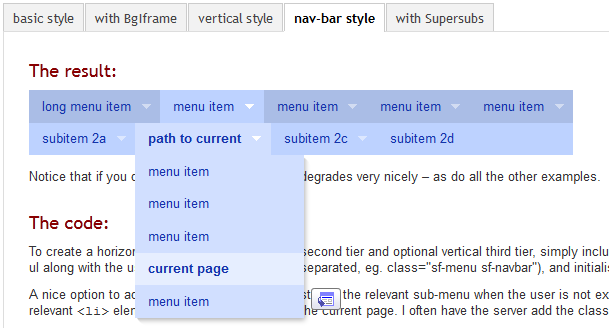
The style is shown in the attached screenshot:

...and can be seen in action here.

CommentFileSizeAuthor
nice_menus-nav-bar-menu-style.png18.97 KBklonos

Comments

klonos’s picture

And here's the code implementation instructions (copied from the Superfish library official site, just for ease of access):

To create a horizontal nav-bar with a horizontal second tier and optional vertical third tier, simply include the superfish-navbar.css file after the main superfish.css file and add the class sf-navbar to the parent ul along with the usual sf-menu class (space-separated, eg. class="sf-menu sf-navbar"), and initialize as normal.

A nice option to add to this types of menu is restoring the relevant sub-menu when the user is not exploring other sub-menus. This can be done by telling Superfish the name of the class you are adding to the relevant <li> elements to indicate the path to the current page. I often have the server add the class name 'current' for this purpose, so I would initialize this menu thusly:

//link to the CSS files for this menu type 
<link rel="stylesheet" media="screen" href="superfish.css" /> 
<link rel="stylesheet" media="screen" href="superfish-navbar.css" /> 
 
// link to the JavaScript files (hoverIntent is optional) 
<script src="hoverIntent.js"></script> 
<script src="superfish.js"></script> 
 
// initialize Superfish 
<script> 
 
    $(document).ready(function(){ 
        $("ul.sf-menu").superfish({ 
            pathClass:  'current' 
        }); 
    }); 
 
</script>
astonvictor’s picture

Issue summary: View changes
Status: Active » Closed (outdated)

I'm closing it because the issue was created a long time ago without any further steps.

if you still need it then raise a new one.
thanks