

Closed (fixed)
Project:
Views (for Drupal 7)
Version:
7.x-3.1
Component:
Code
Priority:
Major
Category:
Bug report
Assigned:
Unassigned
Reporter:
Created:
21 Jan 2012 at 21:11 UTC
Updated:
29 Feb 2012 at 11:00 UTC
Jump to comment: Most recent file

Comments
Comment #1
danielb commentedAre you using the View reference module? At what point does this happen? Can you use the View properly without View reference?
Comment #2
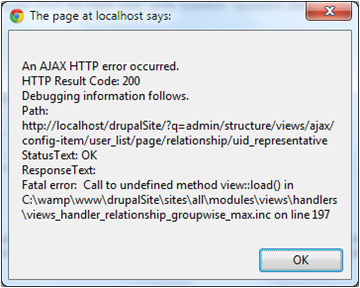
jeepers52004 commentedI believe I am using the standard Views UI. I have several views created and they work fine. I was trying to add a relationship to another view through the Advanced drop down menu in the view editing window. When I try to add the relationship, representative node and then choose a representative view, a get the error upon submitting.
Again, I am new to Drupal and I may not be going in the right direction to accomplish my goal, but thought I shouldn't get the error?
Comment #3
danielb commentedI think you've posted this in the wrong place. This issue queue is specifically for a module that inserts views into content.
I'll move this to the Views issue queue.
If you want an explanation of how these issue queues work see here: http://drupal.org/node/317
Comment #4
dawehnerview::load got removed as it seemed to be unnecessary as it's not used by views_get_view.
Sadly the relationship handler used it.
As this quite a experimental feature set it just to major.
The short fix would be to reintroduce the function.
Comment #5
dawehnerI don't see a reason why this patch shouldn't work.
Can you please try it out?
Comment #6
bschilt commentedthe patch in #5 worked for me. I was receiving the Call to undefined method view::load() too when trying to use a view to retrieve the representative node.
Just need to figure out how to use the representative view...
Comment #7
jeepers52004 commentedCan you point me to the relevant info on applying the patch?
Comment #8
danielb commentedjeepers, go to the Views project page and click "version control" near the top. Scroll down to 'applying a patch'. You need to know some git basics, and have git.
However as this is a simple patch, you can apply it manually. Read the patch file for clues as to the file and lines to edit, the code with "-" before it is to be deleted, and the code with "+" before it is to be inserted.
Comment #9
dawehnerCommitted the patch to 7.x-3.x