When I add the Order Balance field to any View, including the default Orders list view provided by Commerce, it always just displays the order total, as if no payments were made.
I know the payments are being registered by this module, because in the payments tab, the correct order balance is shown, reflecting all payments made.
I'm wondering if there's a context or relationship I'm supposed to add to any view that I want the balance to display on. I can't find one that seems relevant, and my web searches have not found any posts describing a need for context -- or anything for that matter -- when using the order balance field in views.




Comments
Comment #1
amateescu commentedI cannot reproduce this with a stock commerce install. Maybe you are looking for the Order Total field? Because Order Balance will always give the amount that remains to be paid for that order. For completed orders it should be 0, and for cart orders it should be equal to the Order Total field.
Comment #2
somatics commentedI've been looking into this further, and it appears that it may be the following issue:
I imported payment transactions from an Ubercart installation. I was able to match up the new order ids from Commerce to the old order numbers from UC, and all the necessary fields in DC were populated with similar fields from the UC payment transactions.
All the payment transactions display properly in the payment page for each order. Each order's payment page also shows payment transactions totaled in the Total Paid field. And the Order Balance field on that page shows as $0 (or whatever the remaining balance is). I have attached a screen shot showing an example of this, Order#847, whose payment transaction was imported from UC.
I have also attached an image of Order#3034, whose payment transaction was created new in DC. Both orders' Order Balance field behave the same way on the payment page.
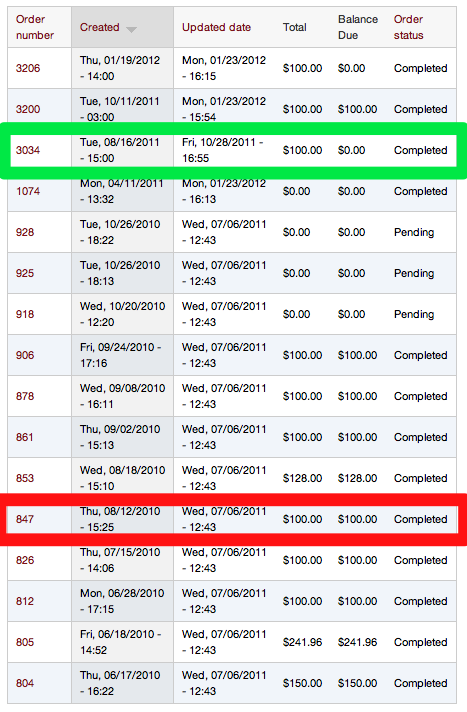
However, for those orders with UC payment transactions imported, when you view this same Order Balance field in a View list, the Order Balance field does not reflect the payments, i.e., it does not show as $0 -- it shows as the full order total.
I attached a screen shot showing this, called OrdersList --
#847 (payment imported from UC) is circled in red;
#3034 (payment created in DC) is circled in green.
Comment #3
somatics commentedOops, forgot to attached the screen shots -- they're attached in this post.
Comment #4
somatics commentedA new problem has appeared, which I think might be related. I posted it as a separate issue -- http://drupal.org/node/1538726 -- but the gist of it is that when the Order Balance field is on the view, the view causes a Server Error and doesn't display.
Any idea what this is or if it's related to this or does it shed any light on this?
Comment #5
rszrama commentedHmm, this has been open for quite a while, but I'm not sure we can really shed any more light on it. All I can really say is that you should just load an imported payment transaction and load one created in the new system, dump them to the screen, and figure out what's different. Looking at your screenshots, I also notice that the operations links aren't showing on the Payments tab for a migrated order. I'd guess that something is failing in the load process, but them I'm not sure why other properties are showing. But if a direct load of the payment transaction failed, it wouldn't be visible to the function that calculates an order balance.
Hope that helps.