Closed (fixed)
Project:
Live CSS
Version:
7.x-2.0
Component:
Code
Priority:
Major
Category:
Bug report
Assigned:
Unassigned
Reporter:
Created:
23 Jan 2012 at 07:04 UTC
Updated:
1 Apr 2012 at 09:27 UTC


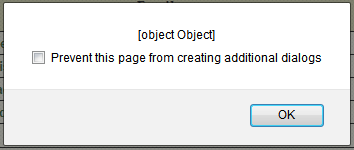
The new Live CSS version cannot "save" on my Drupal installation. I've used this module to theme my entire layout, so I'm very familiar with it, but the new version returns the following error upon clicking save. See attachment.
edit: If this makes no sense, there is a chance this is caused by the server as I recently migrated. Everything else is working up to par, so if anyone could pinpoint what I need to fix, I would appreciate it.
| Comment | File | Size | Author |
|---|---|---|---|
| edit_css.png | 5.25 KB | ownage |

Comments
Comment #1
guybedford commentedIf you're using chrome or firebug, are you getting any error messages in the debug log?
Also, check the request in the network tab to see what the response is to the save request. Is it coming through as a 200 response, and if so, what is the response?
At one point the module didn't work well without clean urls, but I think I fixed those path issues before.
Comment #2
ownage commentedUpdate:
The permissions on all of the styles needed to be changed to u+w so Apache would be able to write to them. (So updating each style's CHMOD to 644 or 664 should fix this).
Comment #3
guybedford commentedGreat, thanks for the update. I will try and make the error messages more useful than [object object]. I believe I know the reason for this.
Comment #4
guybedford commentedComment #5
hles commentedSomething like that (quick and dirty, for discussion only) in css_live_save would give you better information. But this is not enough, there can be many different errors when trying to save a file. Using File API like suggested in #1506590: Use file API for saving files would provide more information about the actual errors.
Comment #6
hles commentedBy the way, on the same topic, this js alert was displayed because on my installation, $_SERVER['DOCUMENT_ROOT'] already ended with "/".
So adding it again creates an incorrect system path with "//" in the URL:
So we need to sanitize paths better, but I guess this goes along the rewrite of the overall function.
Comment #7
guybedford commentedHave updated the error reporting code. Please let me know if you have any more issues with incorrect error messages.
Comment #7.0
guybedford commentededit explained