

Closed (works as designed)
Project:
FileField Sources Plupload
Version:
7.x-1.x-dev
Component:
Miscellaneous
Priority:
Normal
Category:
Task
Assigned:
Unassigned
Reporter:
Created:
25 Jan 2012 at 00:12 UTC
Updated:
23 Aug 2013 at 07:35 UTC
Jump to comment: Most recent, Most recent file



Comments
Comment #1
Anonymous (not verified) commentedI'm using this module on a couple of sites now in pretty much standard configuration. So far, I didn't encounter anything weird. I use it in combination with crop plugins for images, too (focus, smart crop, etc.).
Did you test in on a website which is set to deliver files with the "Private method"? I don't have any site using this right now. But I think this could be a potential security risk. But since file field handles the saving of the files, shouldn't be a problem at the end of the day. afaik. :-)
On a side note, it's kinda funny: I was desperately looking for a batchuploader for 7 for so long now, and suddenly they pop up like mushrooms :). I find the integration into filefield_sources very good, as I use it already on a lot of sites. Therefore, it's better for the UI/UX, demanding less attention and space.
I'm pretty confident that with this solution, finally I can move off a lot of my D6 sites which used SWFupload for batch upload to D7 without having to take into account some major feature set backs in file handling.
That's really worth a *hug* :-D
Comment #2
atlea commented@genox: Thank you for taking the time to get back with some feedback. Much appreciated!
Yes, I most certainly did. :) Files are properly cleaned up and transferred to the file destination set for this file field instance, and if set to private works as expected.
Comment #3
jamesbenison commentedWell done.
This is the best implementation of multiple file uploads that I have seen.
Thanks
Comment #4
dqdatlea, please go on and let me know how to help. Awesome contribution. Let's go thru' the checklist to get ready for a full project release request as soon as possible. This will attract more users to file issues and will make the project grow.
Let me know if you need a co-maintainer. If not ... don't worry, enough to do here ;)
You should make a write up on the project page about what is the difference between your project and the bulk_media_upload project. Bulk_media_upload is rather intended for mass creating nodes with files and depends on media since yours depends on filefield_sources and is rather made for multiple value image fields as far as I can see. The other question is, of course, if you plan to also provide that later.
Comment #5
jbova commentedI agree with the previous commentors. This module works flawlessly, and was greatly needed. Nice work!
Comment #6
natukSame here, works very well. I would be glad to see it as a project listed in drupal.org.
Comment #7
atlea commentedHi guys, thanks for your feedback and suggestions. I am proud to let you know we are finally out of the sandbox. ;)
Comment #8
tesmon commentedVery, very, very good module! Thank you!
Comment #9
stovpow commentedMy only problem is with IE 7 & 8. I thought it would work with them because of the Silverlight / Flash support, but I can't seem to make that happen. Any ideas?
Otherwise, OUTSTANDING & FLAWLESS. Thanks!
Comment #10
atlea commented@stovpow: Thanks for your feedback! :) I had been using plupload integrations defaults, witch is html5 or flash with fallback to single file uploads. This works with IE 7 / 8 if Adobe Flash is installed. I'll make sure to add support for Silverlight as well in the next update.
Comment #11
_paul_meta commentedThanks you for this module, it seems to be exactly what i need!
Unfortunately it is not quite working for me. I have all the required modules installed, fields seem to be set up correctly, and when i choose the multiple files source option, the plupload widget is there. Browse and upload all seems to work, but when the file upload is complete, the files aren't added, and a second instance of the upload dialog appears. I have seen this problem in the latest versions of firefox and chrome, so i don't think its a browser issue.
This is all in a fresh drupal install with up to date modules, using the seven theme.
Anyone else seen this issue or know what it might be ?
Thanks !
Comment #12
jbova commented@_paul_meta:
I'm guessing the maintainer will want you to create a new issue for this. Do file uploads using the regular upload form work correctly? The first thing I would check would be the permissions on your file upload destination folder. Make sure they are writable by the web server user. Please check your error logs for any details on the error.
Comment #13
_paul_meta commentedYep all file uploads work for other filefield sources options... and permissions are set to 777 in my files directory as i'm using dso as my php handler.
I also tried unchecking all the cck options/restrictions such as file size, dimensions, pathauto etc but this issue still exists.
I'm using the Glossy theme for my site but these pages are using the admin theme which is seven, so i don't think there should be js conflicts.
Happy to create a separate issue for this if the maintainer prefers, just thought i would post here as they asked if any issues had been experienced.
Thanks for your suggestions :)
Comment #14
atlea commented@_paul_meta: Hi, thanks for your feedback. This issue was created while the project was still a sandbox to encourage feedback, and I am keeping it open as I sort of like to hear how others are experiencing the module. :) Though I see why you would add your issue to this, I would appreciate if you could create a separate issue as this seems like a bug and deserves its own issue.
Could you try to upload a single file less than 5mb and see if that works ok? Or increase the php file size and max post limit to eg 20mb? As jbova mentioned, you could also check you drupal and php error logs for errors.
Atle
Comment #15
_paul_meta commentedThanks Atle .. issue created here http://drupal.org/node/1537560 :)
Comment #16
Anonymous (not verified) commentedHi,
I'm very interested by this module.
Unfortunately, after installing the module and every dependant module :
How can I activate the FileField Sources Plupload ?
Comment #17
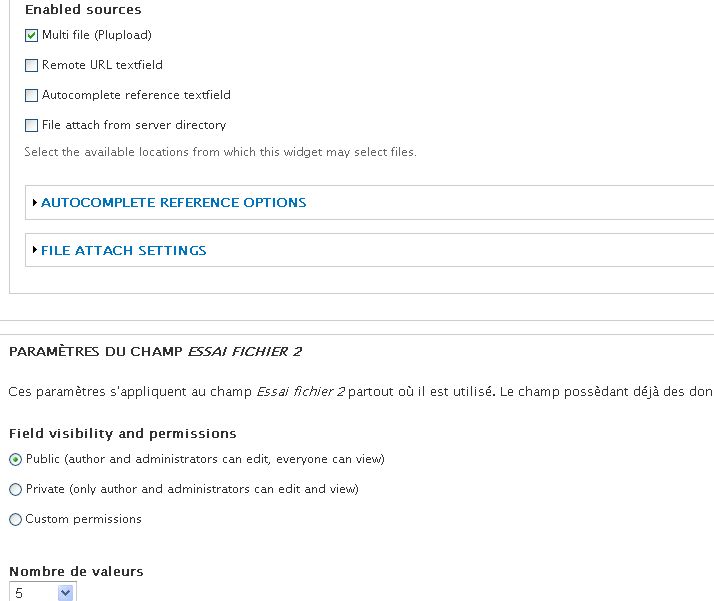
atlea commented@pachakamac: One would need to install Plupload module, libraries and plupload javascript (from plupload.com), filefield sources, and plupload filefield soruces. When you edit a field instance, eg. on a content types "Manage field"- If you edit file or image fields you will find "File sources". Expand this fieldset, and check "Multiple files (Plupload)". Hope this helps! :)
Comment #18
Anonymous (not verified) commented@altea :
Thank you very much for your help. I finally managed to activate the module. But, there is still a serious problem for me because the rendering of the form field is really different from your screenshot. You can find some screenshot of your module in my plateform. The aspect is really curious. Is there a solution to get the good interface ? I have a Drupal 7.
Thanks in advance for your help.
Alexandre
Comment #19
atlea commented@pachakamac: Try visiting Plupload Integration's test-page at yourdomain.com/plupload-test to see if you get the upload dialog there. If you do not, then something is wrong with your plupload installation, and I would guess that the plupload library is not installed correctly. Did you place the javascript files from plupload.com in sites/all/libraries/plupload, so that the main file exists at sites/all/libraries/plupload/js/plupload.full.js?
Comment #20
xaa commentedworking very nice. Many thanks for this module.
@pachakamac, as atlea think, I guess you don''t have installed the PLupload libraries.
Comment #21
Anonymous (not verified) commentedThank you very much for your help !
It is working very fine.
Comment #22
atlea commented