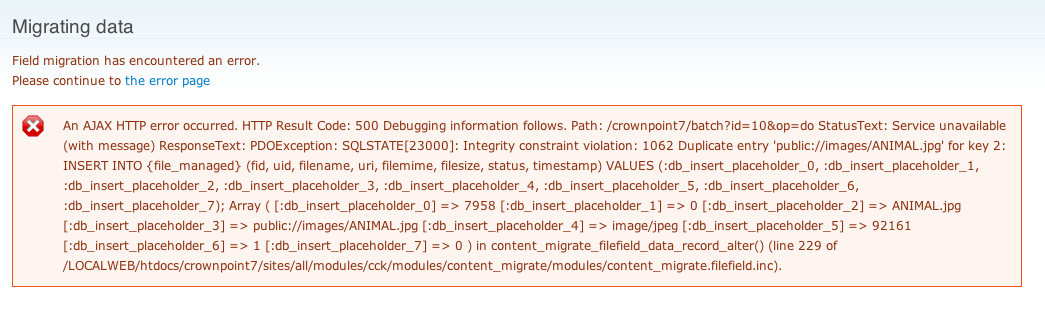
See error message image (attached)
With some trial and error I was able to fix this by adding some code to check to see if the uri already existed in the filed_managed table, and if so copy & rename the file and then add the access to the image
So from line 207.... I added the $test query and if statement (with the else surrounding the original insert portion of the file.
      // We will convert filepaths to uri using the default scheme
      // and stripping off the existing file directory path.
      $file->uri = $scheme . str_replace($basename, '', $file->filepath);
      $file->uri = file_stream_wrapper_uri_normalize($file->uri);
      unset($file->filepath);

      //test to see if uri already exists - if so rename and insert a new record
      $test = db_query('SELECT n.fid
      			FROM {file_managed} n WHERE n.uri = :uri', array(':uri' => $file->uri));

      if($test->rowCount()>0){
      	$file = file_copy($file, $destination = 'public://images/', $replace = FILE_EXISTS_RENAME);
      }

      //otherwise save this file
	  else{
      // Insert into the file_managed table.
      // Each fid should only be stored once in file_managed.
      db_merge('file_managed')
        ->key(array(
          'fid' => $file->fid,
        ))
        ->fields(array(
          'uid' => $file->uid,
          'filename' => $file->filename,
          'uri' => $file->uri,
          'filemime' => $file->filemime,
          'filesize' => $file->filesize,
          'status' => $file->status,
          'timestamp' => $file->timestamp,
        ))
        ->execute();
	}
      // Add the usage entry for the file.
      file_usage_add($file, 'file', 'node', $nid);
      break;
it fixed the issue for me without losing any of the files and also the content migration was able to complete without error messages


Comments
Comment #1
akalam commentedPatch attached
Comment #2
damienmckennaNeeds updating per the Drupal coding standards.