

Closed (works as designed)
Project:
Feed Import
Version:
7.x-2.5
Component:
Code
Priority:
Normal
Category:
Support request
Assigned:
Unassigned
Reporter:
Created:
26 Jan 2012 at 17:13 UTC
Updated:
2 Feb 2012 at 11:59 UTC
Jump to comment: Most recent file


Comments
Comment #1
Sorin Sarca commentedIs not easy to translate title because is not a field. On Entity Translation module it says
. Download Title module and follow instructions for converting title into a field.
For this example I'll use next csv content:
Please note that first line contains only column names and will not be imported.
Go to Feed Import and add new one which points to csv file and has process function processCSV. Go to edit it:
-click on Show Process function settings and set for Use column names value of 1. This is very important otherwise import will fail.
-add field type with no xpath but default value article
-add field body with xpath column[@name='price'] because body will contain product price
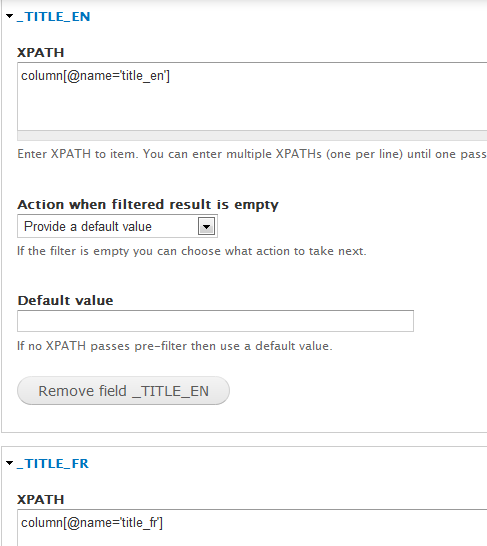
Now we will use fake fields for multilanguage title: uncheck Use defined fields checkbox and manually add three fields: _title_en, _title_fr and _title_es with the following xpaths: column[@name='title_en'], column[@name='title_fr'] and column[@name='title_es']
Save feed configuration.
Now create a new module (or use an existing one) and add a node_presave hook (this hook is for a module named test):
Save module, clear cache and now you can run import.
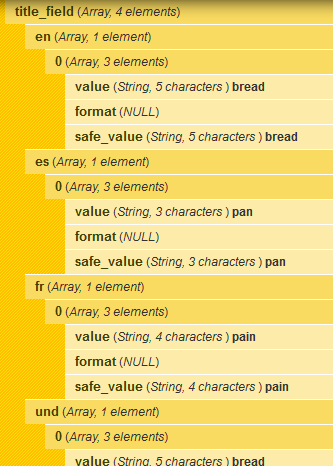
If you check with devel imported items you will see something like image below
Comment #2
rtdean93 commentedThanks for your input... This is promising, but it appears you have more features / options than I do.
The Parser selected is CSV Parser (not processCSV) and I do not have any XPath options.
I am using 7.x-2.5 for Feed Importer.
Comment #3
rtdean93 commentedWow - sorry - I now notice there is a feed_import module (this one) and a feeds_import module which is part of the feeds module.
I'll give your instructions a try.
Thanks
Comment #4
Sorin Sarca commentedIf you decide to use this module I'll show you another method (much simpler):
Do anything I said in my previous post until this (inclusive):
(or you can simply remove _title_en, title_fr and _title_es fields and save it)
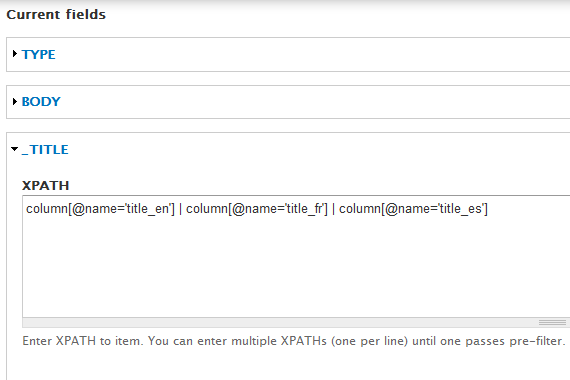
Now add just one field _title with the following xpath column[@name='title_en'] | column[@name='title_fr'] | column[@name='title_es']
Also we have to modify node_presave hook:
Save, clear cache and run import. Does the same but in a simpler and faster way.
Comment #5
Sorin Sarca commented