Closed (fixed)
Project:
Zero Point
Version:
7.x-1.1
Component:
User interface
Priority:
Normal
Category:
Bug report
Assigned:
Unassigned
Reporter:
Created:
29 Jan 2012 at 18:13 UTC
Updated:
13 Aug 2012 at 02:51 UTC


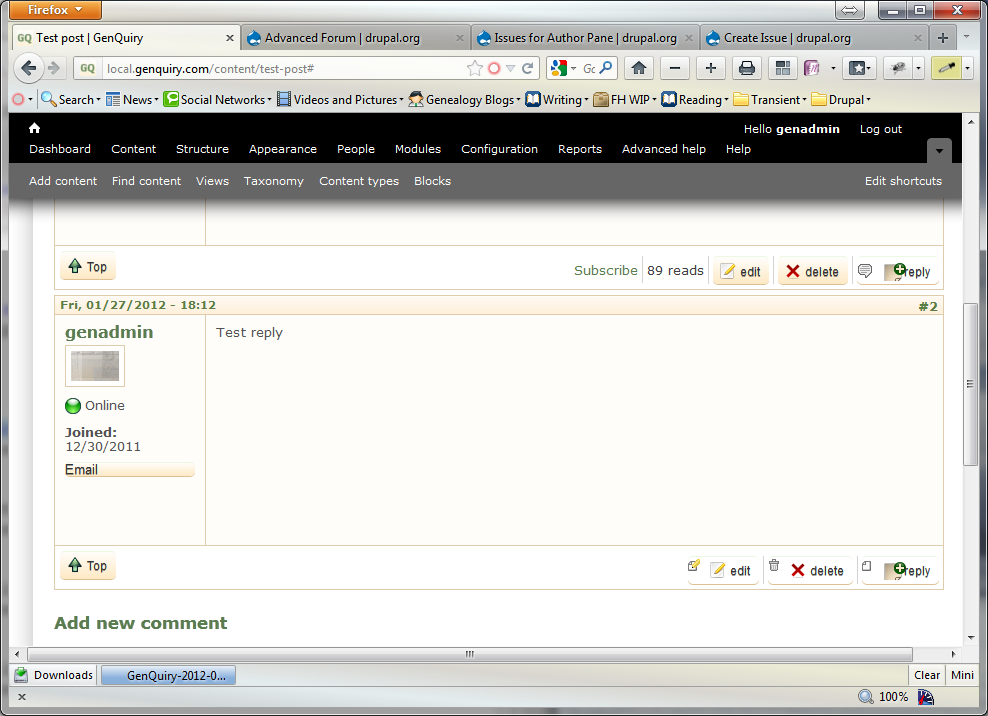
Using ZeroPoint 7.x.1.1 and Advanced Forums 7.x.2.rc1, the edit/delete/reply icons on topics and comments are incorrectly displayed (see attached image). The problem goes away if I change themes, hence reporting it as a theme problem.
I presume it's a css issue but I'm not conversant enough with css to diagnose it further.
| Comment | File | Size | Author |
|---|---|---|---|
| IconProblem.png | 175.83 KB | atiras |

Comments
Comment #1
atiras commentedI think I'd better assume this won't be fixed, and move to a new theme instead. A shame, because ZeroPoint was a favourite that I'd used on several sites.
Comment #2
michelleYou could also remove override Zero Point's link CSS...
Comment #3
michelleOh, just re-read your OP and I guess that's not much of a pointer. Get Firebug for Firefox (or similar extensions for other browsers) and inspect the link. You should see double sets of CSS for images.
Michelle
Comment #4
atiras commentedThank you! By experimentation, I can see that I need to override lines like this in ZeroPoints css:
.picons .comment-add a {
background: url("../images/icons/comment.png") no-repeat scroll left center transparent;
padding-left: 20px;
}
There are similar sections for .comment-reply, .comment-delete and .comment-edit
As a quick fix, I can comment them out in the themes css file, but for a long-term fix I need to work out how to write some css in the themes custom css file to override them properly... Which will be a good learning exercise, I guess.
Comment #5
michelleI don't remember off the top of my head what CSS AF uses. If it uses background-image then you could do background:none in your custom CSS. If that wipes out the AF ones, just copy the AF CSS lines right after it.
Michelle
Comment #6
florian commentedThis was fixed in 7.x-1.2 release of ZeroPoint theme.