Closed (fixed)
Project:
Panels
Version:
7.x-3.x-dev
Component:
Panel pages
Priority:
Normal
Category:
Support request
Assigned:
Unassigned
Reporter:
Created:
30 Jan 2012 at 14:52 UTC
Updated:
5 Mar 2012 at 21:17 UTC


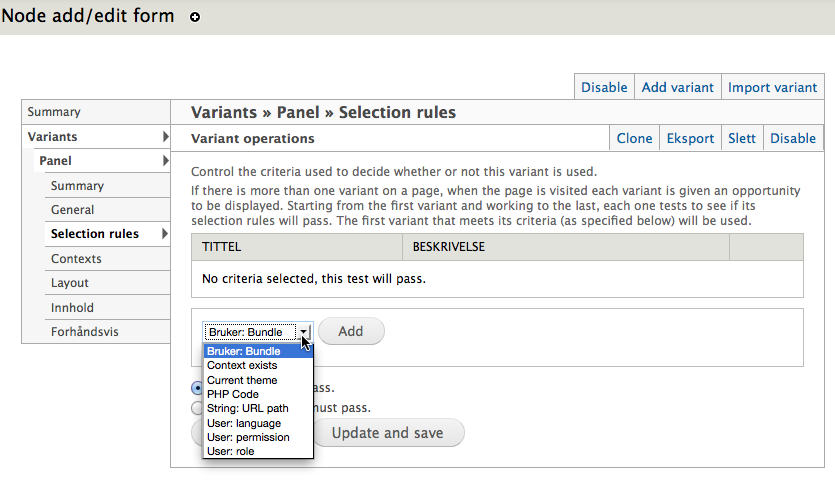
I want to setup different panel variants depending on the node type. Shouldn't the node context be a option when creating a panel variant for the Node add / edit form?

If i look in the context tab all the node stuff is there but cant base my variant on this information.

| Comment | File | Size | Author |
|---|---|---|---|
| Node context | 169.25 KB | freakalis | |
| Variant - selection rules | 98.03 KB | freakalis |


Comments
Comment #1
Letharion commentedI'm not sure exactly what you are doing to capture these images, but since you have some fields in that listing, I believe you already have a node-context.
When I enable the node-edit page myself, I can select "Node: Bundle" in the selection rules list, and I don't have any keywords. I think you are simply doing something fundamentally wrong, like using the wrong task-handler.
Comment #2
freakalis commentedBut how could i be using the wrong task-handler? I just enabled the predefined add / edit node page.
If i look in the db under page_manager_handlers i see that the task for this panel page is node_edit.
Comment #3
Letharion commentedI don't know really, I can just see that it behaves as expected locally.
Can you post the exact ctools and panels version you are using?
Could another module be interfering?
Can you reproduce on a clean install?
Comment #4
freakalis commentedHi, i just tried a clean install using Drupal 7.10, latest Ctools (7.x-1.0-rc1) and Panels (7.x-3.0) it gives the same result. Node: Bundle is not in the selection rules list.
Comment #5
merlinofchaos commentedI'm not familiar with translation, but what is "Bruker"? I'm guessing that's actually the one you want. It's the only one with a bundle attached to it.
Comment #6
Letharion commentedI think that's "User: Bundle" unfortunately. @freakalis, what about the latest -dev of Ctools? I'm really just clutching at straws here, because I don't know why it's failing for you. I cannot reproduce this behaviour.
Comment #7
freakalis commentedUpdated to latest ctools dev version and that solved my problem, thanks!
Comment #8
Letharion commentedComment #9
citricguy commentedWanted to confirm that the current 7.x-1.x-dev version of ctools fixes this problem.
In short: 'Node: ' options in drop down list displayed on 'admin/structure/pages/nojs/operation/node_edit/handlers/node_edit_panel_context/criteria' did not show until updating to dev version.
Comment #11
josevelas commentedJust to confirm this, and adding clarity for newbies, I had the same problem with the production version.
[I'm a newbie (have been learning drupal for four days)]
1. I changed my CTools to 7.x-1.x-dev (2012-Feb-25) by deleting the contents of the mysite\sites\all\modules\ctools, and replacing the contents of the 7.x-1.x-dev zip file.
2. Then, I ran the mysite\upgrade.php
3. Then, I went to mysite/admin/config/development/performance and cleared all caches.
4. Now, when you create a new 'Page' or try to edit a default page, say the "Node template" (node_view), in "Selection Rules" you're now able to see a super complete list of conditions, including "Node:type", which is what I wanted to use.
Thank you guys!