

Closed (cannot reproduce)
Project:
Featured Content
Version:
7.x-1.x-dev
Component:
Code
Priority:
Normal
Category:
Support request
Assigned:
Unassigned
Reporter:
Created:
31 Jan 2012 at 00:34 UTC
Updated:
29 Jul 2025 at 23:48 UTC
Jump to comment: Most recent, Most recent file


Comments
Comment #1
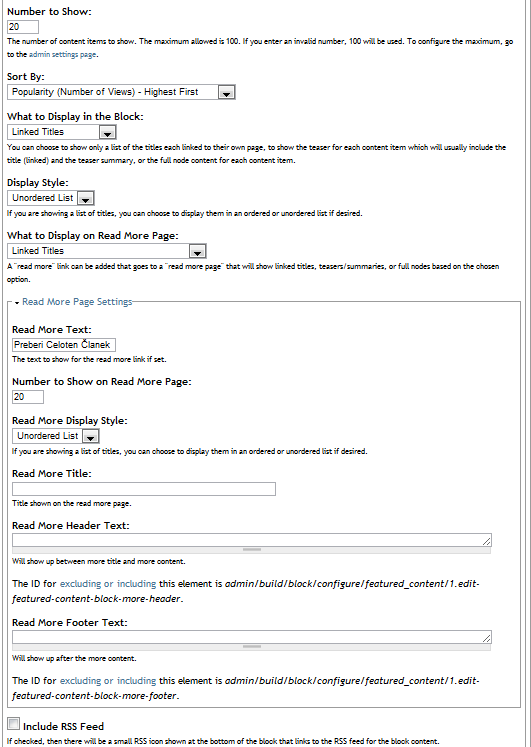
kristen polYou should be using 7.x-1.x-dev not 7.x-2.x-dev. Please take a screenshot of your settings with screengrab or kwout or something similar. For search results, your search indexing and cron must be set up properly.
Kristen
Comment #2
jack the blogger commentedyes i used this
http://ftp.drupal.org/files/projects/featured_content-7.x-1.x-dev.tar.gz
Comment #3
kristen polAre you sure the block is placed on a node page? Make sure your visibility settings at the bottom of the settings page aren't making it not show up.
For search results:
1) You must be on a "node" page (it uses the title of the node)... a node page is one that you created using a content type, e.g. Basic page
2) Your search must be set up... to see if this is the case, try searching (using the search form at www.yourdomain.com/search) with the node title... for example:
* If your node is node/3 and it has title "my very cool page", then go to /search and put in "my very cool page" into the keywords box and click the search button
* If you get search results for that title, then your search is working. If you don't get results, then your search is not set up
You can try making a different block.
1) Choose Filtered Content for the type but don't set any filters.
2) put the block on a node page
3) block should show content
After trying the above, please make sure to explain clearly what did or did not work.
Kristen
Comment #4
kristen polComment #5
kristen polI just noticed that you are setting the Content Type visibility settings to "Story". That means that the block will ONLY show up *if* you are viewing a STORY node page. Is this what you are trying to do?
Kristen
Comment #6
kristen polComment #7
jack the blogger commentedyes i want to show it up on the story only, it is a story node content. if i open up node that talks about red, then all other related nodes that contain word red should show up in a list below, is that correct?
that is what I want to do
also the search is working just fine, with no problems whatsoever.
i dont know why it doe snow up at all
Comment #8
kristen polAre you able to get a Featured Content block to show up at all? Either trying the Filtered Content (explained above) or by using the Manual Content (fill in the node/[nid] links...)?
I want to see if you can get something to show up with some settings or if it is specific to the Search Results Content setting.
Kristen
Comment #9
kristen polClose due to lack of response.
Comment #10
kristen polunassigning old issues