

 The 2026 Drupal Business Survey is open. Your response will help shape the future of the Drupal business ecosystem.
Helo,
I tried to restrict the access to data, available via autocompletion:
/**
 * Implements hook_permission()
 *
 * The following permissions are used to restrict access to data that could be
 * retreived via autocomplete paths.
 *
 * @see hook_permission()
 */
function mymodule_permission() {
  return array(
    'access autocomplete data' => array(
      'title' => t('Access autocomplete data'),
      'description' => t('Allow users to access data for autocompletion.'),
    ),
  );
}
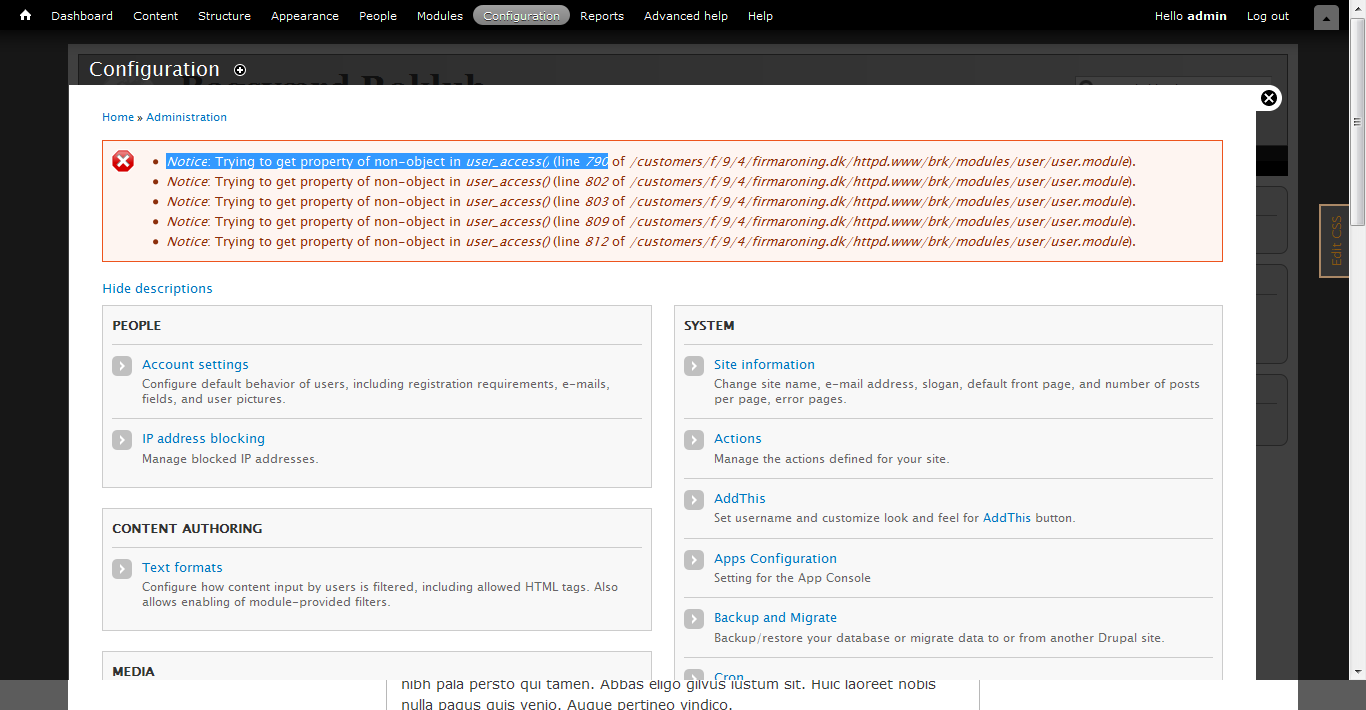
Using this code I got the following notices:
    Notice: Trying to get property of non-object in user_access() (line 790 of ./drupal/modules/user/user.module).
    Notice: Trying to get property of non-object in user_access() (line 802 of ./drupal/modules/user/user.module).
    Notice: Trying to get property of non-object in user_access() (line 803 of ./drupal/modules/user/user.module).
    Notice: Trying to get property of non-object in user_access() (line 809 of ./drupal/modules/user/user.module).
    Notice: Trying to get property of non-object in user_access() (line 812 of ./drupal/modules/user/user.module).
    Notice: Trying to get property of non-object in user_access() (line 790 of ./drupal/modules/user/user.module).
    Notice: Trying to get property of non-object in user_access() (line 802 of ./drupal/modules/user/user.module).
    Notice: Trying to get property of non-object in user_access() (line 812 of ./drupal/modules/user/user.module).
And this relates to:
function user_access($string, $account = NULL) {
  global $user;

  if (!isset($account)) {
    $account = $user;
  }

  // User #1 has all privileges:
  if ($account->uid == 1) {
    return TRUE;
  }
$account should be replaced by $user in the second if.
| Comment | File | Size | Author |
|---|---|---|---|
| #6 | Notice_trying to get property of non-object in user_access.png | 56.2 KB | monsoon |
| user.module-D7.patch | 250 bytes | hevr |

Comments
Comment #1
hevr commentedComment #2
droplet commented$account = $user; if no $account passed...
I guess you passed a non-object $account into this function.
Comment #3
hevr commentedyes of course... my patch and using $user->uid was wrong.
Comment #4
boabjohn commentedSorry: I'm confused here...
We're getting the same error series as above. Happend after upgrades to CTools, Panels, and Views. Appears on admin/content and other views pages, but not on non-views admin pages.
Have you guys had a chance to look more into the problem?
Keen to hear,
JB
Comment #5
Anonymous (not verified) commentedIs this a problem with core, or a problem with something in Ctools, Panels and/or Views? There seems to be some similar issues floating around all having the somewhat same solution/cause: upgrading to the lastest dev of Views and Ctools.
Any ideas?
Comment #6
monsoon commentedI have similar problem. Anyone has solution so far??
Comment #7
jeremymcminn commentedAm also getting this error, but only on the admin/config page. Any idea what this is?
Comment #8
monsoon commentedI got rid of this nasty display by changing "Error messages to display" to
"None"
in the following:
/admin/config/development/logging
Hope this helps.. others. I guess this simply blocks displaying of error messages.
Comment #9
droplet commentedbacktrace or disable some module to figure out the problem. It doesn't looks like the CORE issue
Comment #10
harri00413 commentedHad same problem, switched off module Security Review 7.x-1.0, problem gone.
Comment #11
imclean commentedSee also #1771140: view_menu_alter() adding to existing "access arguments" causes user_access() error.
Comment #12
jpwester commentedIs anyone else experiencing this? It just started popping up on one of our sites.
Comment #13
VanessaM commentedHi,
I started experiencing these errors as soon as I installed the Administration views module. When I disabled the module the errors went away.
Comment #14
dddave commentedper #9 + this issue is tagged for a very old version
This most likely is caused by a module anyways so you'll have to hunt it down.
Comment #15
joelpittetSecurity Review for me too, turned that off bingo.
Comment #16
flyke commentedI just recently saw this error a lot on a certain Drupal 7 site of me after updating all my modules.
I tested te applied patch manually by editing modules/user/user.module on line 808 from if ($account->uid == 1) to if ($user->uid == 1).
Now all my errors are gone and site is working as normal.
- I do not have the module Security Review installed
- I DO have the modules Administration Views and Views Bulk Operations installed