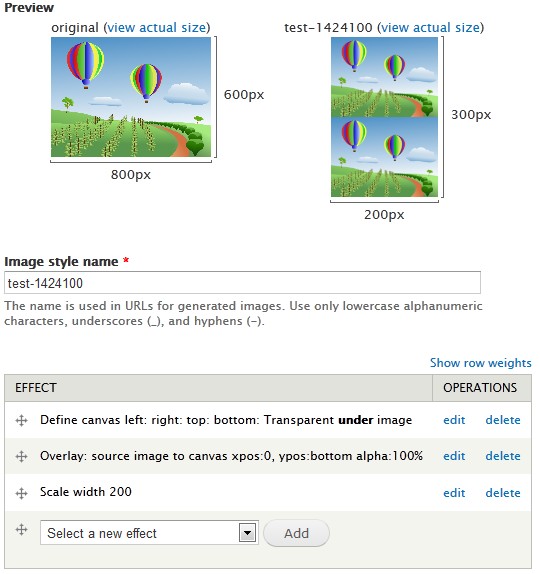
I'd like to create a image button with hover effect, using imagecache from Drupal to make the image processing. So, I want to:
1 - Scale and crop the original image to the button size.
2 - Extend the image canvas to 2x the width (or 2x the height)
3 - Duplicate the current image (already scaled and cropped) on the new blank canvas space.
4 - Add an overlay image to achieve the hovering effect.
1, 2 and 4 are easy to achieve, but I can't get to do the 3rd step. I can only duplicate the original image, not the processed one. Some advice?
I think an «Overlay: canvas to canvas» effect would solve this problem. What do you think? Thank you!


Comments
Comment #1
dman commentedIn the early days, we did have a file2canvas that sort of would allow you to place the source image onto 'itself' but it never really worked out practical.
It's pushing the tool pretty hard to get it to do things like button rollovers and sprites - a dedicated module would be more effective than trying to twist this in I think. And a dedicated version would be a useful utility, and could re-use all the imagecache process APIs, but just have a UI that was tuned for different effects.
In the meantime, it's not crazy to add and extend a 'clone' sort of action via customactions.
This works for me:
(You don't need the extend canvas step, it's easier to do it in code here.)
Comment #2
fietserwinPostponing for now until we have a 7.x-1.0 release out.
Please feel free to post patches/code if you have so. I will be glad to add it. if you have an idea of how to add this to an existing effect you might also detail your ideas and try to implement it.
Comment #3
fietserwinActually, going through all the current effects, it looks like that the existing and working "Overlay: source image to canvas" effect does what you want. Except that it does not copy the current state of the image, but the original image, so you will have to scale after applying this effect.
See image (set exact height = 200% in define canvas effect):