

 The 2026 Drupal Business Survey is open. Your response will help shape the future of the Drupal business ecosystem.
Hello,
New D7 module, and R2integrated's first contributed module. Nodelocks provides an additional setting on the node add/edit form allowing an sufficiently privileged user to "lock" a node, thereby preventing the node's deletion. This module does not control whether or not a node can be edited. Typical use case is to prevent unintentional node deletion in cases where certain nodes serve as more than content, like using a node for a homepage.
Administrators can also manually enter and remove NIDs to be locked at admin/config/development/nodelocks.
Thanks for your time reviewing!
Patrick
git clone --branch 7.x-1.x http://git.drupal.org/sandbox/r2integrated/1401726.git nodelocks
| Comment | File | Size | Author |
|---|---|---|---|
| #15 | Capture.PNG | 41.21 KB | adammalone |
| #12 | drupal_tab.JPG | 68.17 KB | pgogy |

Comments
Comment #1
misc commentedWelcome with your application.
The project could be too small to get your full project access, but you could get it out as single project, see the discussion over here: http://groups.drupal.org/node/195848
Also you have some coding standards issue to take care about:
http://ventral.org/pareview/httpgitdrupalorgsandboxr2integrated1401726git
Comment #2
misc commentedComment #3
r2integrated commentedThank you Mikke! I will address the issues you identified as soon as possible.
I was wondering if you could elaborate on why you think this project may not qualify this account for creating full projects. If I'm reading the discussion you referenced correctly, it was determined that the cutoff point would be projects containing less than 120 lines of PHP or JS code and less than 5 functions or class methods. Even after removing all blank lines and comments, the module comprises well over 120 lines of code and defines 13 PHP functions including the hook_uninstall implementation. I will grant that this project's scope is rather small and focused, but I was wondering if you could elaborate a bit.
Again, thank you very much for your time and other contributions to the community.
Patrick
Comment #4
misc commentedThe module itself is a little bit simple (but nothing bad with that), with standard hooks, and does not tell so much about your coding skills, but maybe you pass anyhow, but first of all, take care of the issues, and add comments to the code.
Comment #5
r2integrated commentedI believe I have addressed all the issues that were pointed out. Please let me know what you find!
Thanks again,
Patrick
Comment #6
sammys commentedHi @r2integrated,
I've just stumbled onto your sandbox looking for a quick way to lock nodes. Your module is definitely a good idea and you've done a great job with the code.
I have a couple suggestions I'd like to share with you. These may help you get the access you deserve and for the module to be more universally appealing.
I won't adjust the status of this request since I don't have authority to say yes or no to your application. Hope you get through!
Comment #7
r2integrated commentedHey @sammys!
Thank you so much for your encouragement, and for this terrific feedback.
Regarding your first point, I totally overlooked this. I am right now implementing the simple changes that will allow this module to target all content types. Regarding your second point, this is a bug - I had implemented a validation function for the node_delete_confirm form to intercept this sort of exploit and I remember it working, but I just tested it now and it apparently isn't working properly anymore. I am investigating and will reply to the thread when a new version is released that reflects both of your suggestions. For now, I am changing the status back to "needs work" until I wrap these changes/fixes up.
Thanks again!
Patrick
Comment #8
r2integrated commentedAlright folks, the latest version of the module is in git, incorporating @sammys' suggestions. Changing back to needs review so we can have this reviewed and hopefully receive @MiSc's blessing as a full project ;)
Comment #9
sam152 commentedHi. Firstly, I think this module is a great idea and I can already think of a few applications for it.
A couple of little issues here and there:
Notice: Undefined offset: 5 in _menu_translate() (line 762 of /home/sam/Sites/drupal7/includes/menu.inc).1,1,1,1,1,1,1,1as valid input etc.Keep up the good work though, I can see real value in this module. :)
Comment #10
sam152 commentedComment #11
r2integrated commentedHey @DHSamB, thanks for the feedback!
I've fixed the undefined offset notice and the related tabs - they should have been MENU_CALLBACKs. I also removed the console.log - thanks for catching these!
I'm not sure if you noticed, but the main (intended, at least) way to lock or unlock nodes with this module is by getting to a node's edit form - there should be a tab for locking the node. Now, regarding a better interface for the more developer-oriented config screen, I agree - a textarea probably isn't ideal. Do you have any suggestions? I'm going to change back to "needs review" so the application process can proceed but will consider any reasonable suggestions regarding replacing this textarea with a better interface.
Thanks!
Patrick
Comment #12
pgogy commentedHello
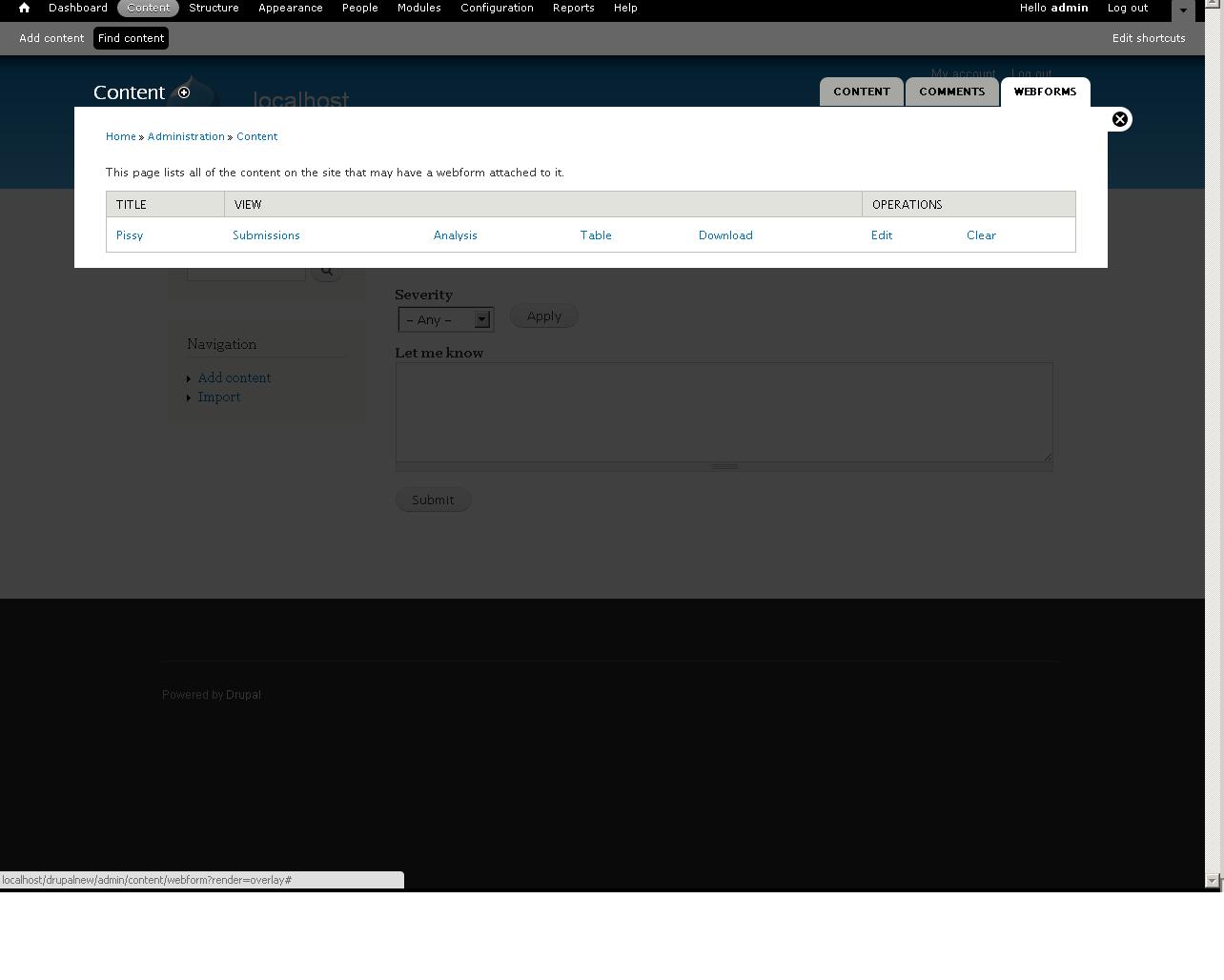
Maybe (see attached image) add a tab to the content panel for locked nodes? This could be done via a simple DB query and allow for bulk unlocking?
Really like the module though.
Pat
Comment #13
r2integrated commentedHey @pgogy,
Thanks for the feedback! Regarding the issue you encountered while manually accessing the lock and unlock endpoints, I can confirm they don't really behave as one would expect. I'm going to roll this issue into the larger issue of an improved administrative interface. While I see most users locking content from the individual node's edit page, it's probably a good idea to provide a table of some sorts where administrators can see all locked nodes. Your idea of using a table in the database to keep track of these locks is good, but I'm beginning to think a field would be more flexible. This way I could actually create a view for the administrative interface, which would allow for customization on the part of the administrator. I'd love to hear your and anyone else's opinion on going with a field.
Thanks again,
Patrick
Comment #14
pgogy commentedHello,
A field is an excellent idea - especially re views (the module "views" just in case we are getting words mixed up).
I haven't used fields as an alternative to my own tables (never came up).
I would still look for a tab to display "all locked nodes" just so managing a lot of nodes could be made a little easier - that is user preference though.
I was testing a module last night and it had a handy message to say if a term had a property - perhaps a locked node could display a message when an administrator views it?
Great ideas though - just making sure you see this as help and not criticism :)
If people are also saying your module isn't complicated enough (point number 1) maybe you could extend the module with some hooks for other developers - so a node_locked, node_unlocked?
Pat
Comment #15
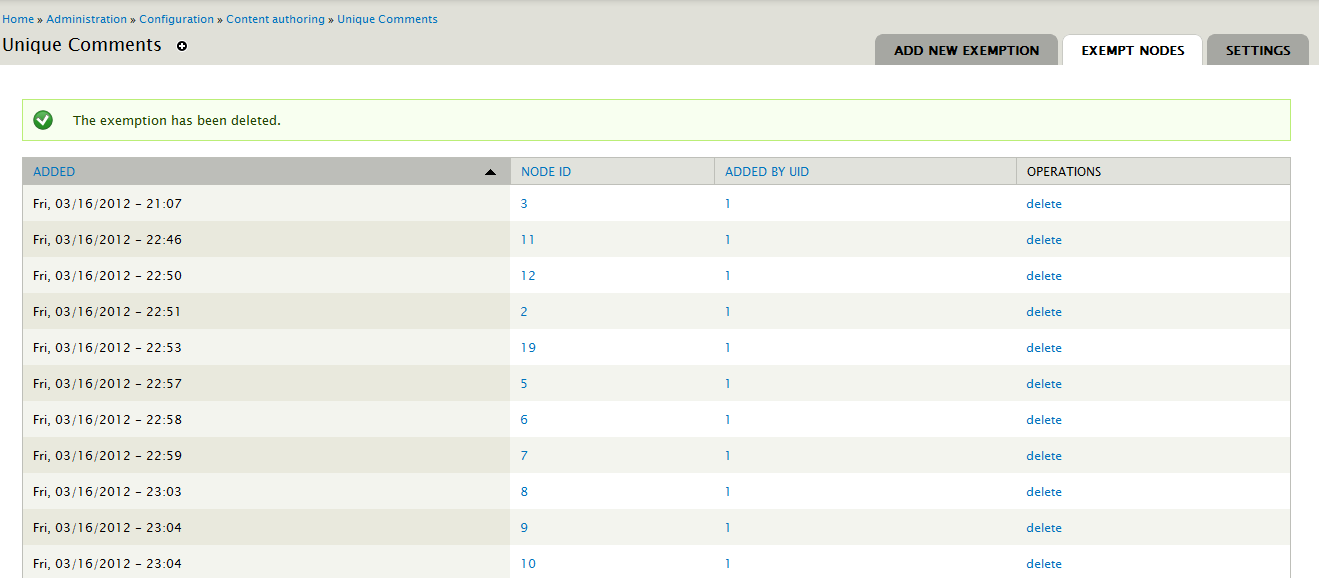
adammaloneJust regarding your issue of displaying locked nodes. I had a similar issue of displaying nodes that had an exemption to my module.
http://drupal.org/node/1462094
I ended up displaying them in a table with some other information and a link to delete them. I'm not saying you should use it, but since your module gave me some ideas for implementing things I thought I'd share my way of getting round the issue you're having!
Comment #16
r2integrated commentedHey @pgogy,
Don't worry, I'm totally seeing this as a very, very constructive suggestion. This is what open source communities are all about!
Regarding views, yes, I mean the ubiquitous module designed by @merlinofchaos. My intention is to have a view in place of the comma-separated textarea that will show a table of nodes that are currently locked. Naturally, being a view, it will be configurable by an administrator for specific use cases.
To expand on the field idea, I think what I'm going to do is make the field available to add to any node (but not all entities I think) just like other fields so that administrators can effectively make certain content types lockable, and others not lockable. A couple of things I have to figure out are how to make sure only one instance of this field can be added to a content type, or alternatively, attach the field programmatically through the content type edit page instead of making the field available in the drop down on the manage fields page.
All this said, it's going to take a bit of time to develop this field integration, so I'm going to upload the fix for the menu item issue you discovered and keep the project in "needs review" so as to not delay its approval. Meanwhile, the field integration will be in the development pipeline for a full version release.
Thanks again for all your suggestions! Politely making observations and suggestions, and being constructive as you have done, is always welcome.
Patrick
Comment #17
bulldozer2003PAReview points out that you do not need to declare the nodelocks.module file[] in your .info file but that severely minor. It also says you need a newline, but if one is added it will probably tell you you have too many...
I like the nodelocks checkbox on the node creation page. It says "Prevent node from being deleted" but does that include editing? You may want to change the field description.
Is it possible to have two permissions? Prevent editing and prevent deletion?
Perhaps the nodelocks options could be added as publishing status'. That and find a way to allow use of the content overview page to find/lock multiple nodes at once. Just adding nodelock as a publishing status may accomplish the former.
Comment #18
r2integrated commentedAll,
I've finally gotten around to do a major rewrite of the module. It now allows the user to select a boolean field attached to a content type to act as storage for the locked/not locked value. This is a more flexible solution than was implemented previously, allowing administrators to present this locked status in Views and other Field API-aware modules.
After installing, simply add a boolean field to any content types that has nodes you want to be able to lock. There is a provided widget that separates the field in the node edit form into the vertical tabs, but is completely optional. You can just choose to display the checkbox or radio buttons.
Once you've added this field, go to the content type edit screen - where you'd normally set whether or not a content type is promoted to the frontpage or not - and select the appropriate field to use as storage under the Nodelocks tab. It will limit you to boolean fields with cardinality of 1.
Now you can lock/unlock nodes, and it's done through the node edit form, or potentially with Views Bulk Operations. It's flexible because it just hooks into a normal Field API field.
Please, everyone, as always, feedback is most welcome. I'm changing the status back to "needs review" as I'd like to move forward with the application process.
Comment #19
bulldozer2003I tried out the module, but it doesn't seem to do what it was supposed to. First I added a bolean field, and chose the nodelocks widget. You should possibly create a field in your .install so there is one ready to go when the module is installed. I gave two roles full permissions on article content, but only gave one role permissions on nodelock. Created an article and locked it. Switched to the non-nodelocks user and was able to delete the node without a problem.
Personally, I don't think this should rely on adding a field to a node. Personally, I think this would all be best accomplished with hook_form_node_type_form_alter() in the same way comment and path do. Then adding a new page at admin/content/nodelocks to manage all the locks on a site. See comment_menu() to see how the comment module added their page at admin/content/comment.
Also, you should implement hook_help(). When I installed the module I went to admin/help for instructions but there was none for nodelocks.
Comment #20
r2integrated commentedHey bulldozer2003, thanks for taking a look at the module. Can you describe how you were able to delete a node that was locked? I have tried to replicate the scenario you described - I have a Basic Page content type that has nodelocks enabled (you did enable the nodelock functionality on the content type settings page, right?), and I have the authenticated user role permission to create/edit/delete any basic page nodes. If I lock the node as an admin, the delete button is disabled for the locked node. Furthermore, if I try and bypass this and go to node/%nid/delete, I am prevented from going through with the delete process.
Regarding the decision to rely on fields, this was done to provide flexibility for the Views module and other modules that leverage the Field API. I agree, however, that it might be a good idea to provide a ready-made field. Regarding implementing hook_help, I absolutely agree. A centralized admin view showing a list of locked nodes isn't a bad idea either.
Comment #21
bulldozer2003Adding a ready made field should be as easy as using field_create_field() in your .install file.
All I did was add a new boolean field and selected the nodelocks widget. I always saw the delete button whether the nodelock boolean was checked or unchecked.
I can check again once you add your hook_help and field_create_field().
Comment #22
r2integrated commentedAlright, you actually need to edit the content type and select the boolean field you want to use. Just creating a field won't have any effect. I'll spell this out in the documentation so others don't make this error.
Comment #23
martins.bertins commentedTook a look at module you have created and here are a few things I would like to point out:
1. You should update readme file with the instructions on how to get the locking working;
2. Just one tiny error in PAReview;
You can fix it like this:
3. Looks like function nodelocks_form_node_form_submit in nodelocks.module is not used anywhere, if so then you should remove it from the code;
Some things that you could consider implementing in the future.
4. I would suggest putting just a checkbox in node type form to enable/disable node locking and depending on that automatically create or remove nodelock field. That would require less actions from the user and so the module would be more user friendly;
5. Some faster way to change the locked status of a node rather than opening the node edit form would be nice to have.
Apart from above things the intended functionality was working for me.
Good luck!
Comment #24
klausiClosing due to lack of activity. Feel free to reopen if you are still working on this application.