

Closed (fixed)
Project:
Taxonomy Super Select (TSS)
Version:
5.x-1.5-1
Component:
User interface
Priority:
Normal
Category:
Support request
Assigned:
Unassigned
Reporter:
Created:
9 May 2007 at 16:37 UTC
Updated:
30 Oct 2007 at 01:38 UTC
Jump to comment: Most recent file

Comments
Comment #1
nancydruNever mind, I got over my blonde moment...
Comment #2
kulfi commentedSee attachment for strange missing admin settings.
Comment #3
kulfi commentedNevermind, finally figured it out. Some how-to documentation would've helped. Guess I should spare others from having to waste their time by submitting something myself ...
Comment #4
ms1 commentedFirst of all my admirations for this simple and powerful module. It really makes my life easier.
But I was a little lost while trying to configure it; finally found out.
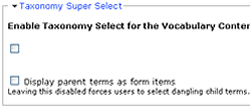
Once enabled you will not find it in 'admin' settings. It will be available as an option only in the cases of already created vocabularies (and not in case of when you are creating a new vocabulary).
1. So for a new vocabulary, first create the vocabulary, then edit it and you will see the option - 'Taxonomy Super Select' (most probably collapsed, present near the top).
2. For older vocabularies, just enable the option by editing it.
Small stuff, but hope it will help others save some time.
Regards