

 Come together with the global Drupal community in Rotterdam, 28 Sept – 1 Oct 2026. Sessions, contribution, connection, and Early Bird savings until 8 June.
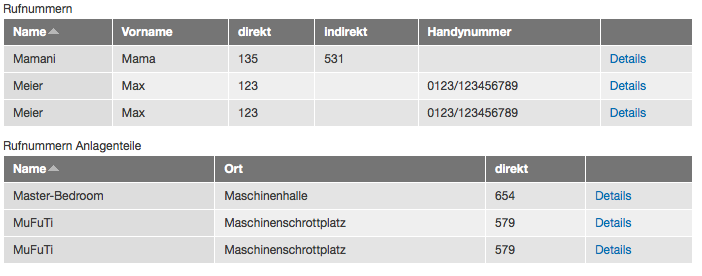
OK, this is weird. I've got a view (attached) that, in table format, overwrites the final row of each page with a duplicate of the next-to-last row. That is, if the last three rows of the table would be 48, 49, and 50, it will instead show 48, 49, 49. If I use any other format, the final row appears just fine; it is only in table format that the final row gets overwritten.
Clearly the attached view is very complex, and a lot of other modules are involved. I should probably strip some of the fields off to see if this behavior is associated with one of the fields. But I thought I'd post it here in case someone else has encountered a similar problem.


Comments
Comment #1
benstallings commentedOn further investigation, the problem appears to be due to the width of the table exceeding the width of the page. If I reduce the number of columns so that the table fits in the page -- regardless of which columns I remove or leave in place -- the next-to-last line does not repeat.
However, I have other table views that are wider than the page, and they do not repeat, so that can't be the only thing going on.
Comment #2
benstallings commentedOK, scrap the previous theory. I got it down to just three fields (see the "test" display of the attached export) while preserving the misbehavior. Removing any of these three fields from the test display causes the rows to stop repeating; however removing the same fields from the "page" display does not cause it to stop repeating, so whatever is going on is not specific to those fields.
Note I also removed all relationships from the "test" display, so we can rule those out as well.
I'm out of ideas to test, for now. Weird stuff.
Comment #3
troussos commentedI think I've got a solution for you. I was running into the exact same problem and I started to track it by turning off features in the view. Does your view hide columns that are empty and are there empty columns in your view?
I turned off hiding two of my empty columns and that solved the problem for me on about ten different views.
Comment #4
benstallings commentedThank you, troussos, that was in fact the same problem! Thanks for taking the time to find and answer my question even though you'd already solved it for yourself!
I have not yet experimented with how many columns I can hide before the problem appears; I just un-hid them all for now. If the maintainers need more information to reproduce the problem, I can experiment.
I'm changing the issue title to reflect the cause, in hopes that gets us a step closer to a bug fix. Thanks to everyone involved with this project for your hard work.
Comment #5
dawehnerThat's quite a good name, though even i experienced with many "hide empty columns" and multiple different fields i couldn't reproduce it.
Maybe someone could try to provide something like a database dump + files so it's just right there to see the bug. I guess it's definitive fixable.
Comment #6
Dennis82 commentedsame problem here, more than 2 hidden columns ends in duplicate at the end.
Comment #7
VonZesen commentedI've experienced the same problem. I tried to visualize the bug via screenshots und my view export.
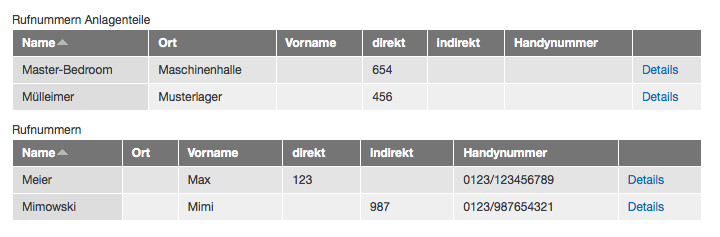
step1.png:
Two Tables with no hidden empty column. Everything is fine.
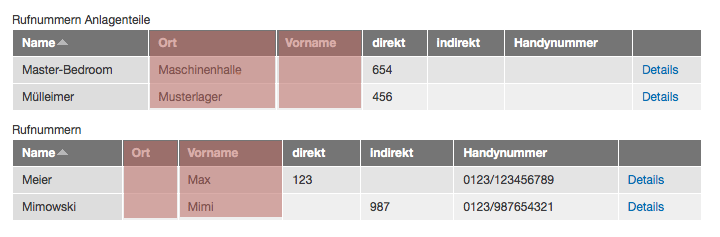
step2.png:
These are the two columns I want to hide first.
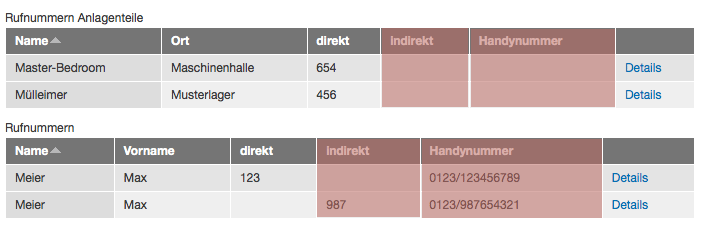
step3.png:
This is the buggy result.
step4.png:
These are the two more columns I want to hide if empty.
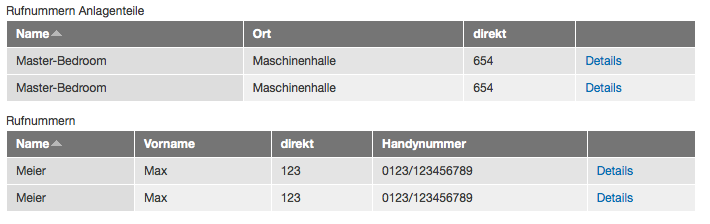
step5.png:
This is the even buggier result.
step6.png:
It only affects the respectively last two rows of the table.
@dereine
I would like to make a database dump available. But even if I sound like a total noob: Do you need a complete dump or only individual tables? I've only added some field tables in the attached zip. I don't know if this is all you'll need...
Comment #8
isaac.niebeling commentedI can confirm this is still happening with 7.x-3.3. If there's anything I can do to help, let me know.
Comment #9
Dennis82 commentedthis fixed it for me: http://drupal.org/node/1371252#comment-5650022
Comment #10
VonZesen commentedThanks for the tip, Dennis! I think the patch is already included in the latest dev (7.x-3.3+17-dev). I've updated views and everything works as expected.
Comment #11
joeebel commentedThanks Dennis82! You saved the day with that link!
Comment #12
dawehnerUpdate status, as this is fixed already in the current dev version.