

Closed (won't fix)
Project:
Drupal core
Version:
7.12
Component:
update.module
Priority:
Normal
Category:
Bug report
Assigned:
Unassigned
Reporter:
Created:
6 Feb 2012 at 09:12 UTC
Updated:
29 Aug 2013 at 14:47 UTC
Jump to comment: Most recent


Comments
Comment #1
ckopack commentedHaving the exact same issue. SUBSCRIBE
Comment #2
Anonymous (not verified) commentedI'm having the same issue too and I can't clear my cache without running into a bunch of errors.
Comment #3
suryaden commentedsame issue
Comment #4
ckopack commentedI checked on IRC and got scolded and told to roll back to a backup that is pre-update. This unfortunately isn't a viable option since I have since added boatloads of content and would lose all of this. Now I have to just deal with the status notification. I wish this would get resolved. Maybe with the 7.13 update it will go away?
Unless of course the gurus know an easy way to get rid of this?
Comment #5
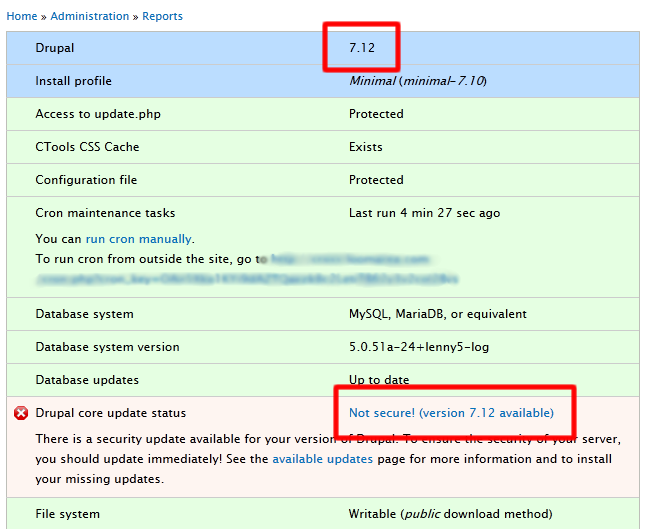
heine commentedYou didn't actually upgrade the site. What the message tells you is that there's an old core module (or modules) still in use.
Possible causes:
Also, please search before posting.
Comment #6
ckopack commentedHeine THANK YOU!!!! You are a genius. I knew a guru would pull through.
I came from Drupal Gardens and I think they have certain modules in development that must rely on certain versions they stick in the sites/all/modules folder to override the core modules.
was exactly what it was.
1. I deleted the duplicate modules found in sites/all/modules using /modules as a reference. Don't delete any modules in /modules!
2. Ran update.php and it found 3 pending updates.
3. 7.12 is now reflected in the update status.
Thanks again Heine. I'd like to buy you a Heine!
Comment #7
nerdoc commentedHad the same problem in Drupal 6.26 -->2.27/6.28
I accidentially made a copy of all core directories (modules, scripts, include, etc) into the sites/modules folder.
Didn't see it as I have many modules activated and they blended into the mass of others ;-)
deleted them, all clean.
Thanks very much, Heine!
Comment #8
drifter commentedWhat happened to me: created a custom module, and copied and pasted a core module's info file as a template. Be sure to take these out: