

Closed (fixed)
Project:
Clientside Validation
Version:
7.x-1.25
Component:
Code
Priority:
Normal
Category:
Bug report
Assigned:
Unassigned
Reporter:
Created:
9 Feb 2012 at 13:57 UTC
Updated:
1 Dec 2015 at 11:34 UTC
Jump to comment: Most recent, Most recent file

Comments
Comment #1
jelle_sCan you give me a screenshot or something of what your webform looks like? I can't seem to reproduce.
Do you by any chance have a webform element with a Webform Validation rule that was defined by you or an other module than Webform Validation itself? Because looking at the code that would be about the only way it would get at that line.
Comment #2
sameer commentedHi,
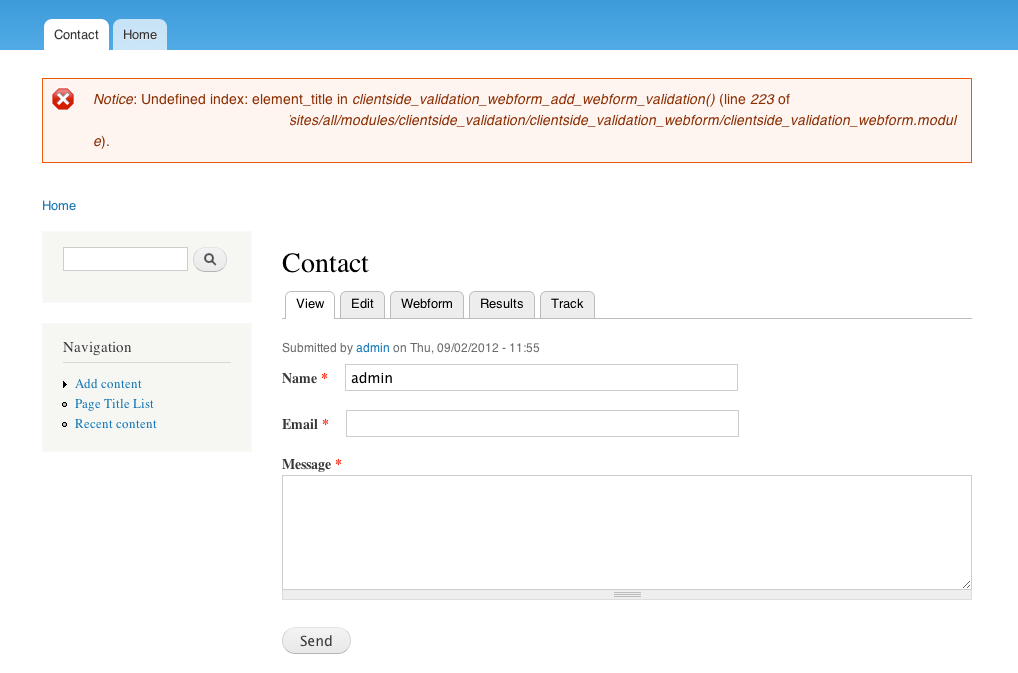
thanks for your reply! You're right, I'm using the webform validation module, sorry for not mentioning that. I have a maximum length on the message textarea and a hidden field that must be empty. Screenshot:
Also, I think I made a mistake on the line number, should be 223 not 226, sorry about that.
Thanks again for your time & help.
Comment #3
beefheartfan commentedI am experiencing a similar problem. Here are specific details of my issue.
Modules Used
Clientside Validation 7.x-1.25
Clientside Validation Webform 7.x-1.25
Webform Validation 7.x-1.0
Webform 7.x-3.15
Form Details
As a simple test case, I set up a form with 3 fields:
1. label: First Name type: textfield mandatory: yes maxlength: 50
2. label: Age type: textfield mandatory: yes maxlength: 2
3. label: City type: textfield mandatory: yes maxlength: 50
I also added one validation rule:
1. Rule name: Age must be numeric Components: Age
Test Case #1
If I view this form it works as expected. I attempt to submit the form without filling everything in or putting letters in the Age field and I get the proper clientside error messages.
Test Case #2
I now want to make the form multi-page. So I add two page breaks. The first between First Name and Age and the second between Age and City.
When I view this form, I get the following notices:
* Notice: Undefined index: element_name in clientside_validation_webform_add_webform_validation() (line 141 of C:\wamp\www\drupal7\sites\all\modules\clientside_validation\clientside_validation_webform\clientside_validation_webform.module).
* Notice: Undefined index: element_title in clientside_validation_webform_add_webform_validation() (line 141 of C:\wamp\www\drupal7\sites\all\modules\clientside_validation\clientside_validation_webform\clientside_validation_webform.module).
If I fill in the first name field and press the Next Page button, I get the following notices:
* Notice: Undefined index: element_name in clientside_validation_webform_add_webform_validation() (line 141 of C:\wamp\www\drupal7\sites\all\modules\clientside_validation\clientside_validation_webform\clientside_validation_webform.module).
* Notice: Undefined index: element_title in clientside_validation_webform_add_webform_validation() (line 141 of C:\wamp\www\drupal7\sites\all\modules\clientside_validation\clientside_validation_webform\clientside_validation_webform.module).
* Notice: Undefined index: element_name in clientside_validation_webform_add_webform_validation() (line 141 of C:\wamp\www\drupal7\sites\all\modules\clientside_validation\clientside_validation_webform\clientside_validation_webform.module).
* Notice: Undefined index: element_title in clientside_validation_webform_add_webform_validation() (line 141 of C:\wamp\www\drupal7\sites\all\modules\clientside_validation\clientside_validation_webform\clientside_validation_webform.module).
Now if I type in letters (not numbers) into the Age field it does not display the proper clientside error message. However, if I attempt to go to the next page I get a server side error message that the Age field must be numeric (Presumably this comes from the Webform Validation module).
I determined the clientside error message in Test Case #2 isn't happening because the javascript variables built by the module that is passed to the .js file is excluding the custom error rules. (Presumably because of the undefined indexes). Here are the javascript variables:
Test Case 1 Javascript Variables
"clientsideValidation":{"forms":{"webform-client-form-419":{"errorPlacement":"6","errorJquerySelector":"","customErrorFunction":"","rules":{"submitted[first_name]":{"required":true,"messages":{"required":"First Name field is required.","maxlength":"First Name field has a max length of 50 characters."},"maxlength":"50"},"submitted[age]":{"required":true,"messages":{"required":"Age field is required.","maxlength":"Age field has a max length of 2 characters.","digits_negative":"Age field accepts only numbers."},"maxlength":"2","digits_negative":true},"submitted[city]":{"required":true,"messages":{"required":"City field is required.","maxlength":"City field has a max length of 50 characters."},"maxlength":"50"}}}},"general":{"errorClass":"error","wrapper":"li","validateTabs":1,"scrollTo":1,"scrollSpeed":1000,"disableHtml5Validation":"1","validateOnBlur":"1","validateOnKeyUp":"1","validateOnSubmit":"1"},"groups":{"webform-client-form-419":[]}}}
Test Case 2 Javascript Variables
"clientsideValidation":{"forms":{"webform-client-form-419":{"errorPlacement":"6","errorJquerySelector":"","customErrorFunction":"","rules":{"submitted[first_name]":{"required":true,"messages":{"required":"First Name field is required.","maxlength":"First Name field has a max length of 50 characters."},"maxlength":"50"},"":{"digits_negative":true,"messages":{"digits_negative":" field accepts only numbers."}},"submitted[age]":{"required":true,"messages":{"required":"Age field is required.","maxlength":"Age field has a max length of 2 characters."},"maxlength":"2"}}}},"general":{"errorClass":"error","wrapper":"li","validateTabs":1,"scrollTo":1,"scrollSpeed":1000,"disableHtml5Validation":"1","validateOnBlur":"1","validateOnKeyUp":"1","validateOnSubmit":"1"},"groups":{"webform-client-form-419":[]}}}
Note that in the Test Case 2 JavaScript variables the digits_negative rule gets moved out of the "submitted[age]" component and into a blank "" component.
Please let me know if you can fix this issue. I would be happy to lend a hand if you need some further assistance in fixing the problem.
Comment #4
beefheartfan commentedI did a little extra troubleshooting and I think the problem resides in this function:
clientside_validation_webform_webform_validation_add_names()
This line:
if ($children = array_values(element_children($form))) {only pulls children that are on the first page of a multi-page form, not every page.
If you pass the $nid into the function you should be able to get all the form's components like this:
...but I could figure out how to get it to jive with the rest of the function's code. I may look at it again later, but perhaps this is a good starting point for someone to look into this further?
Comment #5
jelle_sThis did help me indeed. The problem was that we were trying to add validation rules for all the components of the node(webform), regardles of what page they were on. But since the actual Drupal renderable form array only contains the elements of the current page we could not find the name attribute or title of that element (hence the "undifined index element_name" and "undefined index element_title" warnings). So I changed it so that only the rules of the current page are added to clientside validation, on each page.
Try the latest dev version (wait 12 hours for d.o to sync or download directly from git ;-) )
Comment #6
beefheartfan commentedThanks so much Jelle_S! The new dev version appears to have fixed the problems I was having with multi-page forms!
Comment #7
jelle_sComment #8
jelle_sYou're welcome :-)
Comment #10
sdrycroft commentedNote, in most cases the clientside_validation_webform_add_webform_validation() function does not need to pass the element title to the various helper functions, as a message is passed instead. The attached patch takes this into account.