First I have to say, nice module ! And especially I like the newly added i18n support, but unfortunately I am having some problems:
Problem/Motivation
I am trying to import translated terms, but somehow it seems that not everything is working as expected.
My setup is:
default: German, with additional French and Italien language.
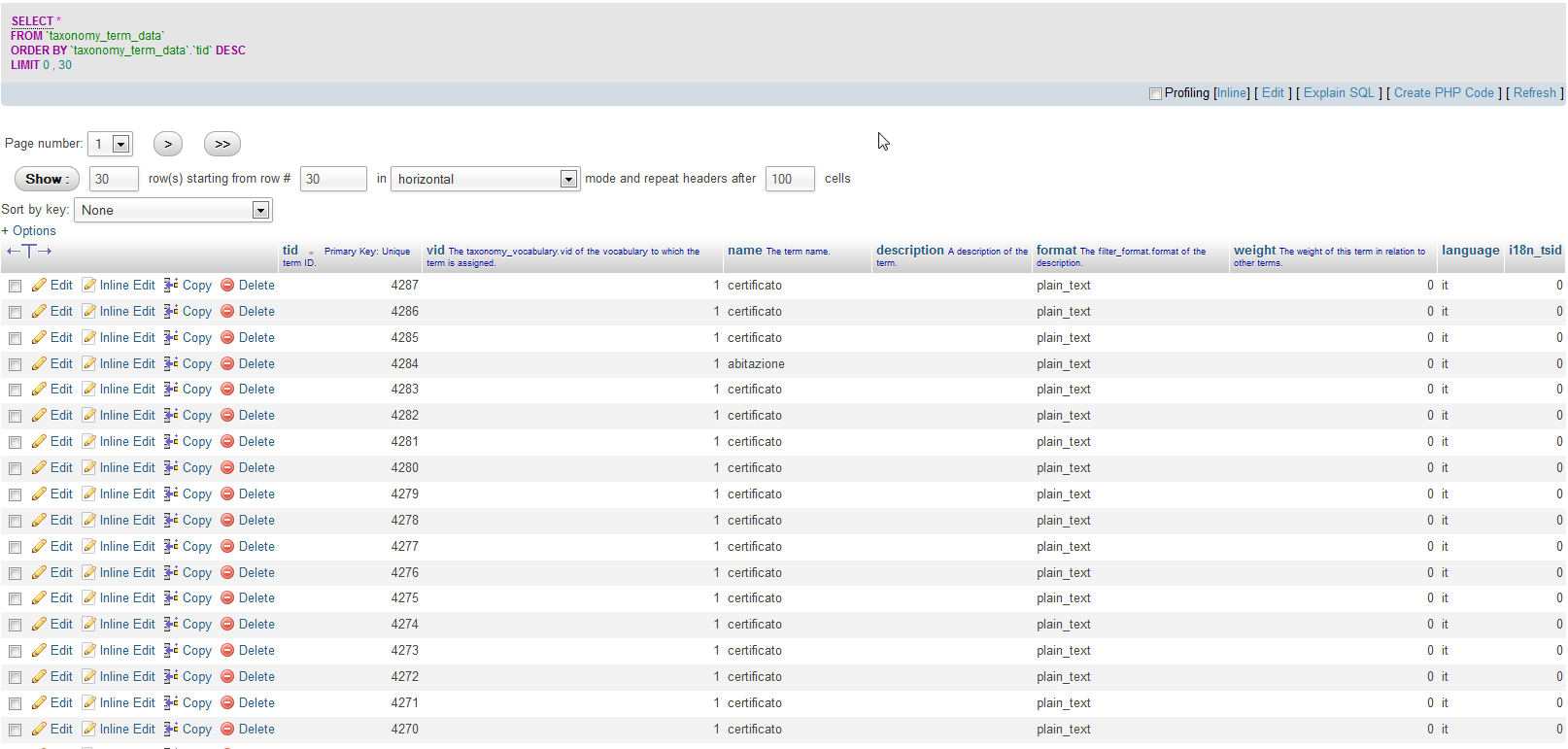
Now when I try to import, the import works without any problems.
But the result is not like I would expect so:
- It creates a translation set
- but it contains only the german term (so the source one)
- the italien one gets no i18n_tsid (0)
- While I was testing, I always used the same Terms, and used the replace mode.
- But the terms were recreated all the times, I now have them all multiple times
So I tried to have a look in the code what the problem could be, and the only thing I see until now is I am having some problems whit the code here:
import/taxonomy_csv.import.line.api.inc around the lines 816 - 825
It looks like the term cannot be loaded, but I checked the DB, the tid exists after running import.
$translated_term = taxonomy_term_load($current_result['tid']);
When I debug the $translated_term it says that it is boolean false
That is what I got until now, if someone has any Idea or so it would be great.
Proposed resolution
Not sure, could it be that the tag not yet exists when the function mentioned above is called ? But for me it looks like it should exist...
Remaining tasks
search for bug, fix it


Comments
Comment #1
Daniel_KM commentedHi,
Are your default terms in German or in neutral? With the full translate mode, a term can be translated only if its language is defined. If your default terms have an undefined language, then can't be grouped in a translation set.
So you need to import:
In fact, the first step is optional: If source terms don't exist, they will be added with the default language of the site (German here).
There is no difference between update and replace mode when there is no duplicate.
Sincerely,
Daniel Berthereau
Infodoc & Knowledge management
Comment #2
Daniel_KM commentedHi,
I continue to investigate.
I can't reproduce your bug, but can you try to comment the line 795 :
$options['existing_items'] = TAXONOMY_CSV_EXISTING_IGNORE;?Sincerely,
Daniel Berthereau
Infodoc & Knowledge management
Comment #3
Cyclodex commentedHey thanks for the fast reply.
I shortly comment this line out and tested. Now the progress bar don't move and nothing happens then, after refreshing page it looks like he still has added the term.
The term I have in the first row is "de", also in drupal yes.
I am using "Translate. Different Begriffe will be allowed for each language and they can be translated. " which I guess its the i18n thing yes ?
I will have to check which version of i18n etc. i am running on, perhaps its related to a version problem of related modules ? Do you have any hints ? Will get into the README and stuff tomorrow.
Adding some screenshots I made.
Regards Fabian Gander
Comment #4
Daniel_KM commentedHi,
When I have developed the module, I used the version 7.x-1.3 of i18n, because there were bugs in dev and it wasn't compatible with the dev version of Drupal. I've just check the new stable version of i18n (7.x-1.4) and it works fine with Drupal 7.12.
I use the i18n form element to choose the mode of translation for the vocabulary and Translate mode is the more complete.
It's not useful to comment the line in previous comment #2, it's only for optimisation. The process in Drupal 7 can be slow, because I only use core functions and there are a lot of invocations and base access with taxonomy and fields.
In fact, I can reproduce your bug only when I use the "ignore and create" option in the fifth tab, but it's not a bug, it's the normal process.
Sincerely,
Daniel Berthereau
Infodoc & Knowledge management
Comment #5
Anonymous (not verified) commentedI have the exact same issue.
Comment #6
Daniel_KM commentedHi,
What is the i18n mode of your vocabulary?
Do you use Update or Ignore option in the fifth tab?
Do you import your terms and translations in one time or in two times (terms then translations)?
Sincerely,
Daniel Berthereau
Infodoc & Knowledge management
Comment #7
Daniel_KM commentedHi,
I could reproduce the issue with a localized vocabulary, but not with a translatable vocabulary.
Anyway, the new version of Taxonomy CSV imports translations by a simplified way. Your bug has probably been fixed.
Sincerely,
Daniel Berthereau
Infodoc & Knowledge management
Comment #9
Cyclodex commentedOkey, I am back here !
So, I tried it out on a test server, only with the needed modules and everything up to date. There it works, so now I am trying to figure out why it is not working on my live running project:
Now I updated my dev server with drupal 7.12 and i18n 7.x-1.4 and also use taxonomy 7.x-5.10. As I noted above, still no success. The localize part seems working but I have the same issues still on translate mode.
What I did:
What I see in the log are following message, which perhaps lead us to the problem:
I added the images as I processed it step by step. Please have a look, am I doing something wrong?
What could be the cause of the errors above ?
Hope you can help me find the problem.
I am struggling a bit if it could be an other module which makes troubles, disabled some and retried, but with no success until now. Any hints/help is very welcome here ! Thanks!
Comment #10
Cyclodex commentedNote: If I retry to import the same combination of data again:
deutsch1,franz1the translated term gets duplicated, and still doesn't get into the translation set.
Means I have then 3 Tags related to "deutsch1" (but not linked together):
Comment #11
Cyclodex commentedHey all.
More success here ! After drilling it down, I found the problematic module, which breaks the functionality of the import.
The problem is the i18n_select module, which has an option called "Select taxonomy terms by language".
If you disable the module or disable just the option, the import seems to work !
So it has to do with the term selection somehow. The module brings also options for disabling the feature by:
Now, I am not sure
So, you guys should now be able to reproduce the problem. Just activate i18n_select (Multilingual select) in addition to the taxonomy csv import.
Right?
Regards Cyclodex
Comment #12
Cyclodex commentedComment #13
Daniel_KM commentedHi,
Thanks for your very complete report. I investigate before answer.
Sincerely,
Daniel Berthereau
Infodoc & Knowledge management