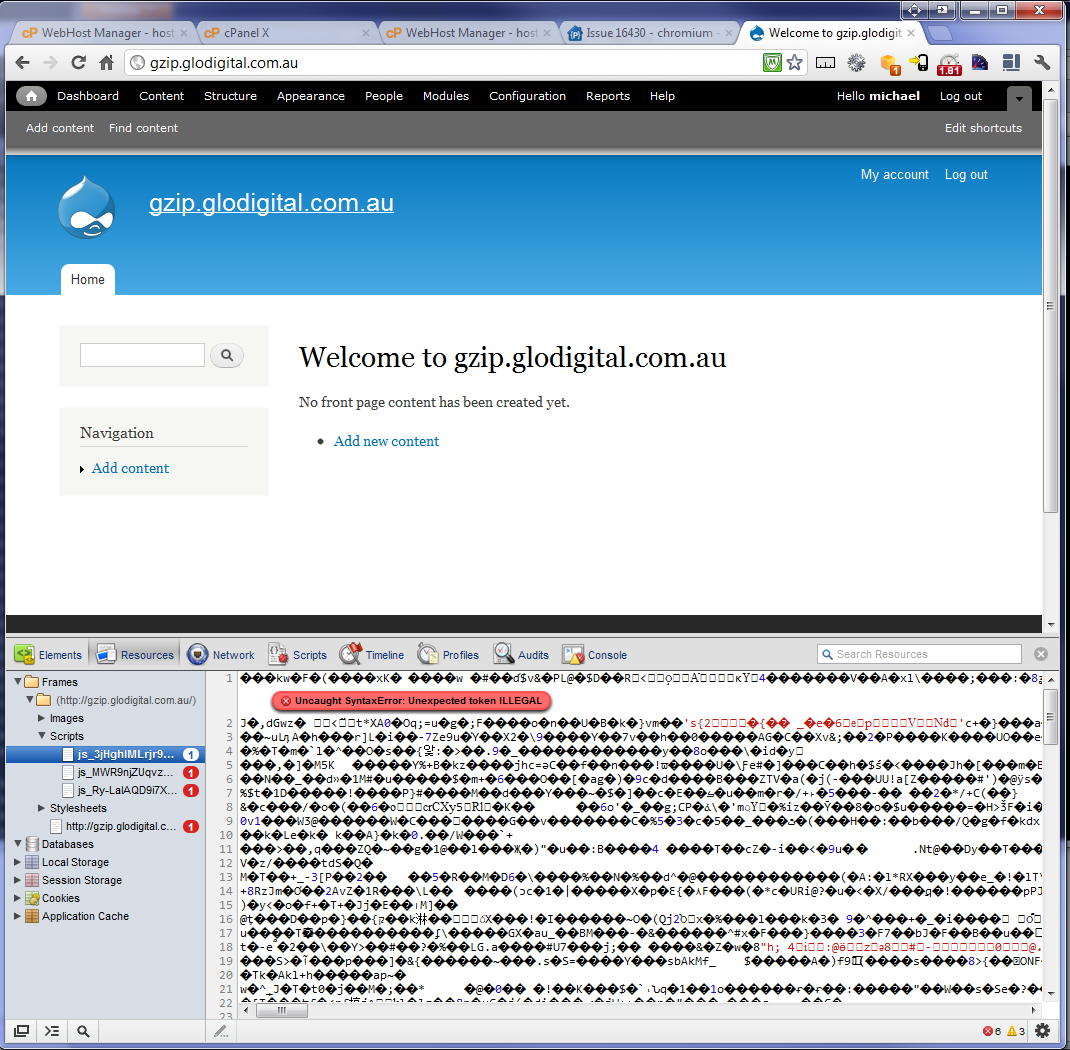
I have a fresh Drupal 7 install with aggregation of js and css enabled. Litespeed is configured to NOT gzip anything by default, so I am not experiencing double encoding. When Drupal gzips the javascript it is not decoded by Chrome or IE9. It works fine in Firefox and Safari.
I can work around this by disabling gzipping in the settings.php file but this is undesirable as I have don't want to do this for every single site I migrate to the Litespeed server.
Is there anything we can do to ensure that gzipping works with Litespeed?
Note that I have read through #986558 and I believe this to be a separate issue.


Comments
Comment #1
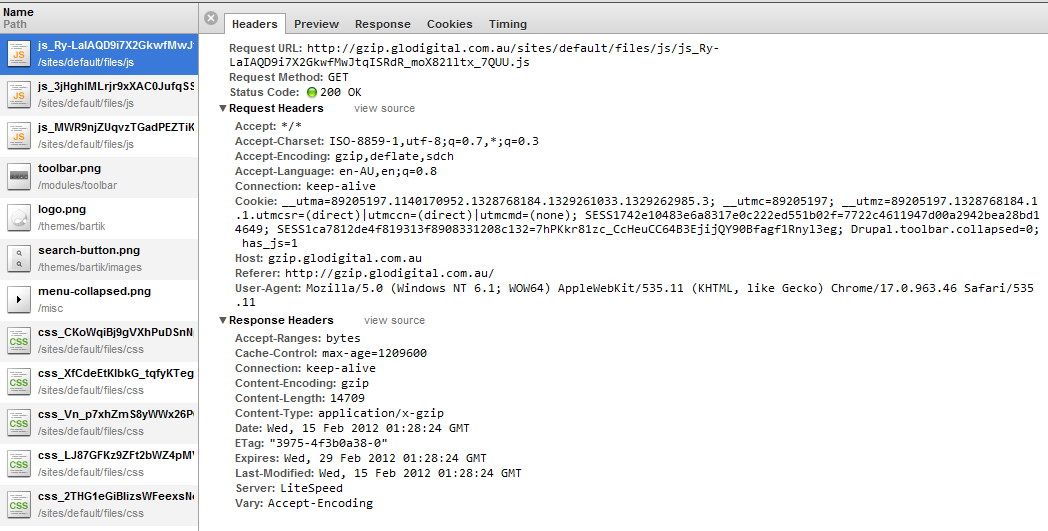
mstrelan commentedNow that I look at it further I see that the Content-Type header is "application/x-gzip" where it should be "text/javascript". I am able to resolve this by adding
Header set Content-Type text/javascriptto my .htaccess file beneath "Header append Vary Accept-Encoding" but I'm not sure the best way to apply this only to .js.gz files and not .css.gz. Is this a suitable fix for this or should I be able to force this in Litespeed configuration?Comment #2
mstrelan commentedUpdated title
Comment #3
onyxnz commentedSame problem, on Downtownhost.com, with LiteSpeed and gzip.
"by adding Header set Content-Type text/javascript to my .htaccess file beneath "Header append Vary Accept-Encoding"" does not fix for me :(
Comment #4
onyxnz commentedSetting the .htaccess to something basic like this:
Removes the server's desire to gzip everything, therefore it is up to Drupal to do it's job....
FIXED for me.
Comment #5
FanisTsiros commentedSame here. I am on LightSpeed server also.
#1116416: Use "Header set" instead of "Header append" in .htaccess to avoid double encoding did not solved my original issue: #986558: "Aggregate and compress CSS files" and "Aggregate JavaScript files" do not work.
Deleting (or commenting) this code from .htaccess file:
solved my issue.
Comment #6
mstrelan commentedYou don't want to be deleting that stuff from .htaccess especially if we're trying to get a patch that works for Apache and for LiteSpeed with no configuration changes required.
What works for me is to take this
And replace it with this
But there are two reasons I haven't made a patch out of this.
But it doesn't work.
.
Comment #7
mstrelan commentedSetting to needs review to get more eyes and test bot, and adding a patch.
Comment #8
kevin morse commentedI'm in the same boat as all of you...
One of my clients insisted on being on their own cloud hosting account and the server they got happens to be running LiteSpeed.
I've tried modifying the .htaccess with your changes and I'm still having no luck. Is there a reason why Aggregate and compress CSS files is working but the Aggregate JavaScript files is not working? That seems very strange to me...
This is the message I'm getting in the Chrome Console:
I have also made sure LiteSpeed is not compressing any files on its own.
Also should this issue not be major? I guess LiteSpeed is not very popular.
Comment #9
mstrelan commentedIt's a shame the .htaccess isn't working for you. IIRC after editing .htaccess you have to manually clear the sites/default/files/js directory and then do a full cache flush.
If that doesn't work just edit settings.php and look for the section on gzip compression, you can set that to FALSE.
Probably not major since Litespeed is not officially supported.
Comment #10
kevin morse commentedSuccess! Emptying the js folder did the trick. Thanks very much!
Comment #11
dalberts69 commented#6 Worked for me fixing the double gzipping on Eleven2's Litespeed with D7. Thanks for the fix for a frustrating problem!
Comment #12
David Woodberry commentedI have been chasing this problem for a week. It was a relief to find this thread.
I am building a new site with D7 on Netfirms server. The trouble only seems to occur with IE. Both FF and Chome work fine. I thought #6 gave me a partial solution but turned out the problem still exists, so have turned off GZIP compression in settings.php
Comment #13
danny englanderI just ran into this same issue with litespeed on WiredTree for a Drupal 7 site. I applied the above patch + clearing cache / JS directory. In the end, I also needed to add this code to the top of my htaccess file:
I'll probably end up adding this to
httpd.confin order to make it more global in nature. I also was able to leave gzip compression enabled and did not have to uncomment that in settings.php.My only outstanding issue is that in Chrome Canary, my site is borked as I am getting this error with CSS aggregated files:
Error 330 (net::ERR_CONTENT_DECODING_FAILED): Unknown error.-- but since Canary is still in development, I would expect this type of thing and will look into this. It could be a permissions issue but I doubt it. At any rate, all other browsers work fine including Chrome Production.Comment #14
danny englanderIt turns out that Chrome Production ended up with the very same error as Canary but Firefox, Safari and IE 9 are perfectly fine. When I view any aggregated files, in either version of Chrome, I now get the same
Error 330 (net::ERR_CONTENT_DECODING_FAILED): Unknown error.. There seems to be a Google forum post with many different reasons why this is happening but many of them point to the gzip issue but with no real clear solution.Comment #15
star-szr@highrockmedia - It would be great if you could provide the major version numbers of Chrome (i.e. 19 and 21) instead of Production and Canary. This makes it much easier to troubleshoot and reference in the future.
Comment #16
danny englander@Cottser -- I was actually just going to post an update. It seems that I needed to tweak some settings in the litespeed admin area and that seems to have helped but I still need to do tons more testing to make sure my settings are stable. As of now, my site is working in all browsers. My versions of Chrome are:
The main setting I changed had to do with Tuning in litespeed, the defaults that I was given by WiredTree were set very low. In addtion, I no longer need to set
AddType application/x-gzip .gz .tgz&AddEncoding x-gzip .gz .tgzin .htaccess. It seems that's better handled by litespeed. If anyone is interested, I can provide more info on my litespeed settings. I am cautiously optimistic but as I mentioned, need to do a lot more testing. I am also only working with one Drupal 7 site so far on this server so I probably need to test some different sites that I have. In the end though, I still had to uncomment$conf['js_gzip_compression'] = FALSE;in settings.php. That will probably be the next thing I work on. No matter what I have tried, keeping this commented out simply broke the JS links even with the patch here.Comment #17
liliplanet commentedHi highrockmedia,
So wonderful to come upon this thread as on Litespeed at http://www.wiredtree.com and having issues with my feeds due to the same cache issue.
see http://feedvalidator.org/check.cgi?url=http%3A%2F%2Fwww.filmcontact.com%...
Error: Not a gzipped file (Server response declares Content-Encoding: gzip; misconfigured server
When I clear cache all is good for a moment, and then back to error.
Would most appreciate any guidance on how to configure the .htaccess or directly on litespeed on wiredtree.com
Comment #18
danny englander@Liliplanet -- Just sent you a detailed PM.
Comment #19
liliplanet commentedThank you all! I've resolved my issue ..
@highrockmedia, sorry did not receive your pm. http://www.WiredTree.com, they really are just absolutely fabulous and found what my problem was:
from Wired Tree:
I disabled the user_visits.module and all was good :)!
Comment #20
2phaI am experiencing the same issue on a litespeed server supplied by bitcloud.com.au
#6 worked for me
Comment #21
jasonabc commentedI'm running Apache with GZIP enabled and the latest version of D7 (7.17). I have no modules installed except Admin Toolbar and Google Analytics.
I've tried all solutions in this thread and also this one (http://drupal.org/node/986558) to no effect. Whenever I select "Aggregate and compress CSS files" the site totally hoses itself. I just get a black and white site. The CSS files and JS files are all present in the sites/default/files/css & /js folders.
Any ideas gratefully received. We have never run into this issue on our server with Drupal 6...
Comment #22
jasonabc commentedUpdate to #21 - turns out the htaccess file in /sites/default/files/ needed tweaking. CSS and JS aggregation works fine now with default settings.
Comment #23
Anonymous (not verified) commented@jasonabc
How exactly did you tweak the htaccess file? I'm having the same issue with d7 (7.18) and nothing has worked for me either.
Please let me know what you did so I can try it out!
Thanks
Comment #24
danny englander@ambitioustyphoon - Did you try the patch in #7? That relates directly to .htaccess.
Comment #25
ashrafzadeh commentedi have this issue too in the litespeed
i solved my own problem by adding
AddType text/javascript .js.gzat the end of .htaccess file
Comment #26
xenyo commentedI think this is an issue that Litespeed should resolve on their end and had a discussion with them to resolve.
Conclusion is that they have located the issue and will be fixing on their next major release.
http://www.litespeedtech.com/support/forum/showthread.php?p=77013&posted...
Maybe can close this issue?
Comment #27
betovargNot yet!
I managed to make it work with #21 on chrome. Does anybody still has that issue on IE? I was trying it on IE 11.
Can someone try on IE and let us know?
Comment #28
mgifford7: 1440534-Gzipped-javascript-sends-wrong-Content-Type-.patch queued for re-testing.
Comment #29
GroovyMotion commentedTried #21 and this one: https://drupal.org/comment/8426719#comment-8426719
Still no luck...in my case it's only the admin toolbar css that breaks once I aggregate the css, .js works.
Comment #30
lancewig commentedI wrangled with this after all the solutions. This site is on FatCow (Deplorable hosting for Drupal BTW). They have a setting in the cPanel to cache files. You have to turn all that off first. That all the above solutions work.
Comment #31
Jeff Burnz commentedIs anyone hitting this issue running 4.2.10 Ent (x86_64) or indeed is anyone running Version 5.0 Linux (x86_64) 5.0 RC1 Ent?
In this thread its claimed to be fixed in 4.2.6 but then later near the end of the thread it says it wasn't fixed and won't be until 5:
http://www.litespeedtech.com/support/forum/threads/drupal-css-js-aggrega...
Odd because there actual release log mentions the issue being fixed:
I'm wanting to move to litespeed shortly but this issue gives me cause for pause, since I actually need these sites to run on both LS and Apache without any changes.
Comment #32
arruk commented#6 worked beautifully for me thank you.
Comment #33
jhedstromThe patch in #7 still applies. Are folks here agreed on this approach? It makes sense to me.
Comment #35
mikeytown2 commentedMerged in #2193333: Follow RFC 4329; use application/javascript instead of text/javascript
I agree with this approach.
Comment #38
mgiffordreroll
Comment #39
Jeff Burnz commented#38 is not working for me running D8 on Litespeed, CSS and JS appear to be double gzipped, i just commented out the entire mod_headers bit of htaccess and everything seems to work OK, which is probably not right thing to do but I needed it to work right away so I just tried it.
Comment #40
bdupls commented#6 worked for me.
http://www.whatsmyip.org/http-compression-test/ results improved to -
Uncompressed Page Size: 37.9 KB
Compressed Page Size: 8.7 KB
Savings: 77.2%
Comment #52
smustgrave commentedSending to PNMI after 7 years. Can you please verify if this issue is still relevant in 9.5? I see it was originally written for D7 and tons of things have changed since.
Comment #53
mstrelan commentedClosing this as outdated since it's been open 10 years, hasn't been touched in 6 years and I can no longer figure out how to use Litespeed, I cannot find any documentation to indicate that Drupal supports Litespeed or vice versa. I tried to run Litespeed in docker but PHP scripts would simply hang. If anyone is still using Litespeed and still experiencing this issue please reopen.