

Closed (fixed)
Project:
Drupal core
Version:
6.x-dev
Component:
javascript
Priority:
Normal
Category:
Bug report
Assigned:
Unassigned
Reporter:
Created:
17 May 2007 at 08:45 UTC
Updated:
11 Dec 2007 at 04:55 UTC
Jump to comment: Most recent file


Comments
Comment #1
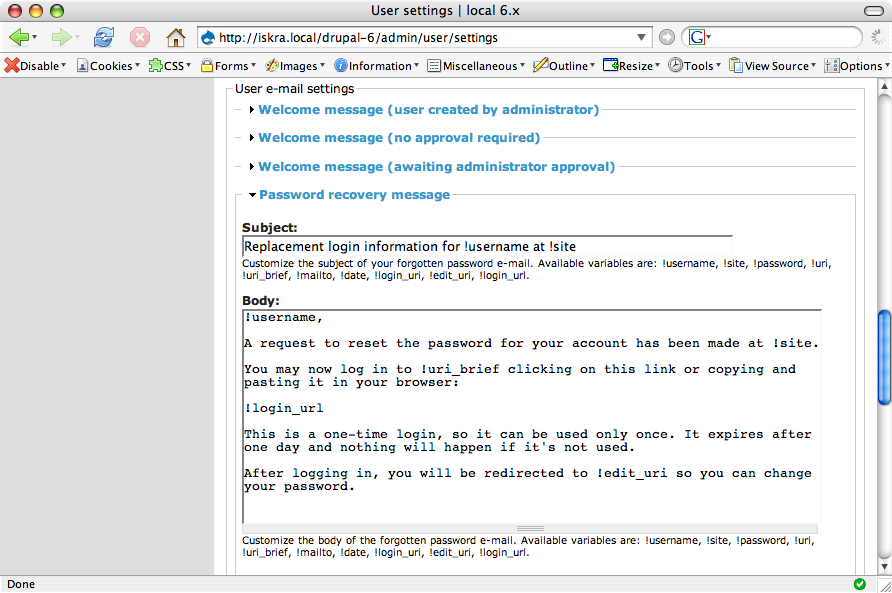
dwwsafari, after expanding a collapsed fieldset... notice "Body" has a title and description, but no actual text area. :(
Comment #2
dwwfirefox, after expanding the same fieldset... works as expected.
Comment #3
Steven commentedI'm pretty sure this is because that form is nesting fieldsets, something which has always been discouraged. In any case, the JS needs to be patched, not the form.
Comment #4
Nick Lewis commentedAlmost certain that this is a safari 2 bug (that's usually version number 4xx in analytics, safari 3 is 523.xx -- the numbers come from the webkit version...). At my own blog, Safari 2 is somewhere around 3 percent of visitors.
Can anyone still reproduce this on safari 2? (all the macs I have access to have safari 3 installed, and our attempts to install dev versions of 2 just result in the browser crashing).
Do we care about safari 2? It has "its own way" of dealing with form elements -- and I believe has its own expandable textarea grippy by default on textareas.
If we do care about safari 2, someone should at least verify that this bug still exists. It has the ability to make textareas unusable to 3% after all. If its still there, we can simply use the jQuery.browser object to detect safari 2 (i think), and prevent the script from running.
Comment #5
dwwI was afraid when Apple's software update told me it was going to blast my copy of safari with safari 3, so I copied my 2.0.4 binary out of harms way before I ran the upgrade. ;) So, now I've got both working nicely on my machine, for testing stuff like this (and at times when I hit Safari 3 bugs that are so annoying I'd rather just use Safari 2 for something).
Anyway, I just tried with the latest HEAD version of core on a clean install, using both versions of safari, and I can no longer reproduce the bug. Presumably, the newer version of jQuery now in core works around the browser bug(s).
Thanks for asking. ;)
-Derek